CPS100 SERIES OPERATION MANUAL
SECTION 9:
USB Driver Installation
Entire Contents Copyright 2018 by Adaptive Power Systems, Inc. (APS) • All Rights Reserved • No reproduction without written authorization from APS.
APS CPS100 Series Power Source Operation Manual Page 192 of 231
Disabling Driver Signature Enforcement in Windows 10
If your Windows PC is configured for Driver signature enforcement, it will be necessary to
temporarily disable this OS features to allow the CPS100 USB driver installation. One way to
do so it use the Advanced Boot Menu. Follow these steps do so. Another option is to click on
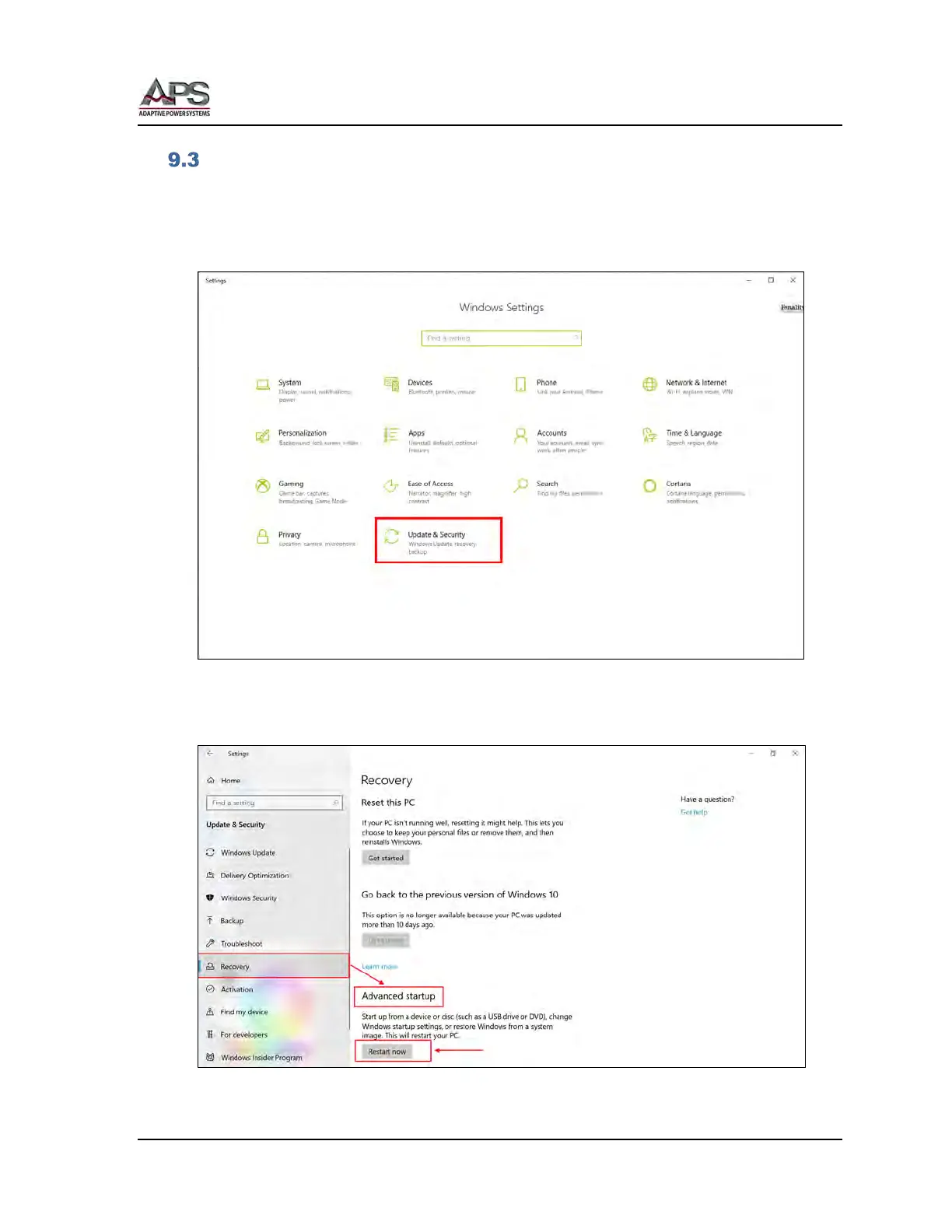
the lower left corner Windows symbol and select “Settings”.
From the Setting menu, click on “Update & Security”. This will bring up the following
screen. Click on the “Restart now” button at the bottom under “Advanced startup” as
shown below.



 To Next Page