CPS100 SERIES OPERATION MANUAL
SECTION 13:
Error Messages & Troubleshooting
Entire Contents Copyright 2018 by Adaptive Power Systems, Inc. (APS) • All Rights Reserved • No reproduction without written authorization from APS.
APS CPS100 Series Power Source Operation Manual Page 209 of 231 PN 160953-10
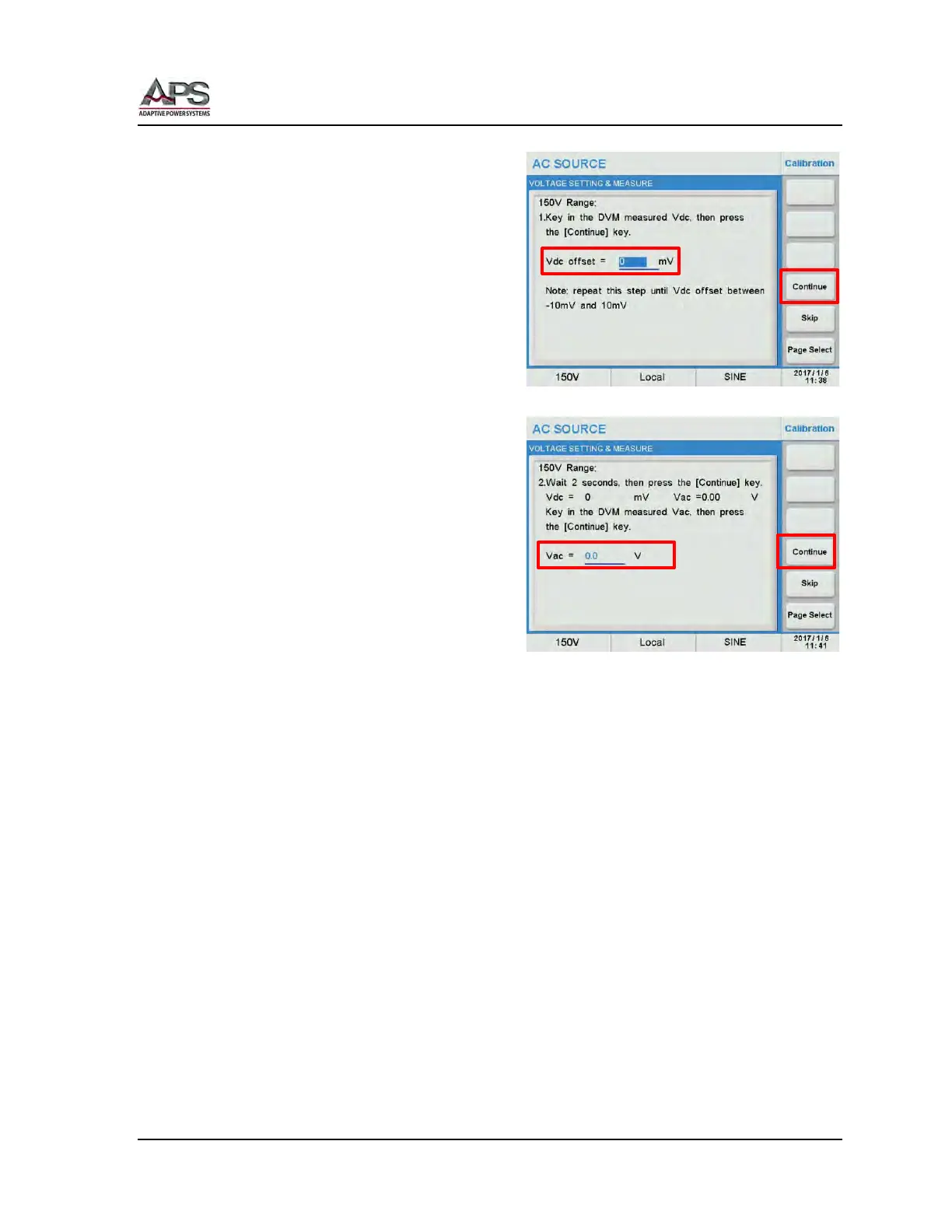
Move the cursor to the Vdc offset field.
Enter the DMM Vdc reading using the touch
keypad or [0] ~ [9] keys, then press the
[Enter] key to confirm.
Repeat this step until the DMM reading is
between -10 mV and +10 mV.
Wait 2 seconds, then press the Continue soft
key to proceed to the next calibration point.
Put the DMM in mode.
Move the cursor to the Vac = field and enter
the Vac reading using the touch keypad or [0]
~ [9] keys, then press the [Enter] key to
confirm.
Follow the on-screen prompts to complete calibration the 150V AC range. Both AC & DC
output and AC & DC measurements are calibrated. This will require changing the DMM
measurement functions as prompted.
Once completed, repeat the same process for the 300V AC range.



 To Next Page