CPS100 SERIES OPERATION MANUAL
SECTION 13:
Error Messages & Troubleshooting
Entire Contents Copyright 2018 by Adaptive Power Systems, Inc. (APS) • All Rights Reserved • No reproduction without written authorization from APS.
APS CPS100 Series Power Source Operation Manual Page 208 of 231 PN 160953-10
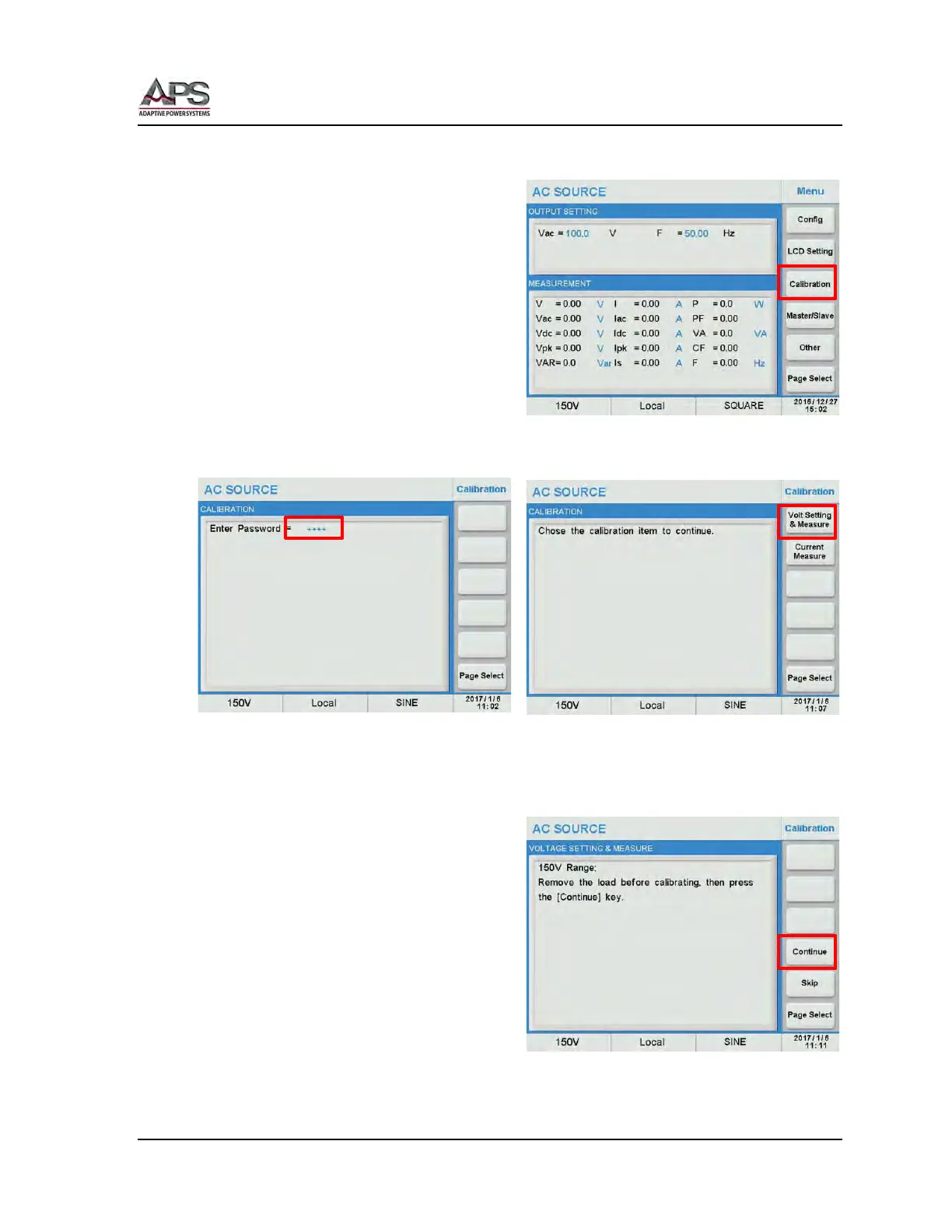
11.4.1 Accessing Calibration Mode
The Calibration screens are located under
the MAIN menu. Press the MAIN key to
display the MAIN menu.
Press the Calibration soft key to display the
calibration password screen.
Move the cursor to the “Enter Password” field and enter the number “9527” as the
password. Press the [Enter] key to confirm.
You will now be able to select either the Voltage Setting & Measurement or the Current
Measurement calibration screens.
11.4.2 Voltage Setting & Measurement Calibration
Press the Volt Setting & Measure soft key.
The first calibration point is DC offset on the
150V range.
Make sure there is NO Load at the output.
Then press the Continue soft key.
Set the DMM to VDC mode.



 To Next Page