www.ayyeka.com | +1 (310) 876-8040 | info@ayyeka.com 41
The device configuration tree is displayed.
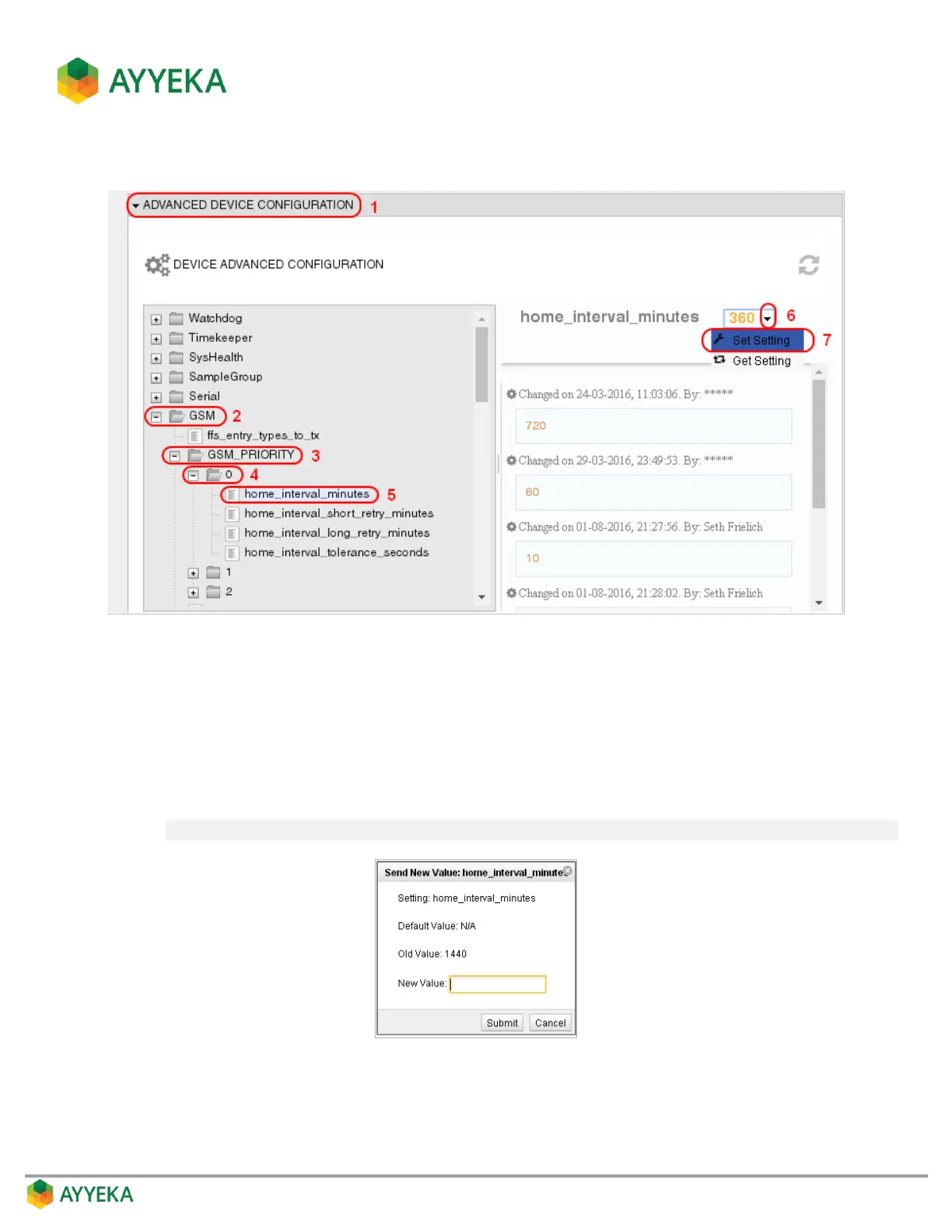
Figure 27: Selecting the device transmission interval parameter
5. To change the device’s Normal transmission interval (in minutes), in the Device Configuration tree select
GSM > GSM_PRIORITY > 0 > home_interval_minutes and then:
a. To the right of the configuration tree, select the drop-down arrow adjacent to the current value.
b. Select Set Setting.
c. In the Send New Value window, enter the desired value in the New Value field, and click Submit.
Note: It is recommended not to set a value below 10 minutes, since this will drain the battery.
Figure 28: Send New Value window
6. To change the Event transmission interval (in minutes), select GSM > GSM_PRIORITY > 1 >
home_interval_minutes and follow the instructions in the sub-steps of step 5.



 To Next Page