www.ayyeka.com | +1 (310) 876-8040 | info@ayyeka.com 72
Defining a Threshold’s Alert Recipients
In a nutshell:
To use this feature, you must first define Alert user groups, as described in Managing User Groups.
1. Click Devices in the sidebar.
2. In the Sites Tree pane select the stream.
3. In the right pane select the Thresholds tab.
4. If the Thresholds slider is OFF , click it to switch Thresholds to ON .
5. In the threshold definition area, click Actions.
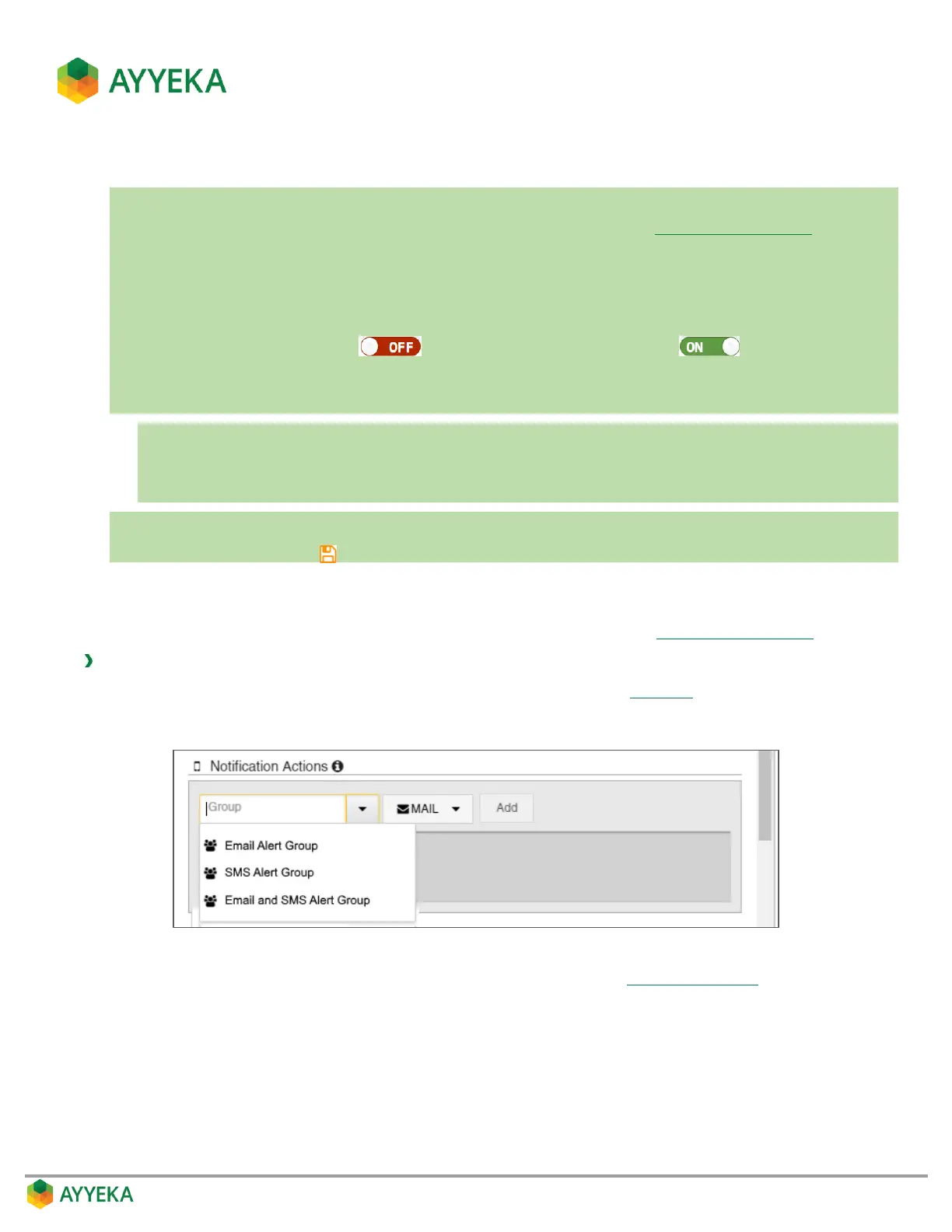
6. Under Notification Actions:
a. Select a group.
b. Select whether to send an email and/or SMS.
c. Click Add.
7. Repeat the previous step for every additional group you want to add.
8. Save changes by clicking .
You can define which user groups will receive an alert whenever a stream sample crosses into a threshold range.
All members of the groups you specify will receive the alerts.
Note that to use this feature you need to first define user groups, as described in Managing User Groups.
To define which groups will receive alerts when samples enter a threshold range:
1. In the Notification Actions section of the threshold’s Actions view (Figure 56), perform the following:
a. Select a group in the drop-down list.
b. Select an alert medium – email and/or SMS. The message will be sent to the mobile phone number
or email address defined for each of the group’s users (refer to Inviting a New User).



 To Next Page