3. Menus
3.3 Main window
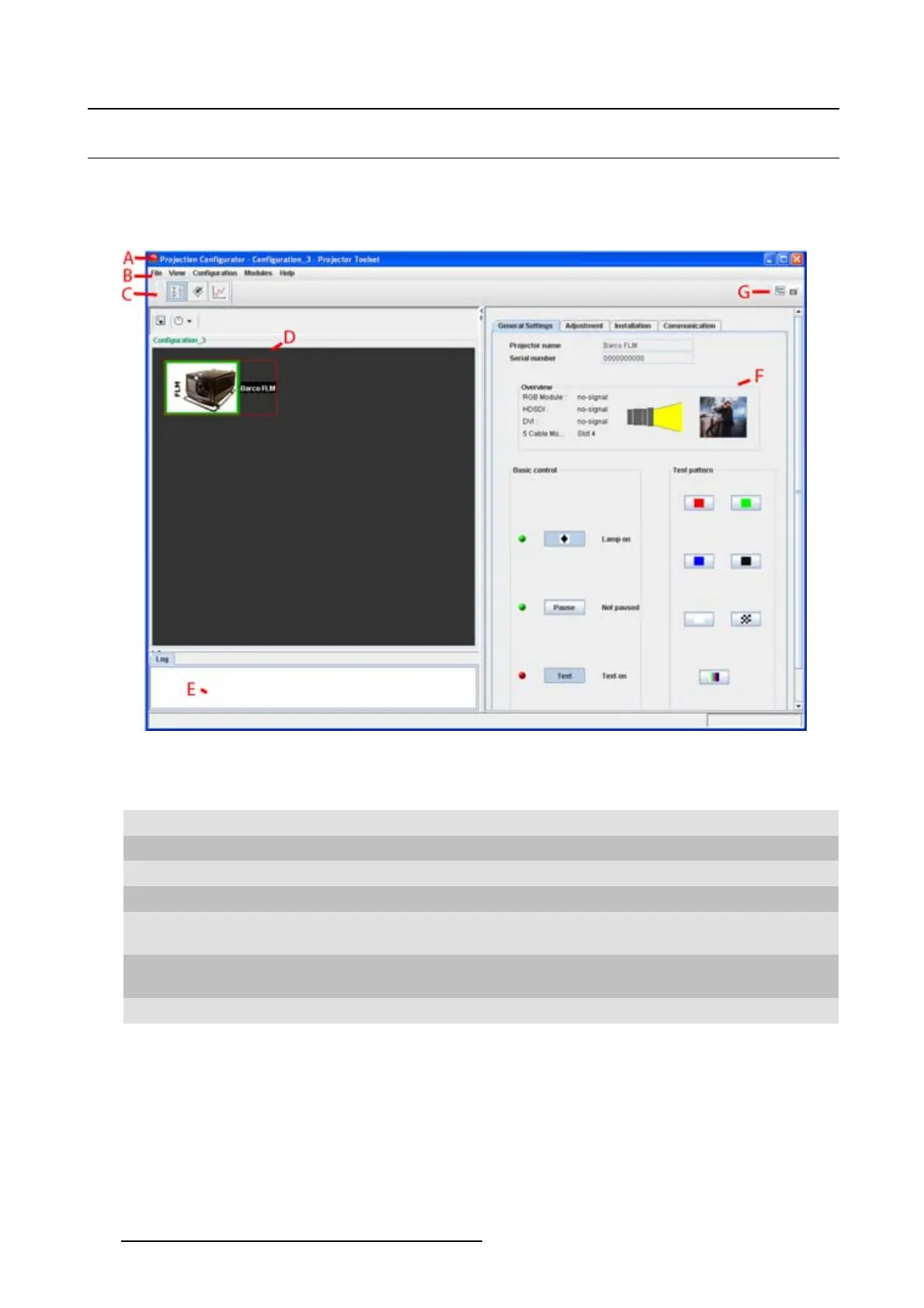
Overview
The content of the main window changes when a other navigation (module) button is activated, but the
main parts are the same for all modules.
Image 3-2
Main window indications
Indica-
tion
Description
A
Window title. Construction of active module - Configuration name
BMenu
C Module navigation buttons
D
Configuration preview pane
E
Log window. Can be hidden by the log information button on top of the configuration preview
pane.
F
Settings pane. Content changes with the selected module button and selected
projector/device.
G Manage buttons for configurations and snapshots
Tool tip
Some items and or icons show a tool tip when moving the cursor over that item or icon. This tool tip helps
to identify the buttons or items.
Scroll bars
If there is more information available than displayed in a pane, vertical and horizontal scroll bars will be
added to that specific pane. These scroll bars let you move up and down and left and right through the
20
R5976924 PROJECTOR TOOLSET 16/04/2009



 To Next Page