5. Configurator
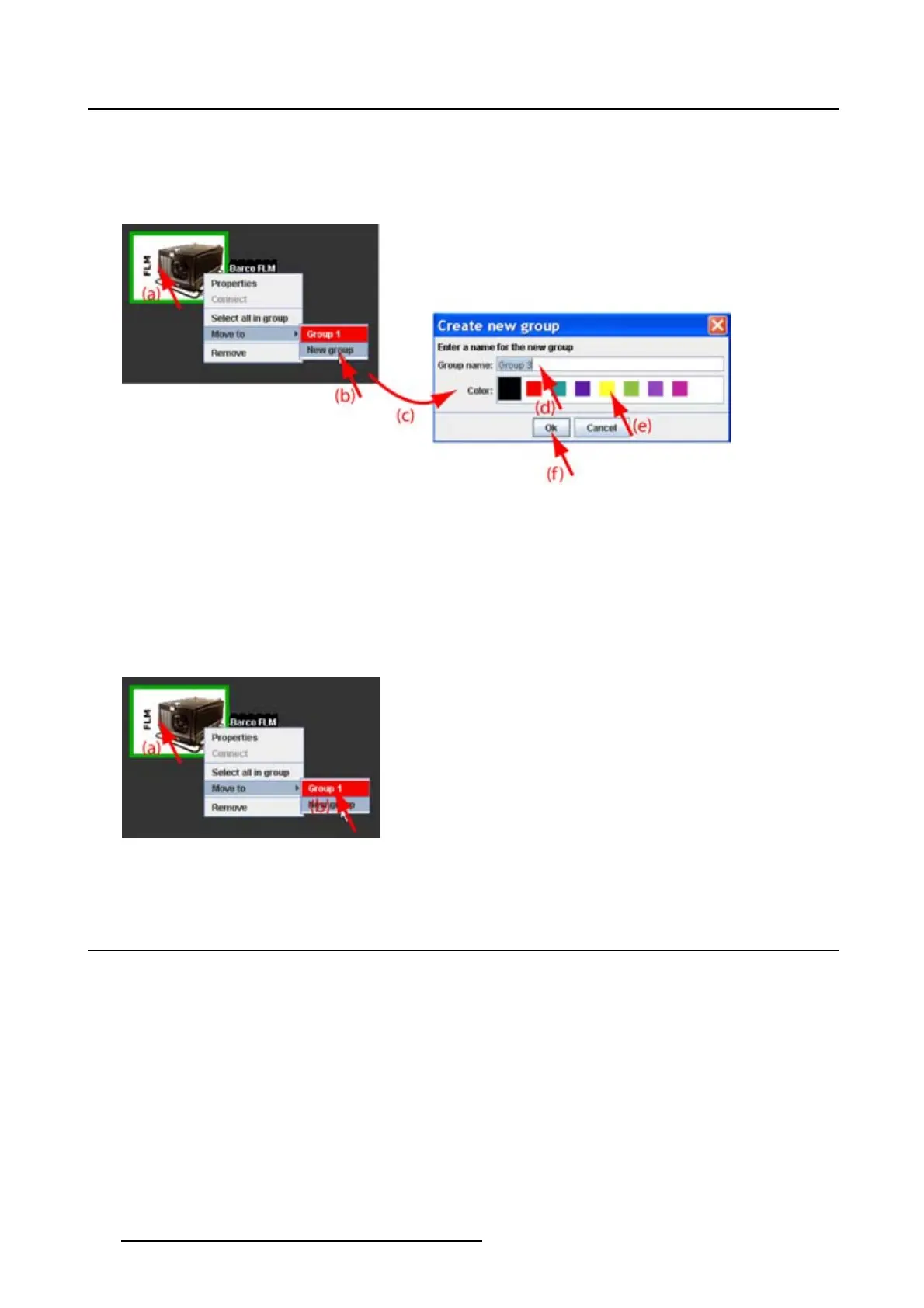
3.TheproposednamenexttoGroup name is selected. Enter a name for the new group (d)..
4. Select a groups color by clicking on one of the proposed colors (e).
5. Click OK to create the new group and to move the selected projector to this group (f).
Image 5-16
Create new group
Howtomovetoanexistinggroup
1. Right click on the projector icon. (image 5-17)
A pop up menu opens.
2. Select Move to and drag your mouse to the right and select the desired group.
The selected projector is moved to the selected group.
Image 5-17
Movetoexistinggroup
5.7 Edit projector properties
Via the menu
1. Click on a projector to select (a). (image 5-18)
2. Click Configuration on the menu and select Selected device → Properties (b).
Or,
press Ctrl + Enter.
The Properties dialog box opens (c).
To edit the:
- general properties, see "General properties", page 48.
- connection properties, see "Connection setup", page 48.
- decorator, see "Decorator setup", page 55.
60
R5976924 PROJECTOR TOOLSET 16/04/2009



 To Next Page