5. Configurator
Or,
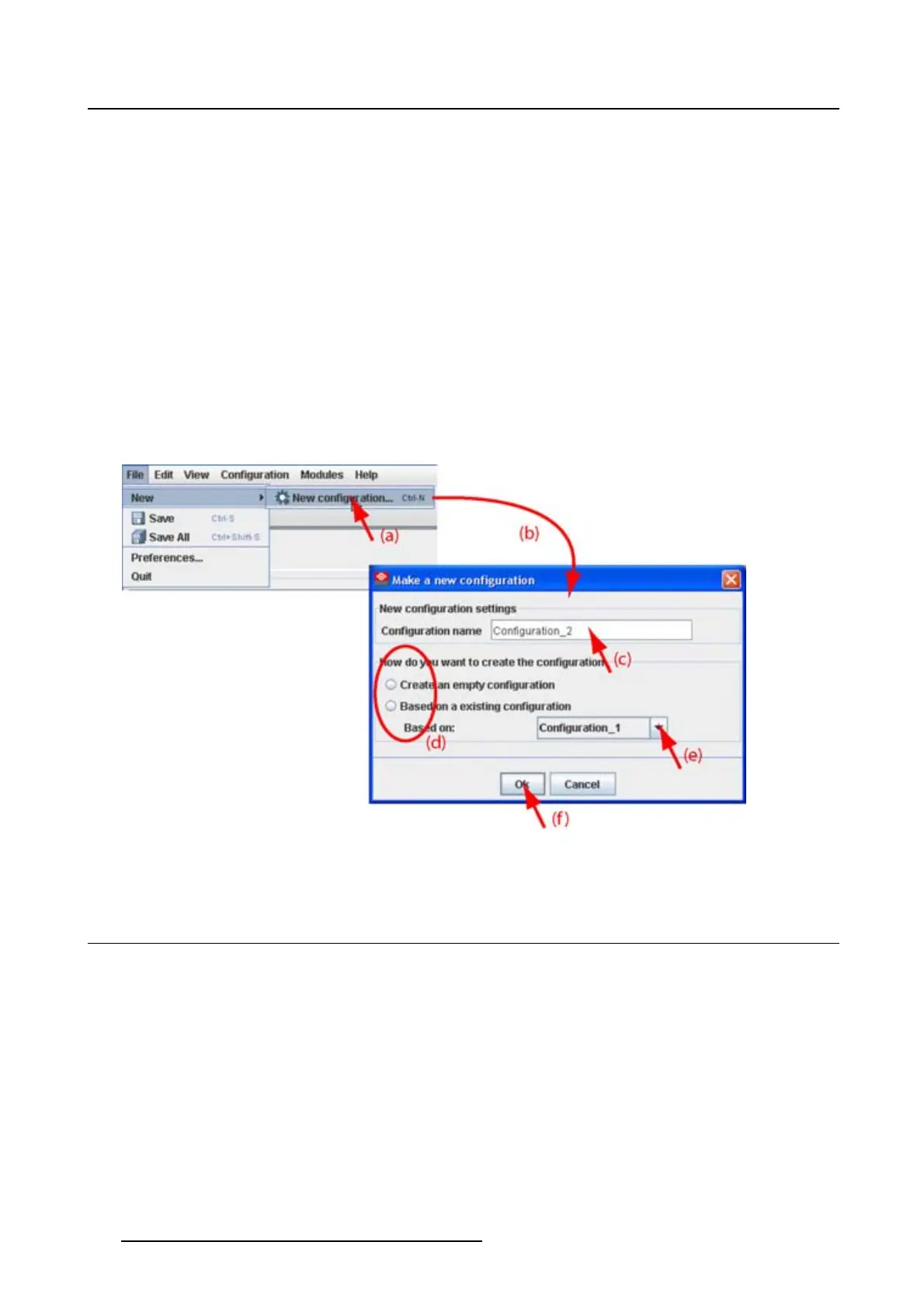
press Ctrl + N.
The New configuration dialog box opens (b).
2. Fill out a name for the new configuration next to Configuration name. The default name will be Config-
uration_’digit’ (c).
Note: Only the characters a to z, A to Z, 1 to 9 and (, ), _, -, @ or allowed in a name.
When it is the first configuration for this workspace, only the option Create by adding projectors is avail-
able.
When there are already configuration available, the option Basedonavailableconfiguration becomes
available
3. Check the radio button of your choice (d).
4. When Basedonavailableconfiguration is checked, click on the combo box and select the configuration
on which the new configuration must be based on (e).
5. Click OK to create the new configuration (f).
Image 5-2
Create new configuration
5.4 Add projector to a configuration
Overview
• Add projector
• General properties
• Connection setup
• Decorator setup
46
R5976924 PROJECTOR TOOLSET 16/04/2009



 To Next Page