3. Menus
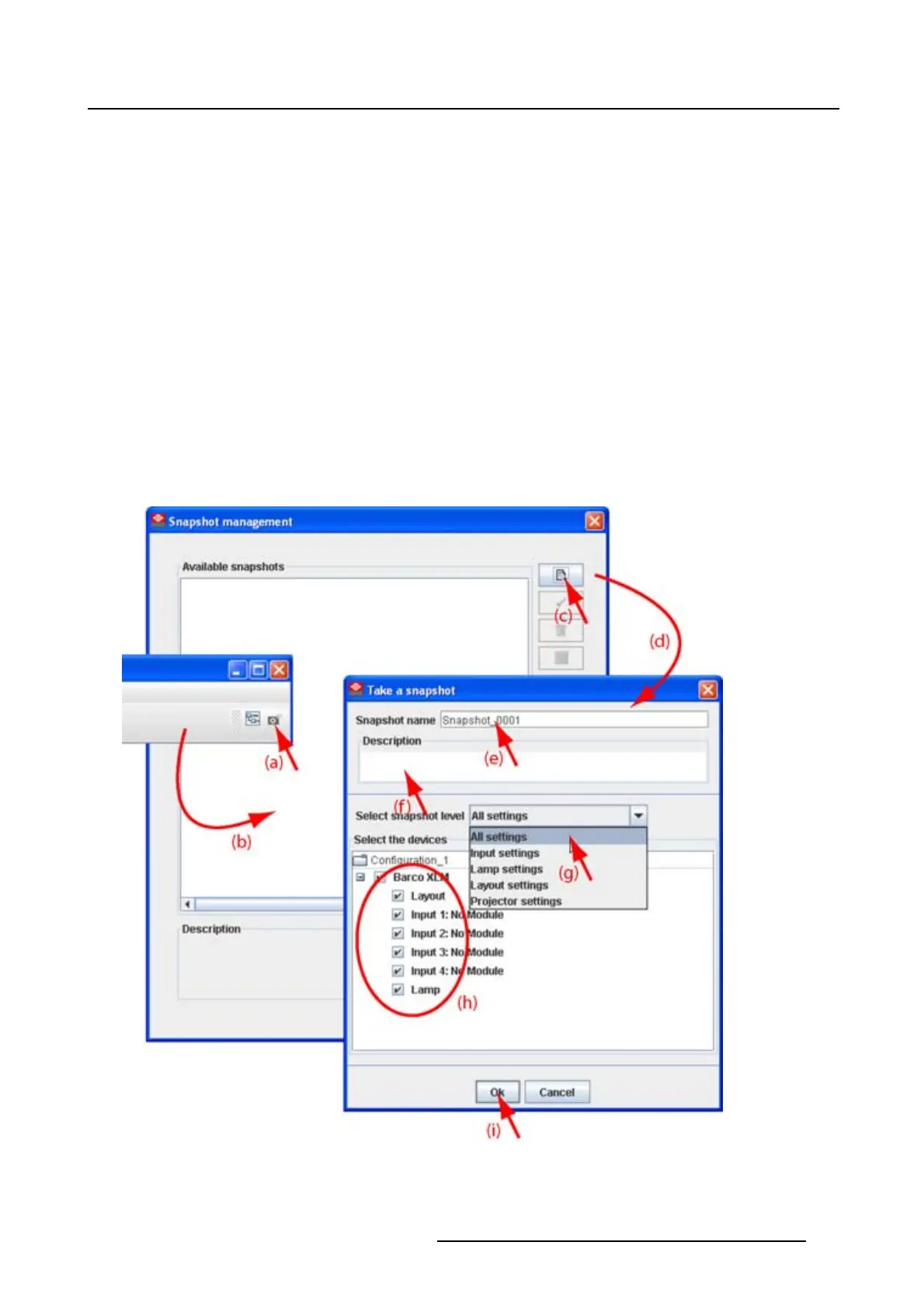
The following levels are available:
- All settings
- All layout settings: only layout settings are saved
- All input settings: only input settings are saved
- Lamp settings: only lamp settings are saved
- Projector settings: only projector settings are saved
This is a first filtering level and can be followed by a device selection.
6. Select the device. By default all devices are selected (h).
Within the setup snapshot level it is possible to exclude some devices by un-checking that device in
Select the device.
E.g. when selecting as snapshot level lamp settings, it is possible to exclude the lamp settings of a
certain projector or when selecting input settings, it is still possible to exclude some inputs.
7. Click OK to take the snapshot (i).
The snapshot is taken. A message is displayed with the result.
8. Click OK to finish the snapshot procedure.
Image 3-11
Take snapshot
R5976924 PROJECTOR TOOLSET 16/04/2009 29



 To Next Page