BD FocalPoint™ GS Imaging System Instrument User’s Manual
22
Table 3-1 – Menu options and tasks
When the BD FocalPoint™ GS Review application is first opened, the user is instructed to
calibrate the stage.
3.2 Calibrating the Stage
In order to set the x and y coordinates of the microscope stage, a stage calibration must be
performed to establish the reference point. Each time the application is opened, there will
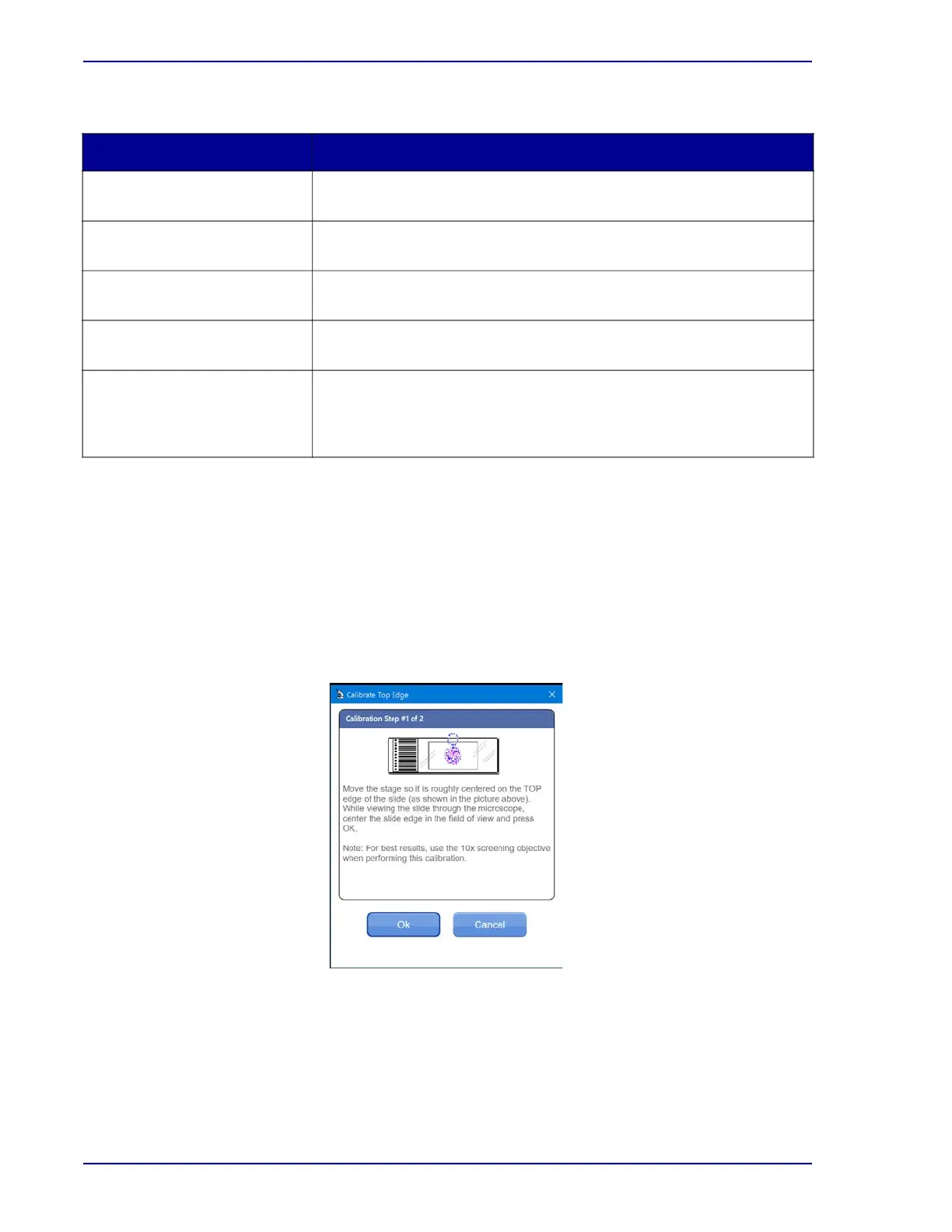
automatically be a prompt to perform a stage calibration. A dialog box (see Figure 3-2) called
"Calibrate Top Edge" opens for guidance through the process.
Figure 3-2 – Calibrate top edge
Menu Option Tasks That Can Be Performed:
FocalPoint™ GS - Tools Access the report utility and other administrative tasks. These tasks
are discussed in Section 8, Section 9 and Section 27.
FocalPoint™ GS - Archive View archived slide data. Section 7 details the tasks performed in this
mode.
FocalPoint™ GS - QC Review of QC review slides. The task performed in this mode is
discussed in Section 6.
FocalPoint™ GS - MD Screen and evaluate abnormal slides. The task performed in this
mode is discussed in Section 6.
FocalPoint™ GS - Review Review and evaluate slides using BD FocalPoint™ Slide Profiler data.
Screening, reviewing, and evaluating slides can also be performed
without reference to BD FocalPoint™ Slide Profiler data. This section
details the tasks performed in this mode.



 To Next Page