Maintenance
14 Care and maintenance 101
12. Insert the hook.
ð The shuttle is magnetic and therefore pulled
into the correct position.
13. Close the bobbin cover and the fastening bracket
until the release bracket engages.
14. Turn the handwheel to check.
ð The hook will rotate.
15. Insert a bobbin case and close the bobbin cover.
16. To absorb excess oil, sew or embroider on a test
fabric.
Cleaning the Thread Catcher
Settings
►
Machine
►
Maintenance
►
Cleaning the Thread Catcher
Thread remnants accumulate in the thread catcher over
time. Clean the thread catcher when the corresponding
message is displayed.
1. You can open the Cleaning the Thread Catcher
function in the settings.
2. Clean the thread catcher according to the
instructions on the screen.
Cleaning the Needle Threader and Thread
Clamp
Settings
►
Machine
►
Maintenance
►
Cleaning the Needle Threader and Thread Clamp
Lint can accumulate on the needle threader and
prevent proper performance. It is recommended to
clean the threader head regularly.
1. You can open the Cleaning the Needle Threader
and Thread Clamp function in the settings.
2. Clean the thread catcher and the thread clamp
according to the instructions on the screen.
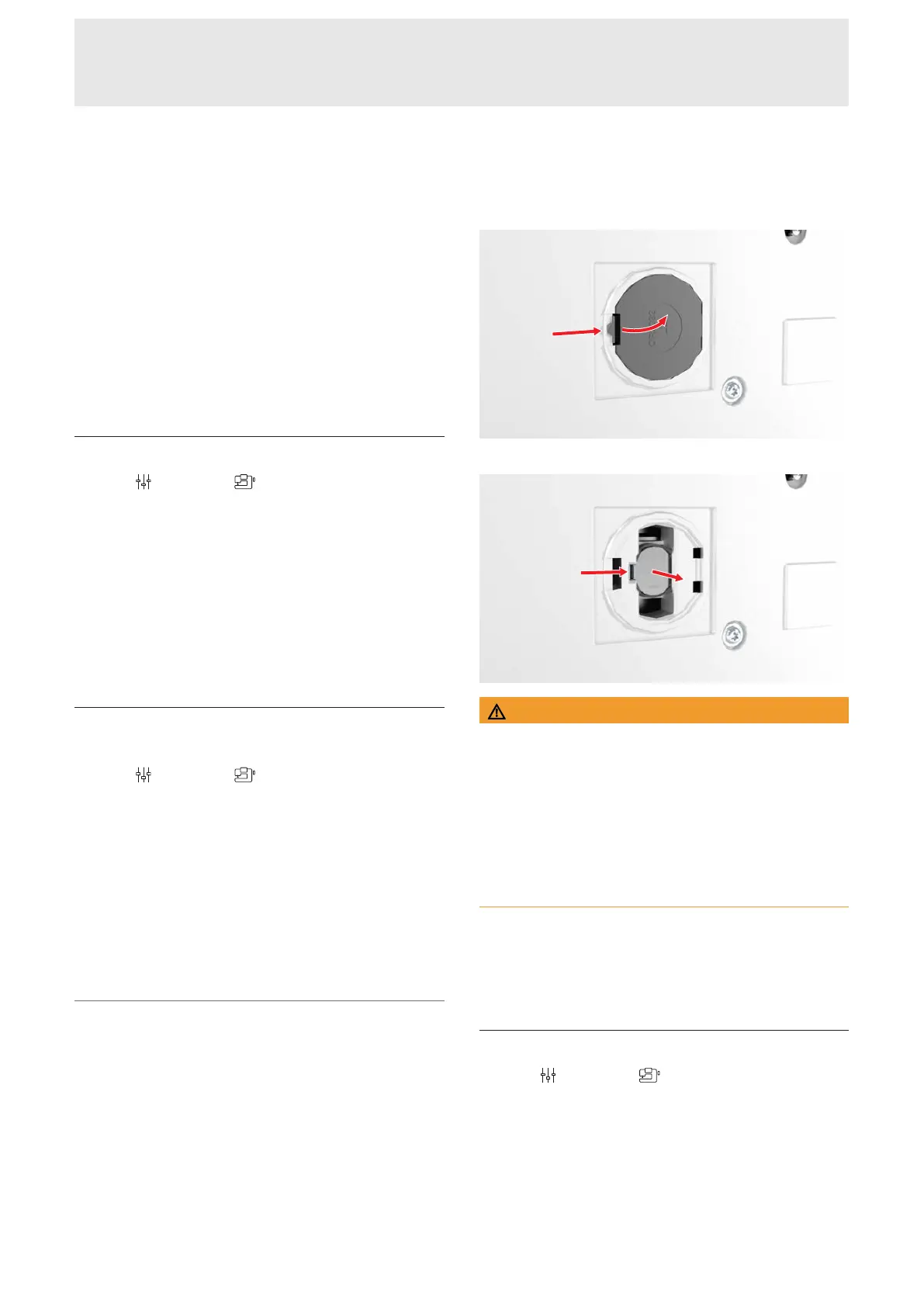
Changing the Battery
1. Switch off the machine and disconnect it from the
power supply.
2. Remove all threads and thread stand.
3. Carefully set down the machine on its back.
4. Open the battery compartment cover on the
bottom of the machine.
5. Remove the battery and dispose of it properly.
WARNING
Danger of chemical burns if the lithium button cell
battery is swallowed
Swallowing the lithium button cell battery may result in
severe internal chemical burns.
►
Make sure that the battery does not fall into the
hands of children and is not swallowed.
►
If you suspect that the battery has been swallowed
or has otherwise entered the body, contact a
doctor immediately.
6. Insert a new type CR2032 battery. When doing so,
make sure that the positive pole is facing outward.
7. Close the battery compartment cover.
8. Set up the machine.
Export the Log File
Settings
►
Machine
►
Maintenance
►
Export
the Log File
Log files help service personnel to find errors in the
firmware. If you are requested to do so by BERNINA
Service, you can export a log file.
1. Insert the USB stick into the machine.
2. Confirm saving the log file and wait until the
export is complete.
3. Close the window.










 To Next Page