Sewing
8 Free-motion Quilting with Stitch Regulation 72
Free-motion quilting often results in varying stitch
lengths due to freely guiding the fabric. The stitch
regulation compensates for these differences in stitch
length.
Integrated sensors register the movement of the fabric
and adjust the speed of the machine to suit the
movement of the fabric. The faster you guide the
fabric, the faster the machine sews. If you move the
fabric more slowly, the machine will sew equally slowly.
This ensures that all stitches are sewn to equal length,
resulting in regular stitch formation.
To use the stitch regulation, choose between the
BERNINA Integrated Stitch Regulator (BISR) and various
presser feet or the BERNINA Stitch Regulator (BSR) #42.
TIP
Detailed step-by-step instructions on this topic can
also be found in the Consultant on your machine.
8.1 Stitch Regulation
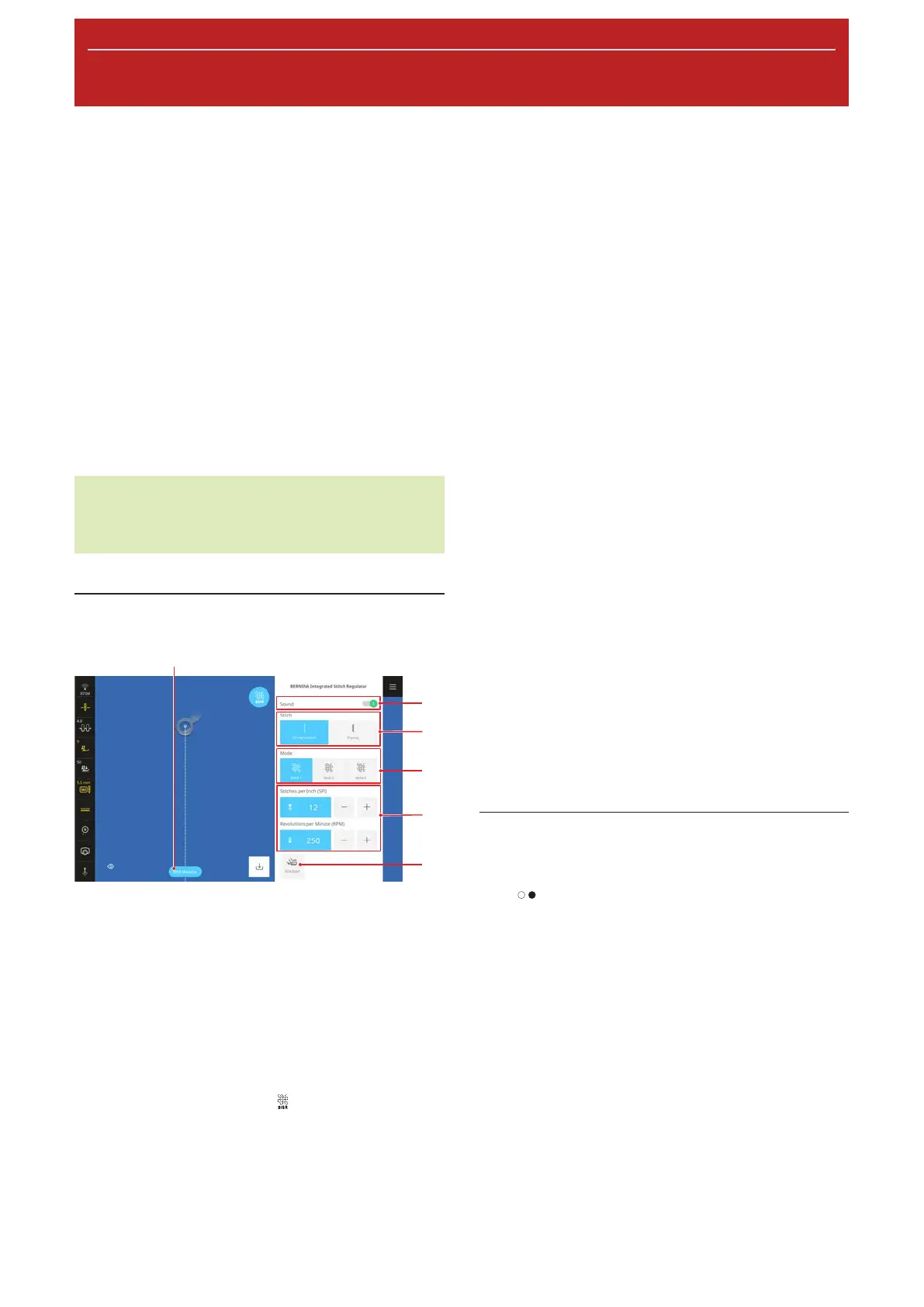
1Stitch Regulation On/Off 2Sound 3Stitch
4Mode 5Settings 6KickStart
Stitch Regulation On/Off
With the Stitch Regulation On/Off function, you can
switch the stitch regulatoin on or off. When the
function is switched off, the stitch length will not be
corrected, even if BISR mode is activated or the BSR
presser foot is attached.
For the BISR Mode function, the BERNINA
Integrated Stitch Regulator
mode must be called
up via the main menu and the 5.5-mm BISR Stitch Plate
must be attached.
The BERNINA Stitch Regulator (BSR) must be attached
in order to use the BSR Mode function [}see page40]
Sound
With the Sound function, you can activate an audible
warning. The warning tone sounds if you feed the
fabric too quickly and the machine reaches the
maximum speed and therefore is no longer able to
correct the stitch length.
Stitch
In BISR and BSR mode, you can choose between
straight stitch and zigzag options.
The straight stitch option is suitable for free-motion
quilting, embroidery and thread painting.
The zigzag option can be used in free-motion
embroidery or thread painting.
Mode
In the Mode area, you can select the desired BSR
mode:
n BSR 1: The needle continues sewing in place if the
fabric is not being moved. [}see page72]
n BSR 2: The needle stops when you stop moving the
fabric. [}see page73]
n BSR 3: Basting Mode [}see page73]
You can edit the settings associated with each mode.
KickStart
With the KickStart function, you can quilt without
continuously pressing down the foot control. [}see
page73]
BISR 1/BSR 1 Mode
In this mode, the machine runs continuously at a low
speed once you press the foot control or the Start/
Stop
button. As you move the fabric, the machine
speeds up or slows down in order to keep to the set
stitch length.
This mode is well-suited to quilt designs with many
points or with micro-stippling, where the fabric stops
briefly with each change in direction. If the machine
continues sewing slowly when doing so, quilting feels
smoother. Sewing in place also enables you to secure
the thread without pressing an additional button.
The following settings can be selected for this mode:
Stitches per Inch (SPI)
With the Stitches per Inch (SPI) setting, you can set
the desired stitch length in stitches per inch.










 To Next Page