Sewing
9 Stitch Designer 74
9.1 Stitch Designer Screen
Sewing
►
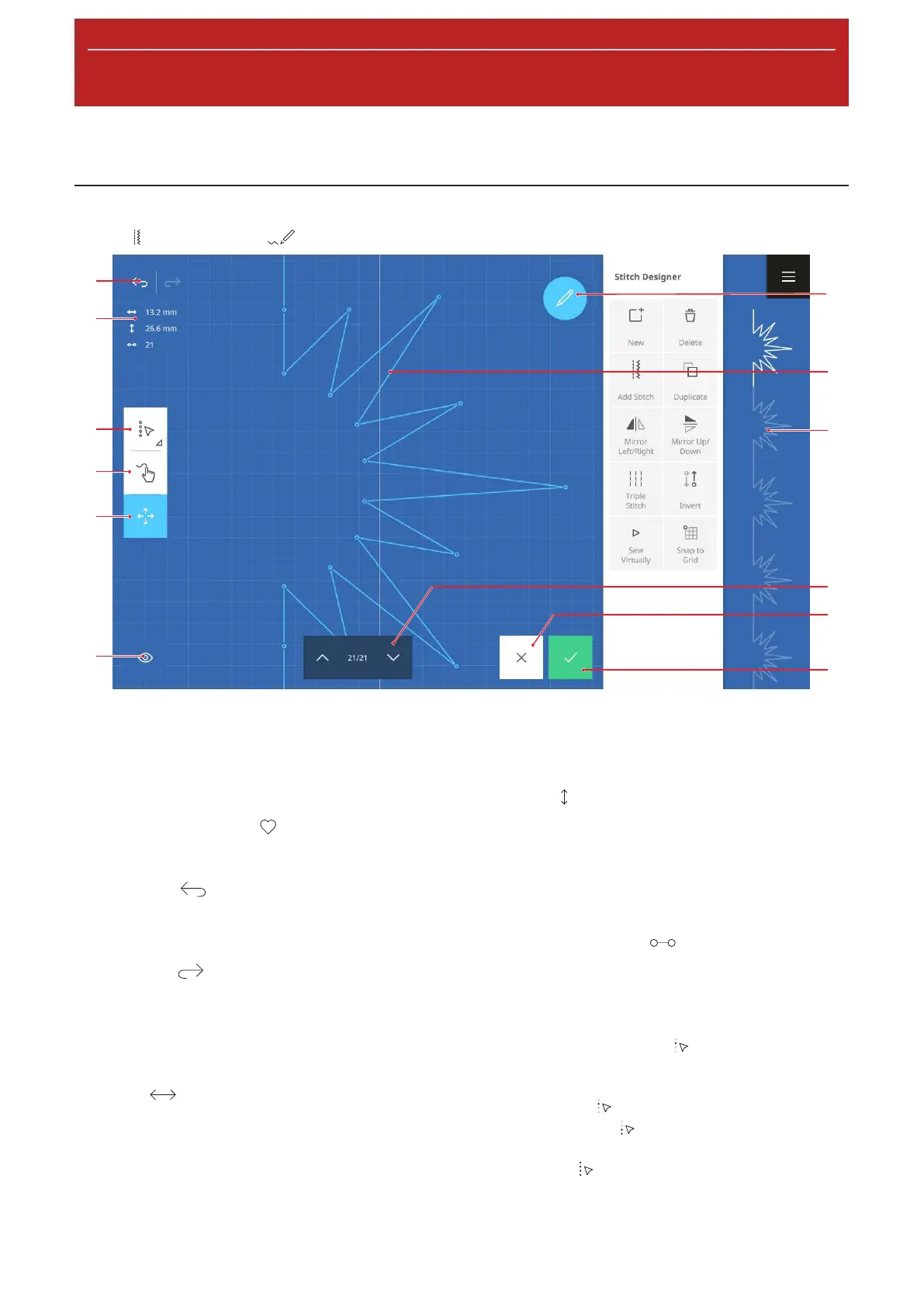
Stitch Designer
1Edit 2Stitch Design Area 3Stitch Preview 4Forward/Backward 5Cancel 6Apply 7View 8Move
9Draw 10Selection Options 11Stitch Information 12Undo/Redo
You can use the Stitch Designer to modify existing
stitch patterns or create your own stitch patterns.
Stitches created in the Stitch Designer can be saved in
the folder Personal Folder
or on an USB stick.
Undo
With the Undo
function, you can undo the most
recent actions.
Redo
With the Redo
function, you can redo undone
actions.
Stitch Information
The stitch information displays information about the
stitch pattern, depending on the selection.
n Width
: Horizontal distance between two
points.
n
One point selected: Distance between the
selected point and the centerline. Points with a
negative value are to the left of the centerline,
while points with a positive value are to the right
of the centerline.
n
Multiple points selected: Distance between the
two points farthest from one another.
n
All points selected: Width of the stitch pattern.
n Length
: Vertical distance between two points.
n
One point selected: Distance between the
selected point and the previous point.
n
Multiple points selected: Distance between the
two points farthest from one another.
n
All points selected: Height of the stitch pattern.
n Number of Stitches
: Number of selected
points.
If only one point is selected, this display is hidden.
Selection Options
With the Selection Options
function, you can
select individual points, multiple points or the entire
stitch pattern.
n Single Point
: Select a single point.
n Multiple Points
: Starting from the currently
selected point, select multiple connected points.
n All Points
: Select all points.










 To Next Page