Application Label Types
Rev A 125 BBP
®
35/37 User’s Manual
The Label Size section defines the size of the gradient scale label. Side A (the long side) can
be defined by either setting the distance between each tick mark (By Tick Spacing) or by
setting an overall length of the scale (By Total Length). Populating one of these parameters
automatically calculates the other parameter since they are dependent on each other. Side B is
the dimension for the short side of the label.
5. Under Label Size, touch the option box that you want to determine the size of the label.
6. Touch the data field for the option box selected and enter the requested measurement.
7. Touch Next .
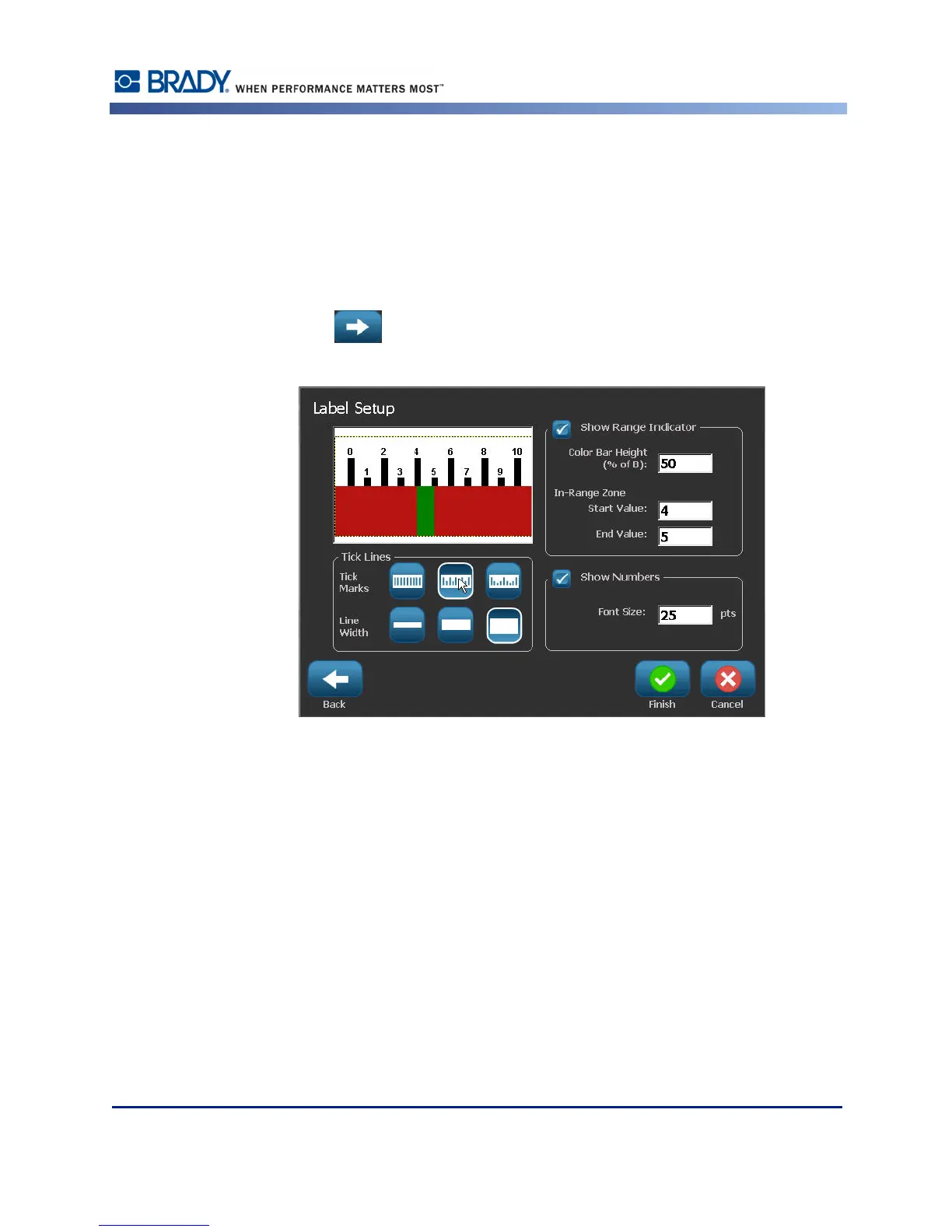
8. Under Tick Lines, touch the button that displays how you want the tick marks to display.
9. Under Tick Lines, touch the button that represents the desired width of the tick marks.
10. Touch Show Range Indicator option box if you want the colored bar to display along with
the tick marks.
11. To change the size of the color bar, touch Color Bar Height (% of B): data field and
indicate the percentage the color bar should occupy of the gradient scale.



 To Next Page