4 - 21
Adjustment
Adjustment
Inner rotary hook bracket position
[Adjustment standard]
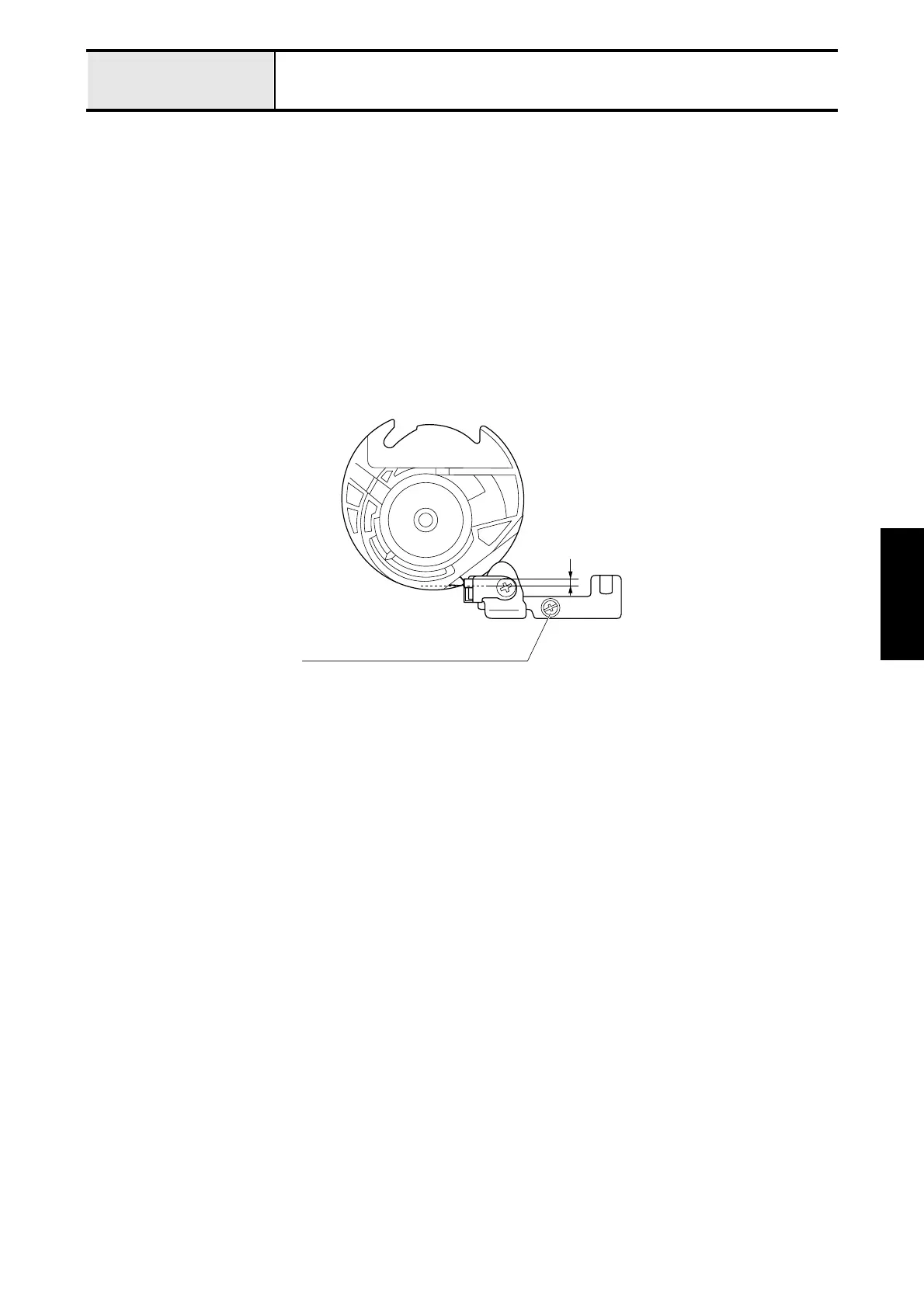
The clearance (overlap) between the inner rotary hook point and the bracket spring must be 2.3 to 2.5mm.
[Adjustment procedure]
1. Remove the front cover.
2. Set the inner rotary hook assy. in the outer rotary hook.
3. Loosen the screw (screw pan (S/P washer) M3 x 8) of the inner rotary hook bracket assy..
4. Move the inner rotary hook bracket assy. back and forth, to adjust the clearance (overlap) between the inner rotary
hook point and the bracket spring to 2.3 to 2.5mm.
5. Tighten the screw (screw pan (S/P washer) M3 x 8) of the inner rotary hook bracket assy..
2.3 - 2.5mm
Screw pan (S/P washer) M3 x 8



 To Next Page
 Loading...