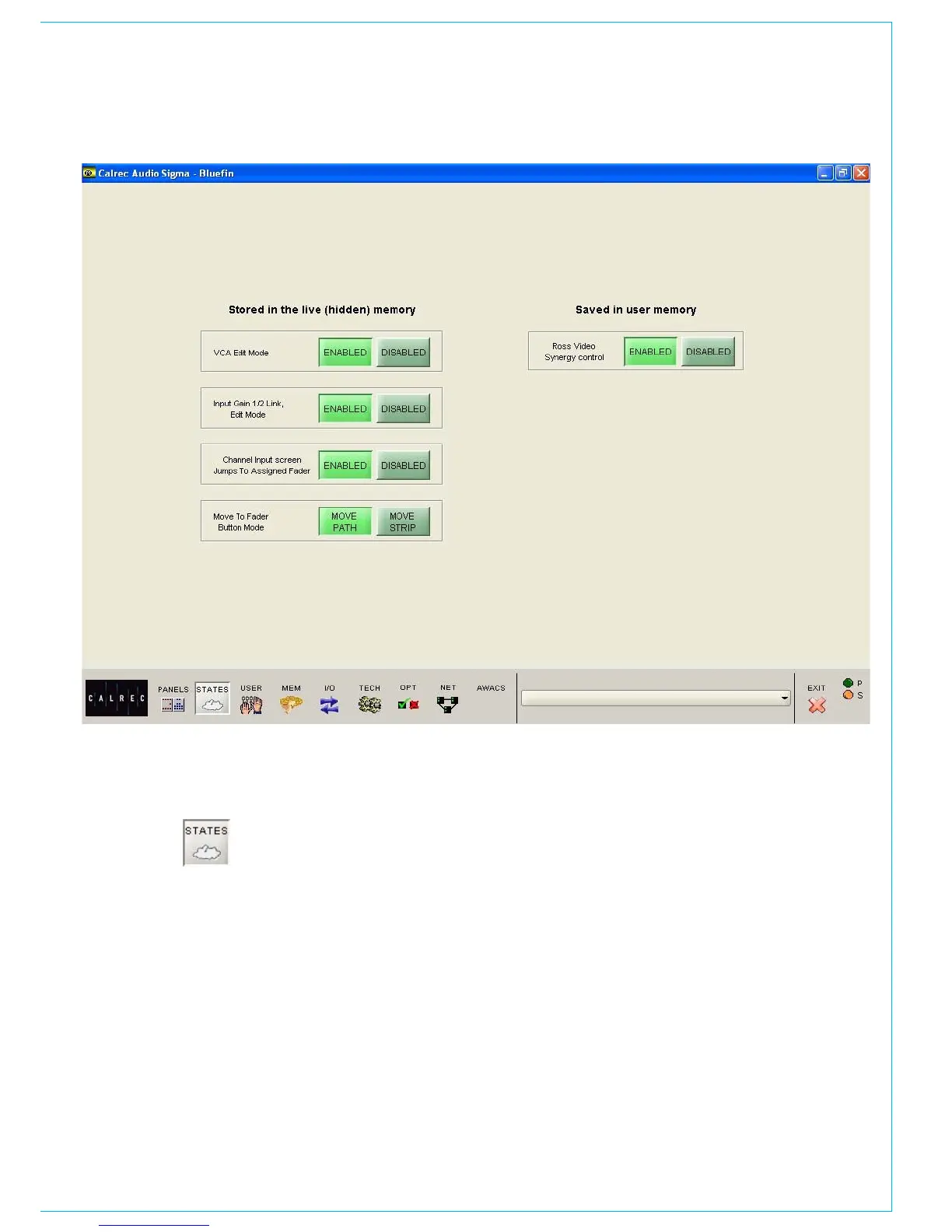
The options are in two groups. Those in
the left column (‘Stored in the live/hidden
memory’) remain are not affected by the
console memory system. The one in the
right column will be changed to whatever
state it had when that memory was saved.
If your console uses the traditional style
monitor panel, then there are additional
functions available on this screen. Please
refer to Appendix B at the end of this
manual for details.
STATES SCREEN
VCA Edit mode
Disabling provides protection against
accidental changes to VCA groups.
Input 1 and 2 Gain Linking
Channels have two inputs and the gains
can either be linked, or adjusted separately.
Channel Inputs Screen
If enabled, selecting a fader assign button
causes the Channel Inputs patching screen
to scroll to that fader in the patching list.
Move To Fader Button Mode
The Move Path buttons on the I/O Matrix
panel can be set to move the selected path
(A or B) to another fader; or they can be set
to move the entire fader strip (both paths
A and B). In both cases, any Wild control
assignments will also move with the path.
Ross Video Synergy control
This allows a Ross Synergy 2 or 3 switcher,
often under control from a Ross Overdrive
automation system, to control the following
functions:
level of input/group faders
•
fader ON/CUT status•
activate console PFL of those faders•
level of main output faders•



 To Next Page