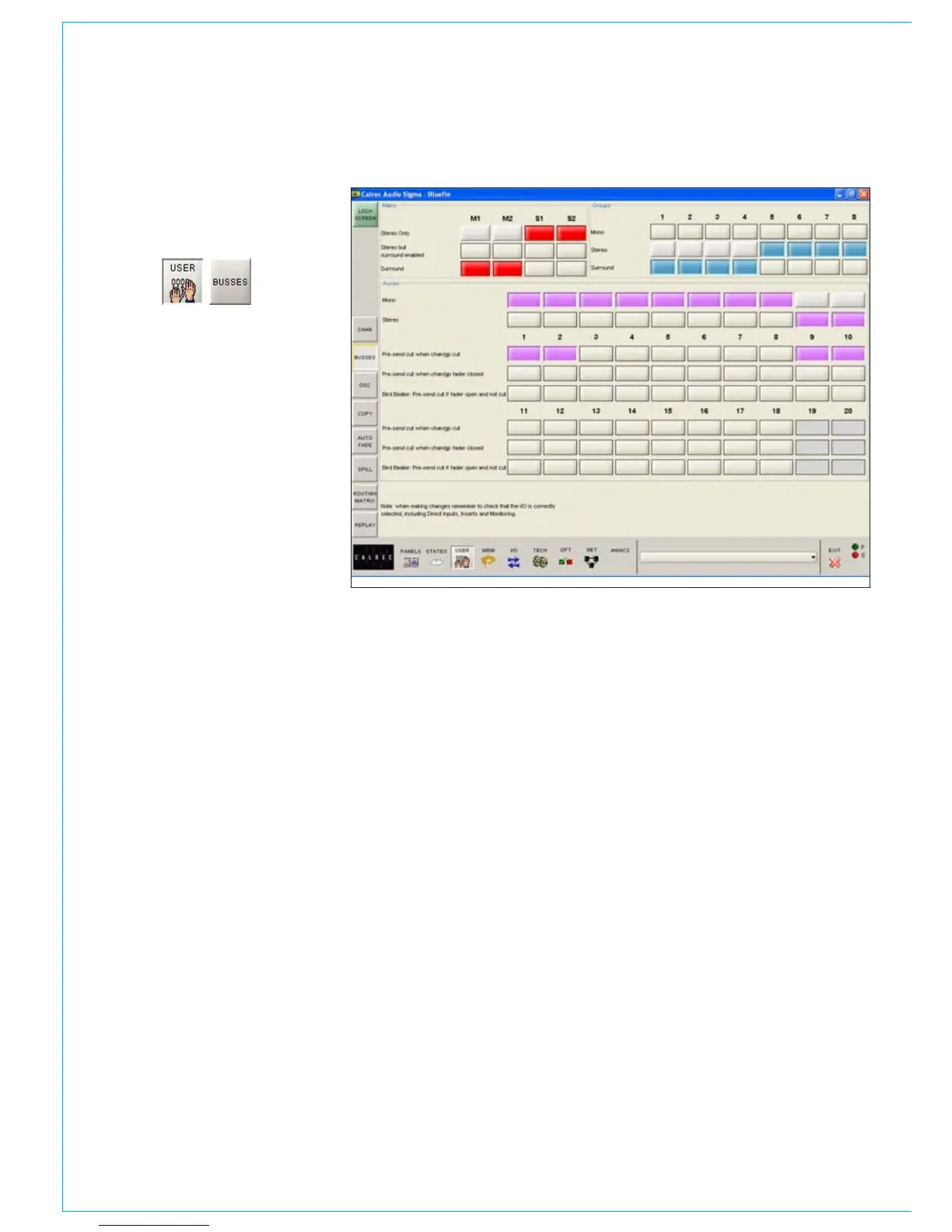
The User-Busses screen allows
the width of the main, group and
auxiliary busses to be defined.
Mains
Each main and sub-main output can be set
to be stereo or surround here.
Groups
Group busses can be selected to be mono,
stereo or 5.1 surround. Stereo channels
feed a mix of left and right to mono groups.
Mono channels pan L/R to stereo groups.
Auxiliary Busses
Mono auxiliary busses can be paired up to
make stereo auxes. When a pair of auxes
are changed in this way, all settings of the
pair are cleared.
Pre-send Cut
Options are available for the pre-send to
be cut :
when the channel or group is cut
•
when the channel or group fader is •
closed
when the fader is open and not cut
•
(Bird Beater). This option cancels the
other two pre-send cut options.
bUSSES SCREEN
The bird beater option mutes the auxiliary
pre-fader send when it’s fader is open
and not cut. Therefore, closing the fader
or using the cut switch enables the
auxiliary pre-fader send. One use of this
feature is to give the producer a feed to
the “cue speaker” when the announcer
or commentator microphones are closed
during a commercial or other break in a live
broadcast.



 To Next Page