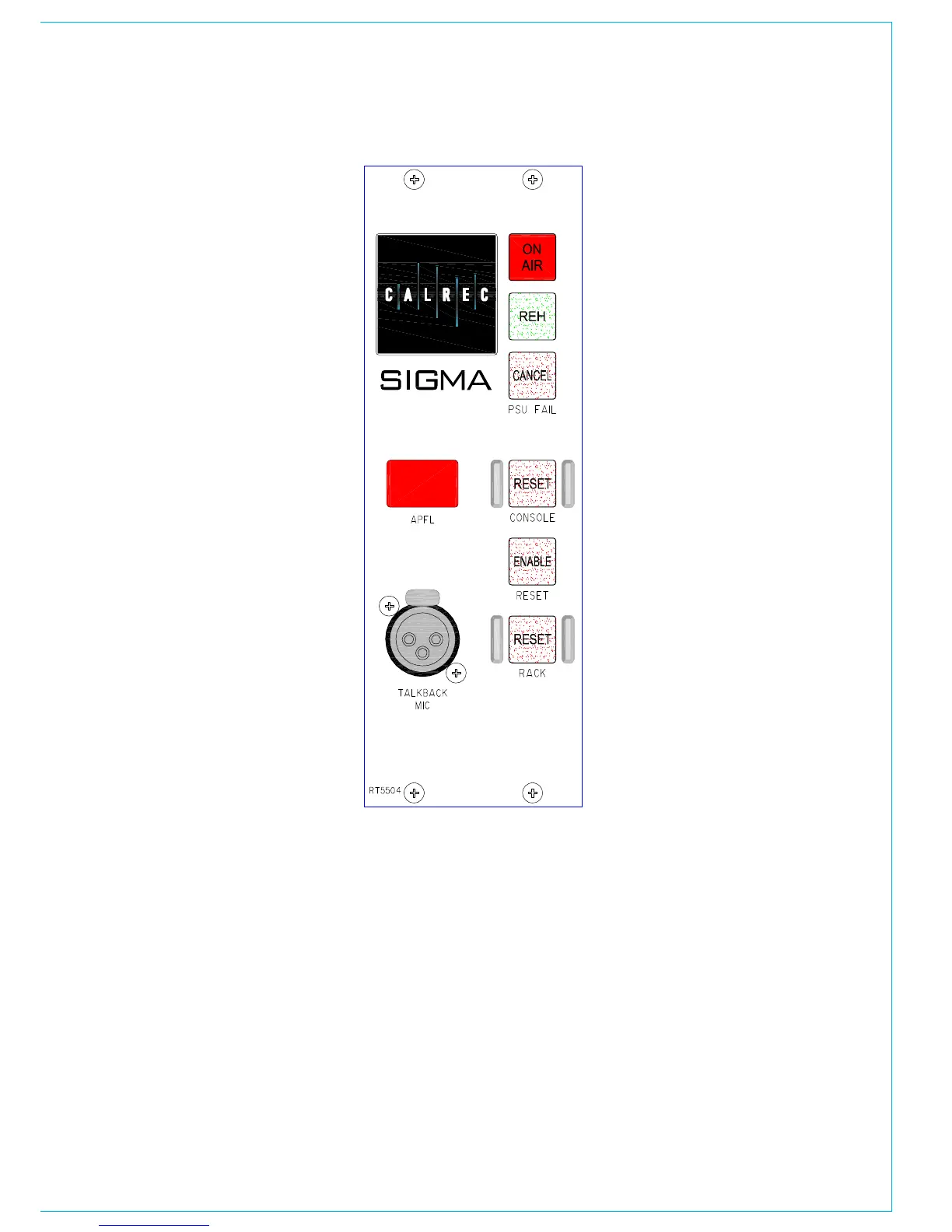
Condition Switching
There are three modes which the system
can be in: Transmit (TX or On Air),
Rehearse, or neither. These are controlled
from the ON AIR and REH buttons or from
external inputs set up on the GPI screen.
The OPTIONS-TX REH screen allows
the condition switching for the system
to be set up. Functions can be set to be
active, or not, in any of the three states.
This can significantly reduce the risk of
human error, making the whole system a
more robust, less stressful, user friendly
environment for operators to work in.
Console Reset
Pressing the ENABLE and CONSOLE
RESET button resets the Control System
only. Independent DSP operation ensures
audio continuity during console reset. The
most recent console settings will be fully
restored in less than 15 seconds.
As the console operates independantly of
the PC, rebooting or failure of the PC will
affect neither the audio nor the operation
of the console.
Rack Reset
Pressing the ENABLE and RACK RESET
button resets the racks only, the control
surface is unaffected.
Please Note: Resetting the racks will
result in a brief audio interruption.
bROAdCAST fACILITIES
Power Supply Monitoring
The rack mounted PSU and distribution
module monitors the power supplies
for failures, and the hot spare will take
over if a fault develops. The PSU FAIL
Indicator/Cancel button on this panel will
flash if any one PSU fails (the hot spare
PSU would prevent the desk from being
affected). Pressing this button will change
the flashing to a steady lit condition. In the
unlikely event of a second PSU failing, the
light will begin to flash again, to alert the
user.
The PSU Fail Indicator can be set to flash
whenever an AWACS error or warning
message is reported. This is done using
a general purpose output, set up on the
Options - GPO screen.
USB
Some consoles may be supplied with a
panel having the optional USB port (not
shown alongside). This is a USB 1.1 port,
provided primarily for connecting flash
memory devices for loading and storing
settings. The small size of console memory
files means data speed is not normally an
issue. The port may not be appropriate to
supply the higher current demands and
other needs of hard disc drives and other
devices.



 To Next Page