Buttons can only be assigned when in
Technician or Supervisor mode. This allows
the system to be set up prior to operation,
and protects against accidental changes
once the console is in use.
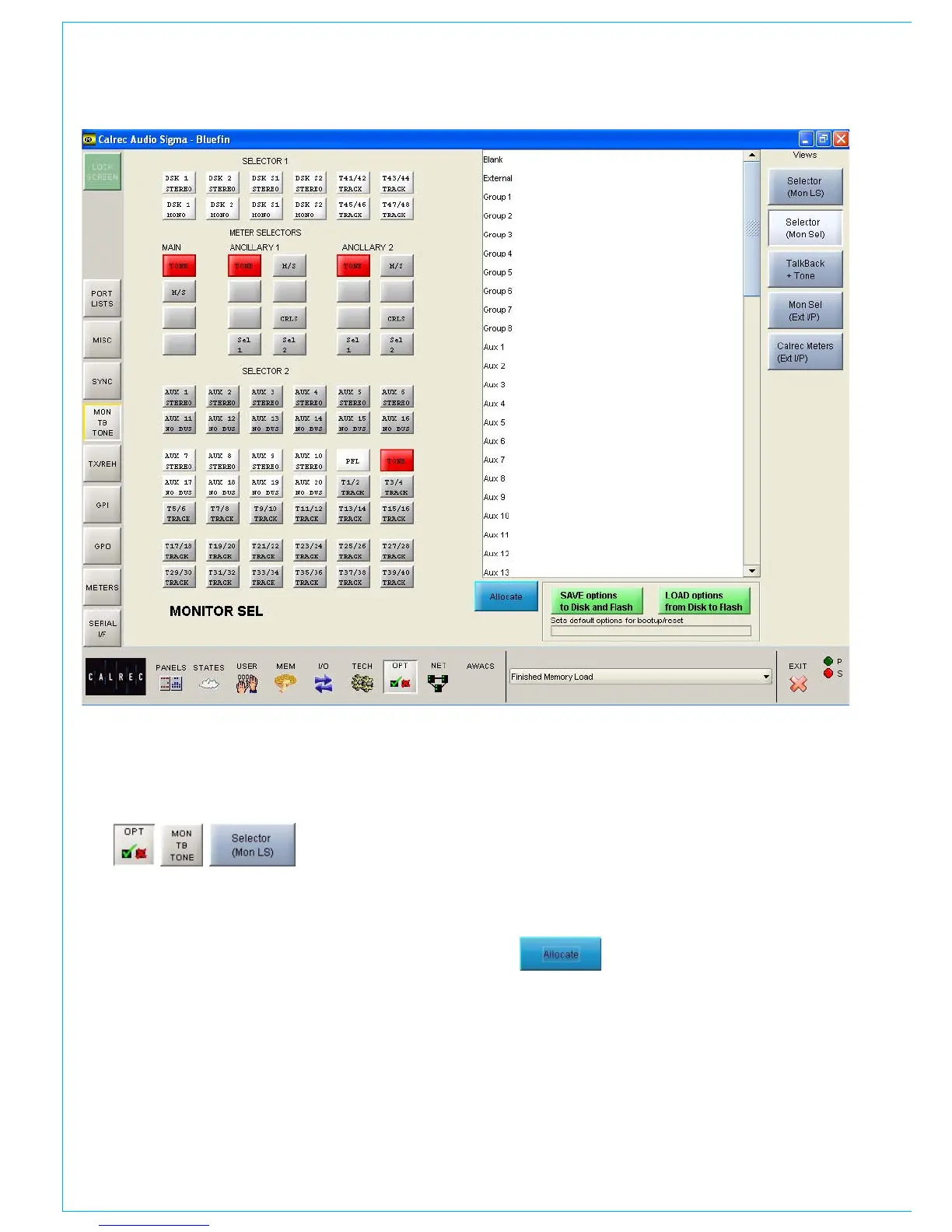
MONITOR SELECTOR SET UP
The screen shows a representation of the
Monitor Selector controls. The right side
of the screen lists all the available monitor
sources. Monitor sources are allocated
to the assignable selection buttons as
follows:
Select the button to which you want
•
to assign a source (screen button will
flash)
Select the required monitor source
•
from the list
Select “Allocate”
•
For external sources, a pop up window
allows the user to enter a suitable label
for the screen button, and to choose
whether the source is mono, stereo or
surround.
To clear any button of its assignment,
simply allocate “Blank” from the list as
a source.
If your console uses the assignable
monitor panels, their control screens will
be slightly different. Please refer to the
Assignable Monitor Panels section for
details of their set up.



 To Next Page