The serial port supports the
following serial interfaces:
Cue Director
•
Nexus Router•
TSI Image Video 1000•
Ross Video (Synergy 2 & 3)•
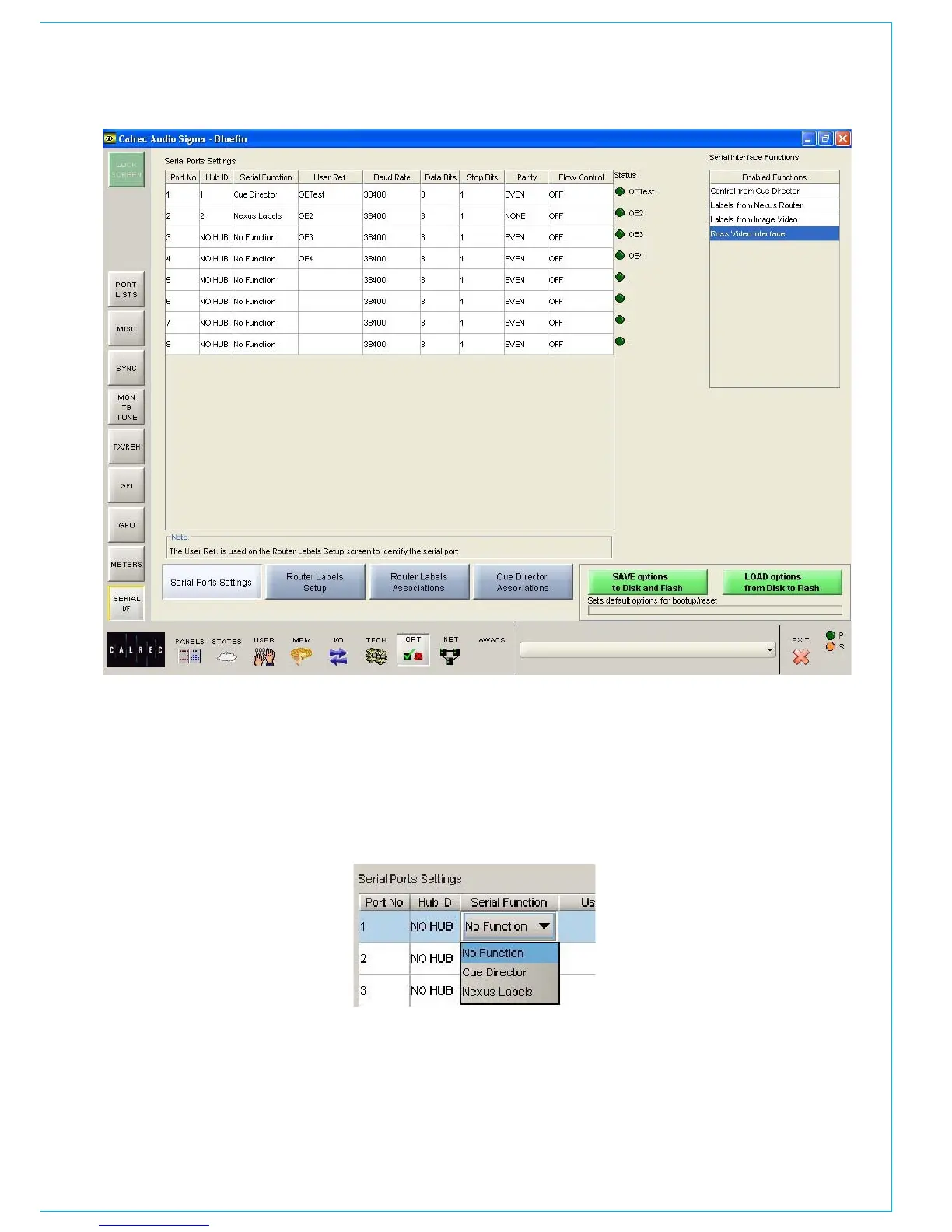
Serial port setup and label associations
are made using the Options-Serial I/F
screens.
Serial Port Settings Screen
The console can have up to 8 hub cards,
each of which can have a serial interface
port for allowing equipment to be
connected to the system.
The Serial Port Settings screen is used
to tell the system what information it
should receive from each serial interface
port, by allocating a function to each
SERIAL INTERfACE
from the Serial Function column.
Only the serial functions which are
enabled for the console will be available for
selection.
The Hub ID number is also selectable from
a drop down list. The ability to change the
Hub ID number is useful for the situation
where two routers are connected to the
console, sending the same information.
If one router or serial port fails the serial
function can be moved from one hub to
another.
The function can be given a name by
typing up to six characters in the USER
REF column.
For each function there is an indicator
which flashes when a valid message is
received from the user serial port.



 To Next Page