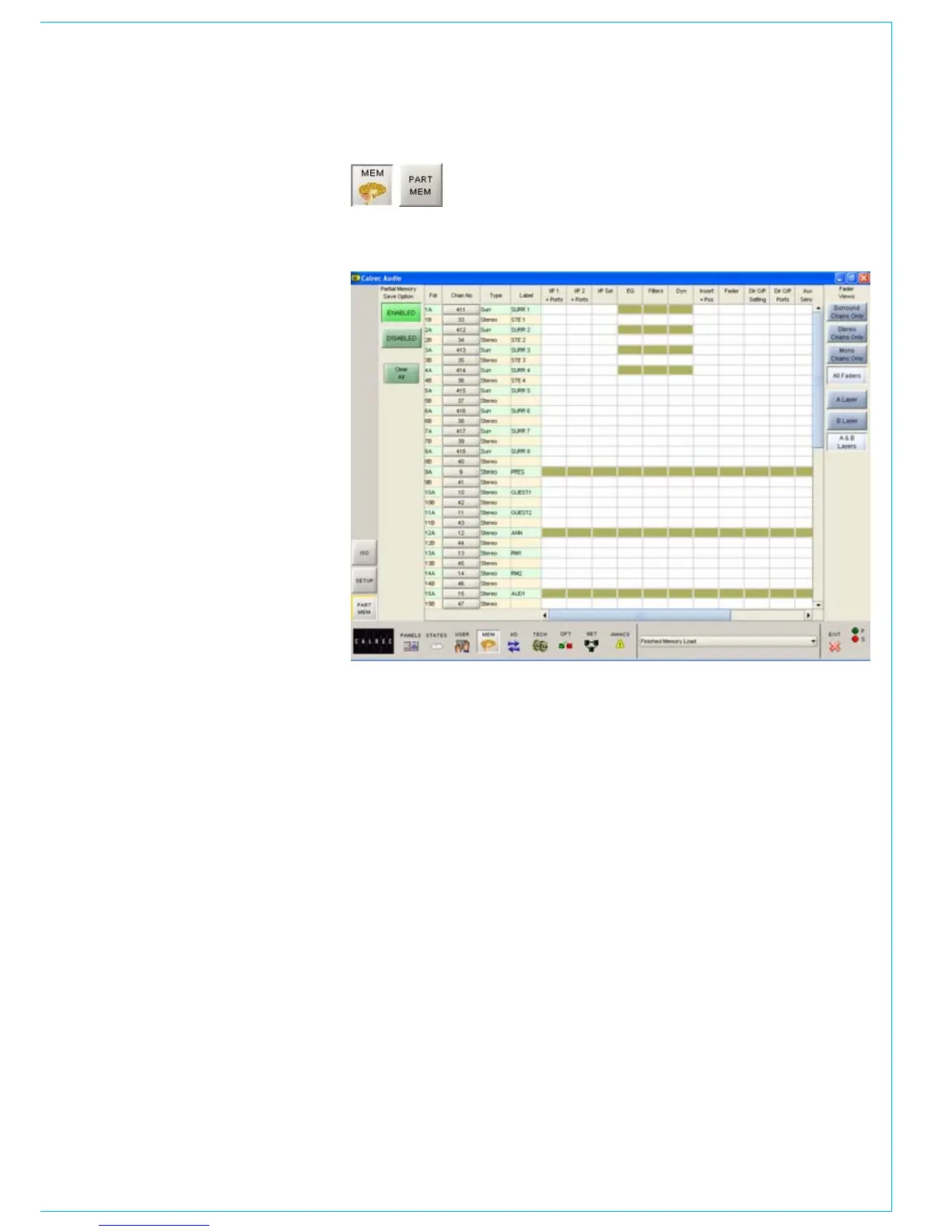
When a partial memory is recalled, only the
settings saved will be updated. The partial
memories screen provides a mechanism for
specifying channels or sub-components of
channels to be saved in a partial memory.
Partial memory save option is enabled
and disabled using buttons at the top left
corner of the screen. These buttons are
also available on the Mem-Setup screen.
When enabled, all memory saves are partial
memory saves. When disabled, all saves are
full console saves.
Including Channel Components in a
Partial Memory
The partial memory screen contains a
table with rows of channel numbers and
columns of partial memory components. The
sequence of the channels is in fader number
order. Partial memory component selections
are made by selecting the intersection of a
channel and a console setting. The Channel
Number field in the fader table is a selectable
button, which selects or deselects all
partial memory components for the channel
occupying that fader.
PARTIAL MEMORIES
A partial memory only loads those channels
or components on the control surface that
were selected using the partial memory
selections. A partial memory load does not
affect the currently assigned fader and the
A/B layer assignments. Partial memory
selections are stored and recalled if a
console reset occurs.
A surround master can be part of a
partial memory, but its spill legs cannot be
individually included in a partial memory.



 To Next Page