Direct Outputs
Ports can be connected to channel and
group direct outputs, first by selecting
PORT1 or PORT2, and using the rotary
control and ON button to choose and
select ports. (Two ports can be connected
to each direct output).
When scrolling through the lists of direct
outputs, those that are in use will display
“IN USE” when the pot switch is relelased.
Direct output port assignment can also be
done using the I/O screens.
Channel and Group Inserts
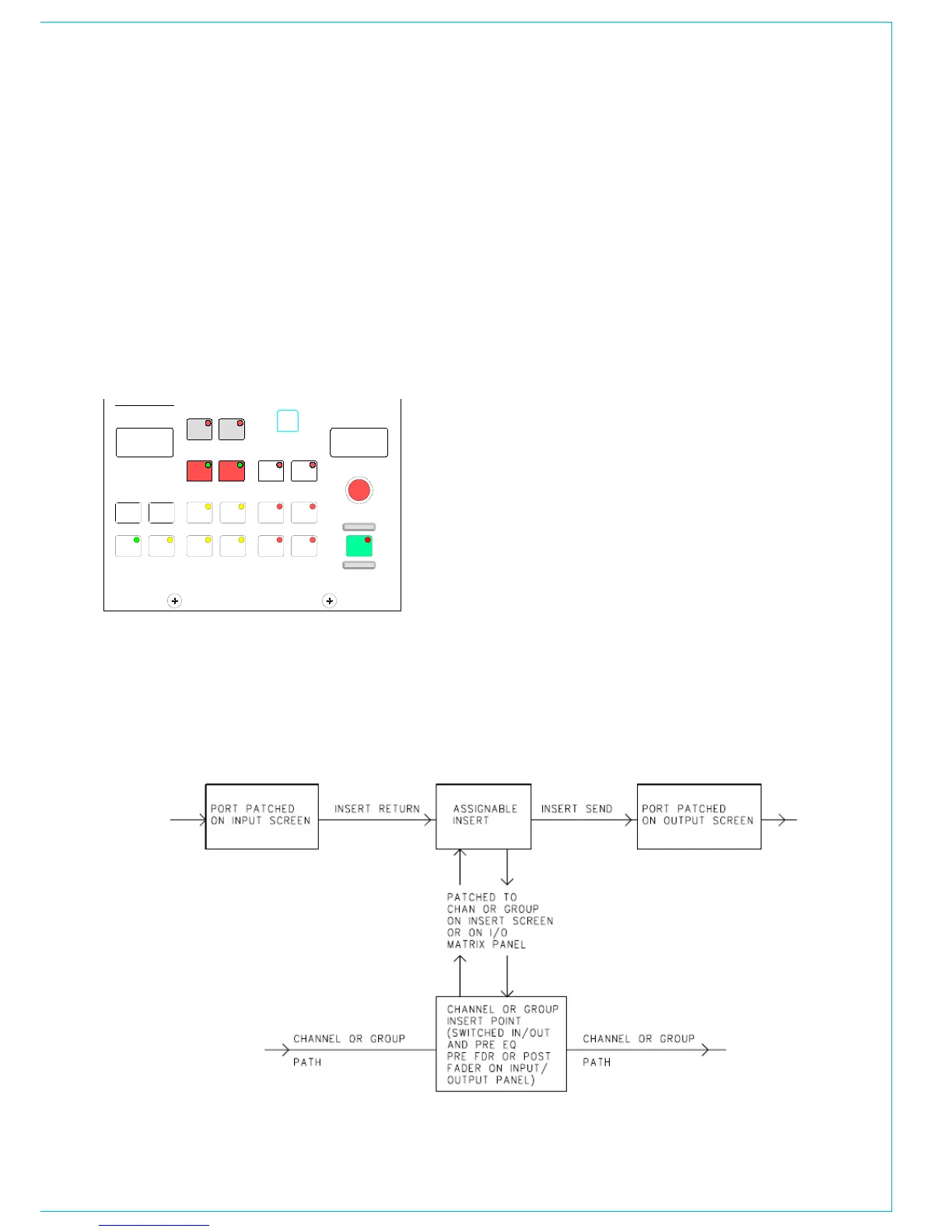
The system provides a pool of assignable
inserts which can be used in the stereo
and mono channels and groups. In
addition, the main outputs have their own
dedicated inserts.
Assignable inserts are designed to be pre-
connected to send and return ports which
are in turn pre-wired to insertable devices
or to an insert patchbay (normally there
would be some assignable inserts of each
type). The I/O screens allow send and
return ports to be set up for the assignable
inserts.
Pressing the INSERT button allows the
rotary control and ON button to control
assignment of inserts to channels and
groups. This can also be done using the
Insert screen. The insert is then patched in
and out of the channel or group path using
the buttons on the Input/Output panel.
To facilitate the assignment of these
inserts, the system allows the user to
label them, in a similar way to how the
Ports are labelled. The same rules also
apply, including the exception that inserts
dedicated to mono devices can be marked
as such. The assignable inserts can be
divided into up to lists in a similar way to
input and output ports. This separates
them for selection on the pot-switch.



 To Next Page