Overview
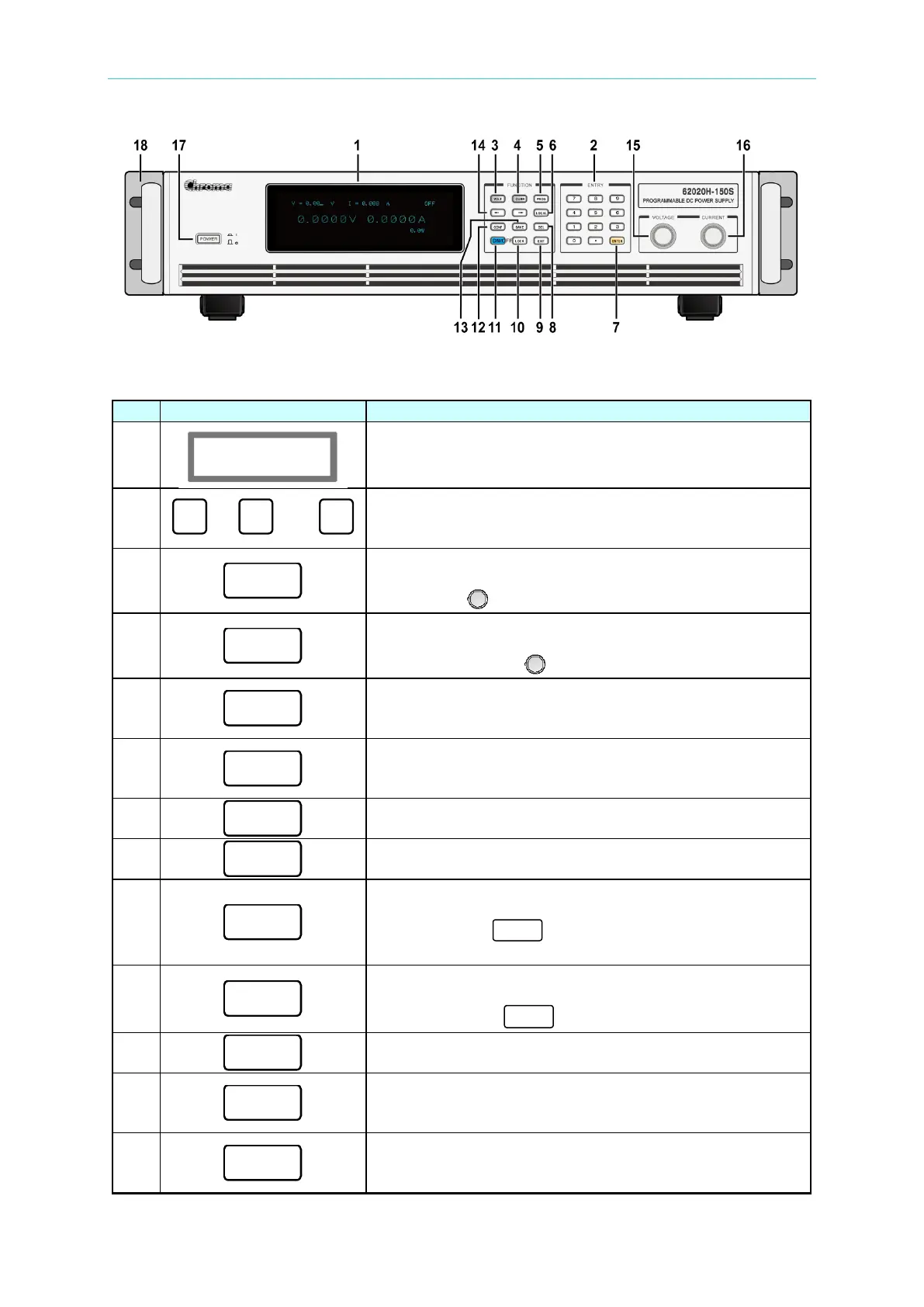
Figure 1-5 Front Panel of 62020H-150S with Solar Array Simulation
Table 1-5 Description of Front Panel
1
VFD Display: displays the output settings and
measurement results.
2
to and
Numeric and Decimal Point Keys:
Numeric keys and the decimal point key to enter digital
3
Enters voltage setting mode. Use numeric keys or
voltage
rotary knob ( ) to input voltage values.
4
Enters current limit setting mode. Use numeric keys or
current rotary knob ( ) to input current limit values.
5
Press this key to skip to the “Program Function Page” for
entering waveform editing mode.
6
Press this key to switch the control mode from remote
control back to the manual operating mode.
7
ENTER Key:
Press this key to confirm the parameter settings.
8
Delete Key:
Press this key to delete the input value.
9
Press this key to go to the previous screen. If this key is
pressed before “ ” is pressed, the screen will go
back to “MAIN PAGE” and the data will not be saved.
10
Press this key to lock all keys and rotary knob.
To unlock, press “ ” for 3 seconds.
11
ON/OFF Key:
Press this key to switch the output “ON” or “OFF”.
12
Press this key to skip to the “Config Choose Page” for
setting various functions.
13
Press this key to save the settings in the “Program and








 To Next Page