Programmable DC Power Supply (with Solar Array Simulation) 62000H Series
Operating & Programming Manual
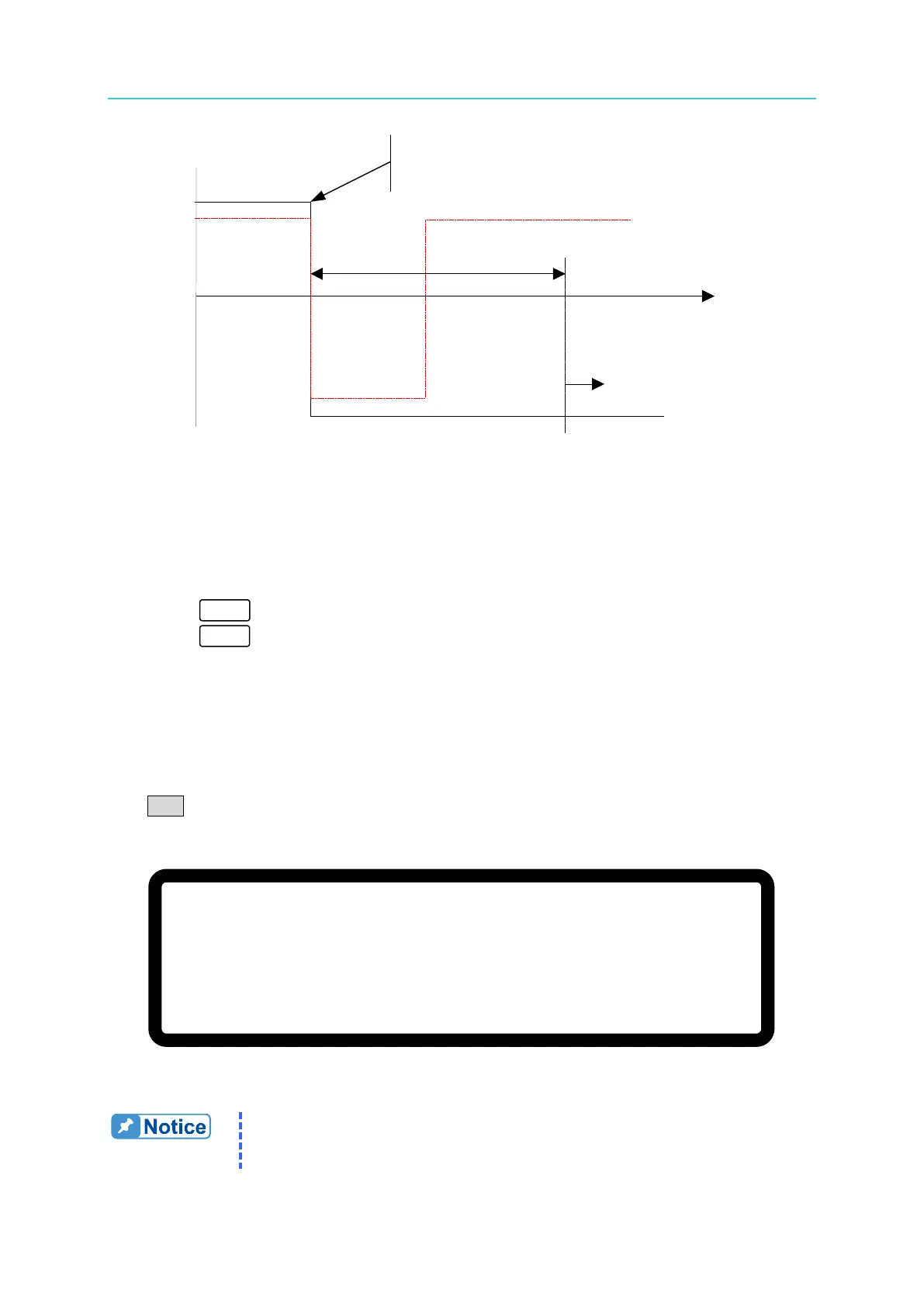
DELAY TIME
C
V MODE
CC MODE
Time
FOLDBACK
PROTECTION
DC SOURCE OPERATION MODE
Figure 3-87
Assuming the FOLDBACK is set to CV TO CC, the solid line in Figure 3-87 indicates
when Foldback protection occurs while the dotted line indicates when it will not occur.
3. Press “ ” to confirm.
4. Press “
” to return to the MAIN PAGE.
3.3.5.8 OTP
The OTP protection will activate when the internal temperature reaches the high limit. The
output will be turned off.
If an OTP occurs the MAIN PAGE menu will display a protection message as shown in Figure
3-88.
V = 6 0. 0 0 V I = 1 0. 0 0 _ A O F F
0 . 0 0 0 0 V 0 . 0 0 0 0 A
O T P 0 . 0 W
Figure 3-88
1. The OTP limit setting cannot be changed by the operator.
2. The output will turn OFF when an OTP occurs and will not turn ON
again until the internal temperature drops to a set value.








 To Next Page