Programmable DC Power Supply (with Solar Array Simulation) 62000H Series
Operating & Programming Manual
7.1.2 Configuration Page
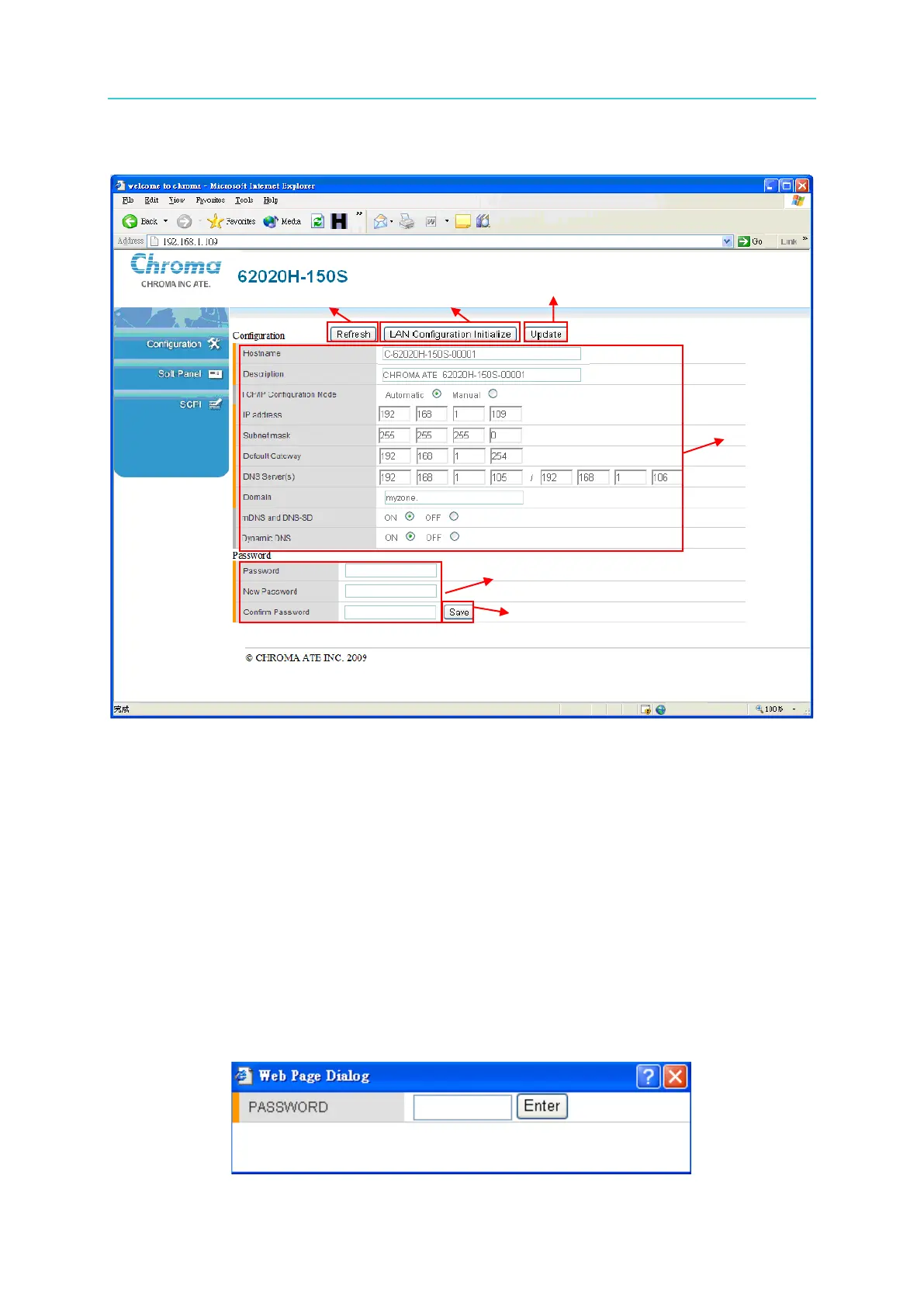
The active network configuration will be retrieved and displayed in the message block [1]
upon entering the Configuration page.
(1) Message block [1]: displays the active network configuration. The IP address, Subnet
mask, Default Gateway and DNS Server(s) are defined by TCP/IP Configuration Mode.
The settings can be edited if DHCP is set to OFF (manual setting mode) but they cannot
be edited when DHCP is set to ON (automatic setting mode).
(2) Refresh button: this function refreshes the configuration page by reading the associated
information again and displaying it on the message block [1].
(3) LAN Configuration Initialize button: returns the network settings to their factory defaults (it
ignores any changes made in the message block [1]). A password confirmation will
appear before executing this function. (No confirmation is required if the system
password is blank.)








 To Next Page