5.1.3.1.1.- Instantaneous parameters.
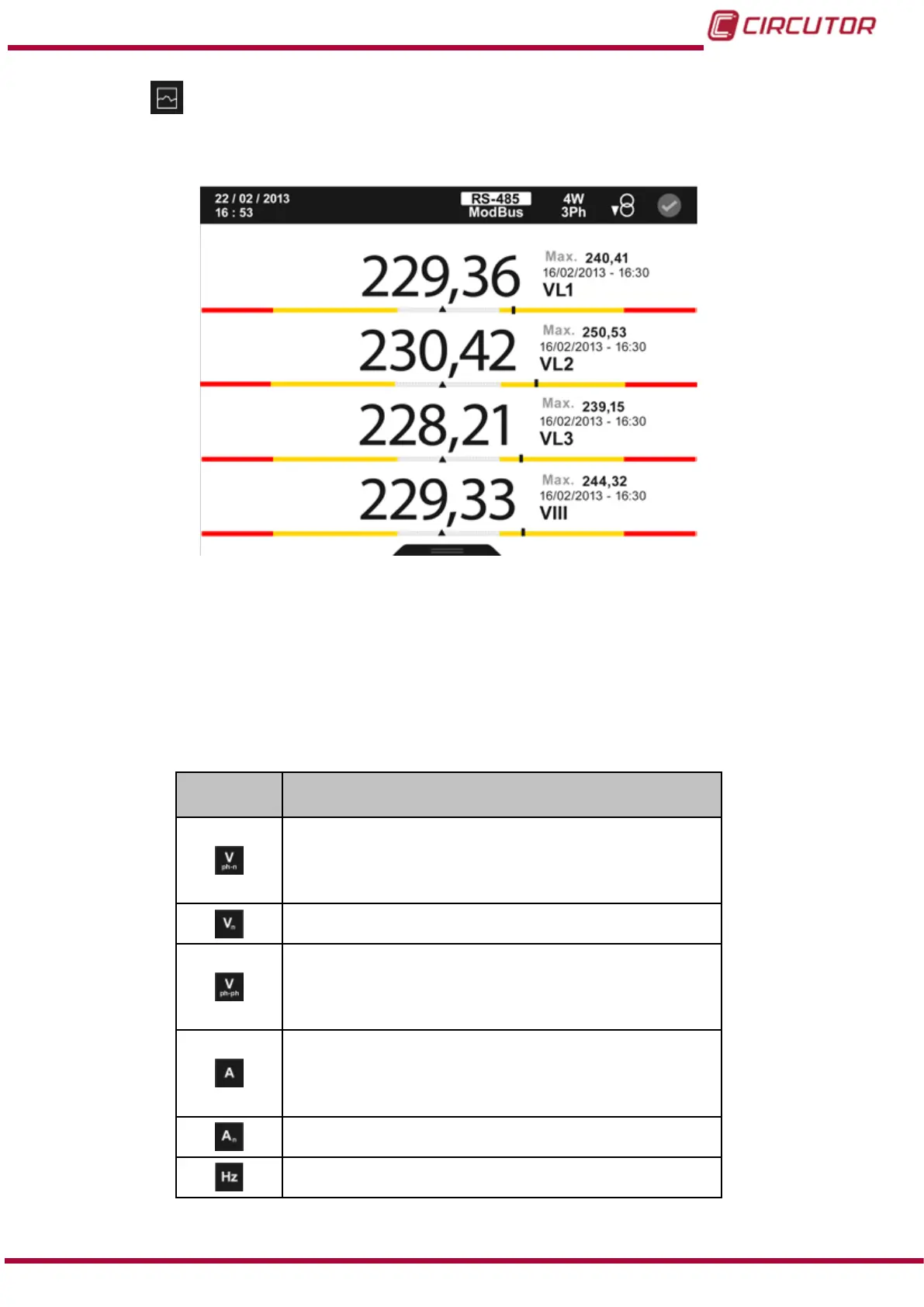
On this screen, Figure 67, you can view all the parameters indicated in Table 17.
Figure 67: Instantaneous parameters (display 4 parameters).
For each of the instantaneous parameters you can view:
The maximum and minimum value, with the date and time when it occurred.
A bar chart with the indications of the instantaneous value, maximum and minimum
values and alarms, see “4.4.3. CENTRAL AREA”.
The graphic view.
Table 17:Instantaneous parameters (display 4 parameters).
Icon
Display 4 parameters
Instantaneous parameters
Phase-Neutral Voltage L1
Phase-Neutral Voltage L2
Phase-Neutral Voltage L3
Phase-Neutral Voltage III
Neutral voltage
Phase-Phase Voltage L1-L2
Phase-Phase Voltage L2-L3
Phase-Phase Voltage L3-L1
Phase-Phase Voltage III
Current L1
Current L2
Current L3
Current III
Neutral current
Frequency
81
Instruction Manual
CVM-B100 - CVM-B150













 To Next Page