Installation – RF Path Elements P/N 709C011801 Page 73
Cascaded Management Connections:
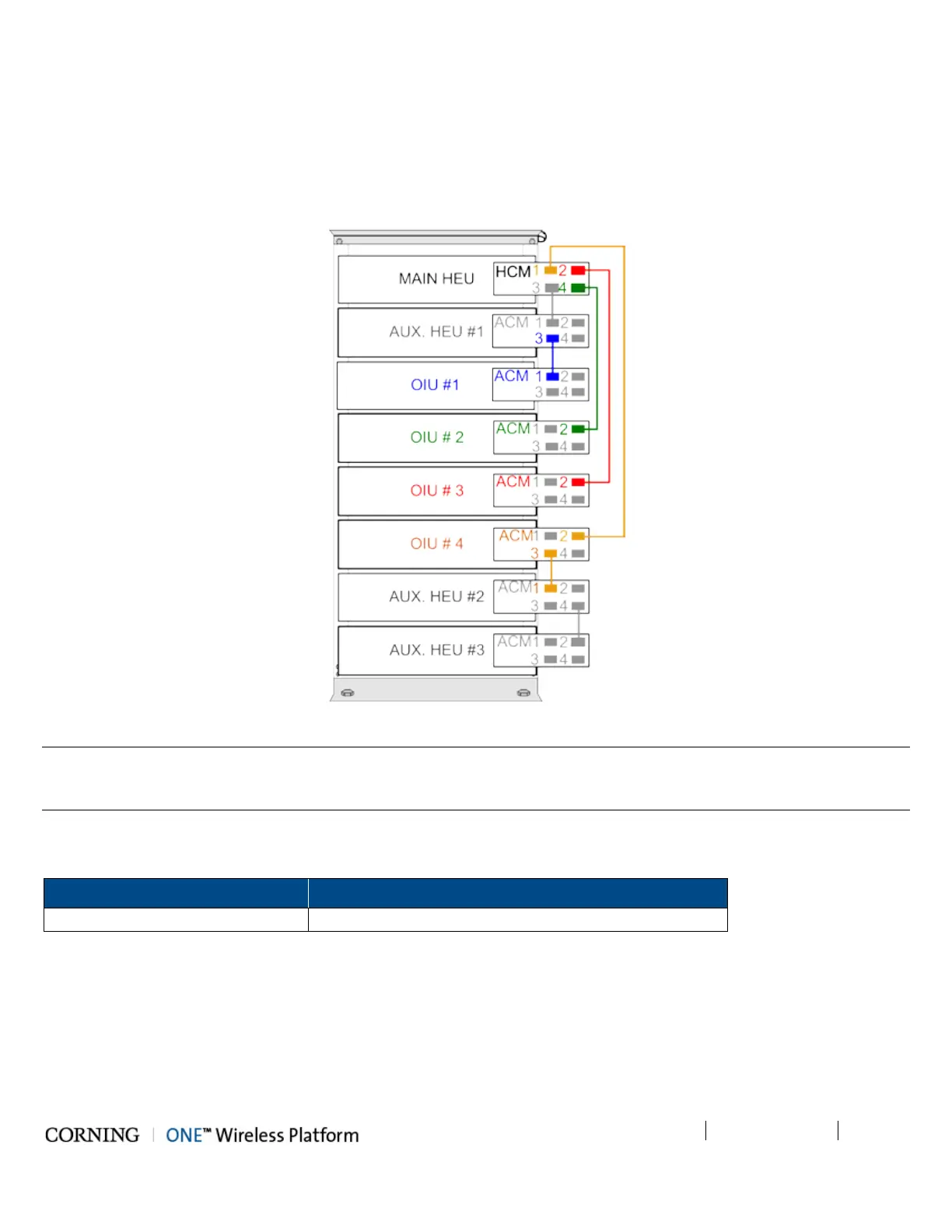
The HCM supports cascaded management connections between ACM modules in cases where the system configuration
includes more than four ACM modules (e.g. 4x4 HEU-OIU configurations), where additional ACM modules and managed
devices are managed by the HCM via an indirect connection.
Figure 5-17 shows an example of how to cascade management connections in installations with more than four ACM modules.
Figure 5-17. Schematic Example of 4x4 Management Connections
Note: The management connections between the HCM and ACM modules are performed using CAT5 communication cables.
Make sure that an ACM which is directly connected to the HCM is done so via a single network connection, as to avoid
network conflicts (i.e. do not perform more than one connection between an ACM and HCM).
Where only HCM INTERNAL ports are available, use RJ45/RJ45 communication cables to perform the Headend management
connections as in Table 5-5:
From (any) HCM To (any) ACM
Port 1/2/3/4 Other available ACM module ‘INTERNAL (TO ACM)” port
Table 5-5. Indirect Management Connections



 To Next Page