V1108, 10.5
10.c
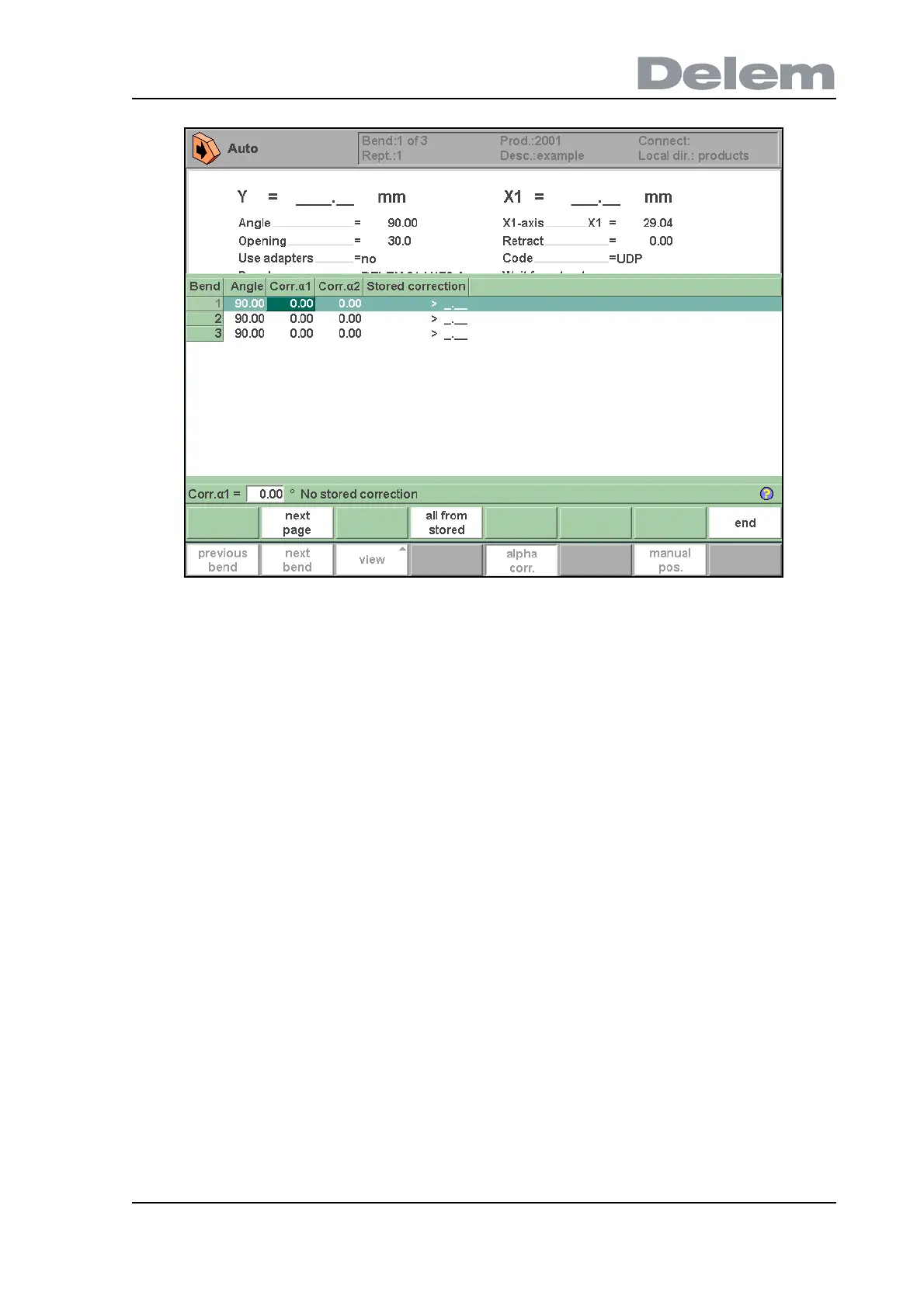
In this window the corrections of all bends are shown. You can browse through all corrections
and change them as you see fit. If a correction for
α1 is entered then this value is copied to
the correction for
α2. Different corrections for α2 can be entered in the field itself.
The columns 'measured
α1/2' are present if they are enabled through the parameter 'angle
correction computation' in the programming constants.
In the columns 'measured
α1/2' the real, measured angle of the completed bend can be
entered. On entry of this measured angle, the control will automatically compute a necessary
correction to reach the programmed angle. If there is already a correction present, the control
will adjust this correction to account for the latest discrepancy.
The column ‘Stored correction’ is only available when the Angle correction database has been
activated. When activated, the column ‘Stored correction’ shows for each bend the correction
value that is present in the database. A blank entry in this column means the database does
not have a correction value for this type of bend. When a new correction is entered, it will be
copied to the database automatically.
The markers ‘>’ indicate bends that have the same value.
The function key ‘all from stored’ serves to copy corrections in the database to the current
program: corrections in all bends are adjusted according to database values.
• X corrections
X-axis corrections can be edited in a separate window. This window can be activated by
pressing the function key ‘X corr.’ in the main screen. The following window appears:



 To Next Page