H
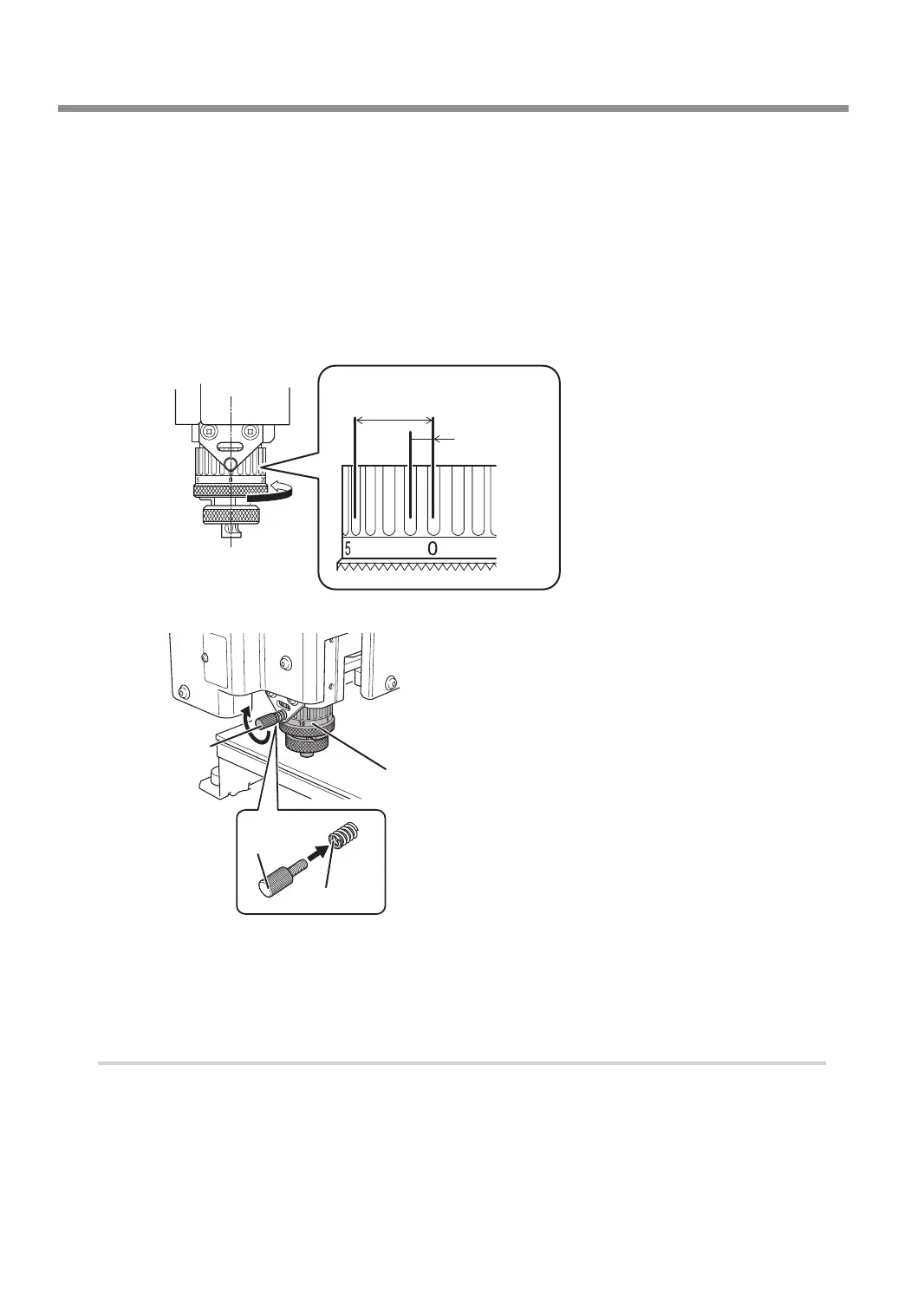
Set the engraving depth.
Adjust the amount of extension of the cutter after raising the cutter to prevent the workpiece from being scratched.
1 Close the front cover and press [ENTER/PAUSE].
2 Press [ +Z] to move the cutter to the upper limit of the z-axis.
3 Open the front cover.
4 Turn the scale of the nose unit to match the desired engraving depth.
The amount of extension of the cutter is the engraving depth.
* The [Depth] setting selected in the software is disabled.
1 scale tick
= 0.0254 mm
(0.001 in.)
4 scale ticks =
Approx. 0.1 mm (0.004 in.)
1 full turn =
0.635 mm (0.025 in.)
5 Secure the nose unit with a retaining screw.
Retaining
screw
Nose unit
Retaining
screw
Spring
I
Close the front cover.
J
Press [ENTER/PAUSE].
5.
Attach the vacuum adapter.
For precautions regarding attaching the vacuum adapter, see P. 58 "Attaching the Vacuum Adapter".
A
Turn off this machine.
B
Open the front cover.
Starting Engraving
48
Chapter 3 Basic Engraving Methods



 To Next Page