5
4
2 3
1
(g.48/C)
B
(g.49/C)
A
B
D
C
6
- CAUTION -
The stabiliser beam can only be manoeuvred if
the stabiliser is completely retracted.
POSITIONING EIGHT MOVEMENT STABILISERS.
(Pegasus 45.19, 45.21, 50.21, 40.25)
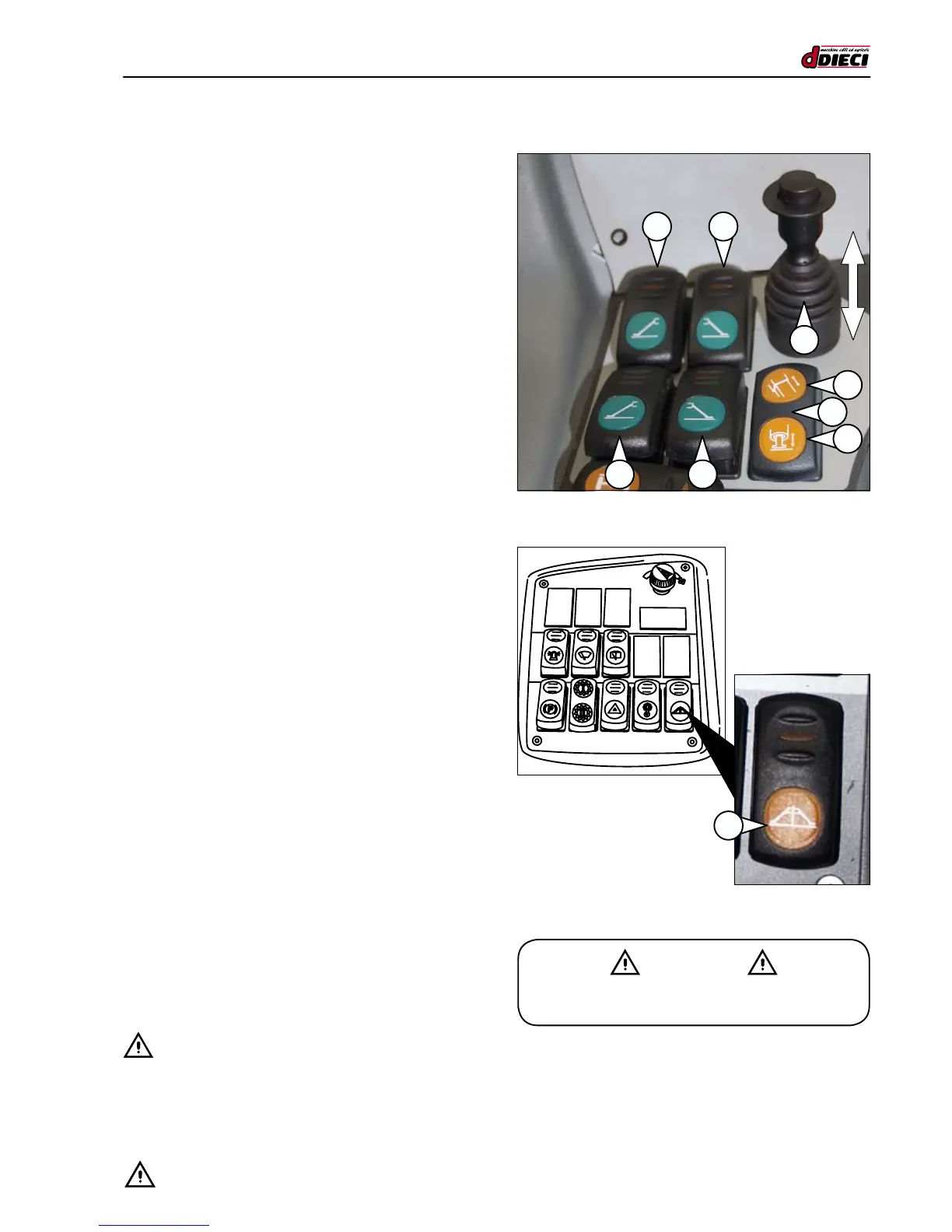
To enable the stabilisers act on the lever/selector (g.48/C
Pos. “1”), the beam or stabiliser selector (g.48/C Pos. “6”),
the desired stabiliser switch (g.48/C Pos. “2”, “3”, “4” and
“5”) and the stabiliser switch (g.49/C3 Pos.“A”).
The switches light up when each stabiliser is selected.
The lever/selector features a locking mechanism to avoid
accidental manoeuvres. To enable, press the button on the
top, and at the same time, pull the top of the lever/selector
upwards. Then move the lever/selector forwards (fig.47/C
Pos.“A”) to lower the stabilisers or backwards (towards you)
(g.47/C Pos.“B”) to raise them.
To ensure you have a perfect grip on the lever/selector, turn
the palm of your hand upwards and insert the lever between
your index and middle nger (g.47/C). Then push the but-
ton on the top of the lever with your thumb while at the same
time pulling the top of the lever upwards with your index and
middle nger (g.47/C).
How to operate the stabilisers
- Select the stabilisers that you wish to operate:
• Switch “2”: front left stabiliser (g.48/C).
• Switch “3”: front right stabiliser (g.48/C).
• Switch “4”: rear left stabiliser (g.48/C).
• Switch “5”: rear right stabiliser (g.48/C).
- Use the relative switch (g.48/C Pos.“6”) to extend the
stabiliser beam (g.48/C Pos. “C”).
- Press the “enable stabilisers” switch (g.49/C Pos.“B”) and
keep it pressed until you have completed the manoeuvre.
- Shift the lever/selector (fig.47/C Pos.“1”) towards the
front of the machine (fig.47/C Pos.“A”) and hold in this
position to carry out the manoeuvre.
- Use the relative switch (fig.48/C Pos.“6”) to lower the
stabilisers (g.48/C Pos.“D”).
- Shift the lever/selector (fig.47/C Pos.“1”) towards the
front of the machine (fig.47/C Pos.“A”) and hold in this
position to lower.
- Shift the lever/selector (g.47/C Pos.“1”) towards you (g.47/C
Pos.“B”) and hold in this position to raise the stabilisers.
- Use the relative switch (g.48/C3 Pos.“6”) to select the
stabiliser beam (g.48/C Pos.“C”).
- Shift the lever/selector (fig.47/C Pos.“1”) towards you
(g.47/C Pos.“B”) and hold in this position to completely
retract the stabiliser beams.
It is possible to select more than one stabiliser at the same
time by acting on the relative switches and enable them by
carrying out the procedure described above.
- CAUTION:
To ensure you are working in complete safety, the machine
must be levelled. The maximum allowed tilt is 2°.
Once the stabilisers have been positioned, always ensure the
machine is levelled correctly by using the spirit level in the cab.


 To Next Page