Getting to know and using tha machine
Integrated devices
C/76
Model E.T. PEGASUS
- CAUTION: - Read the SAFETY REGULATIONS (in this manual) carefully for the safety of all personnel and the machine.
ATTACHMENT AND OPERATING MODE SELECTION
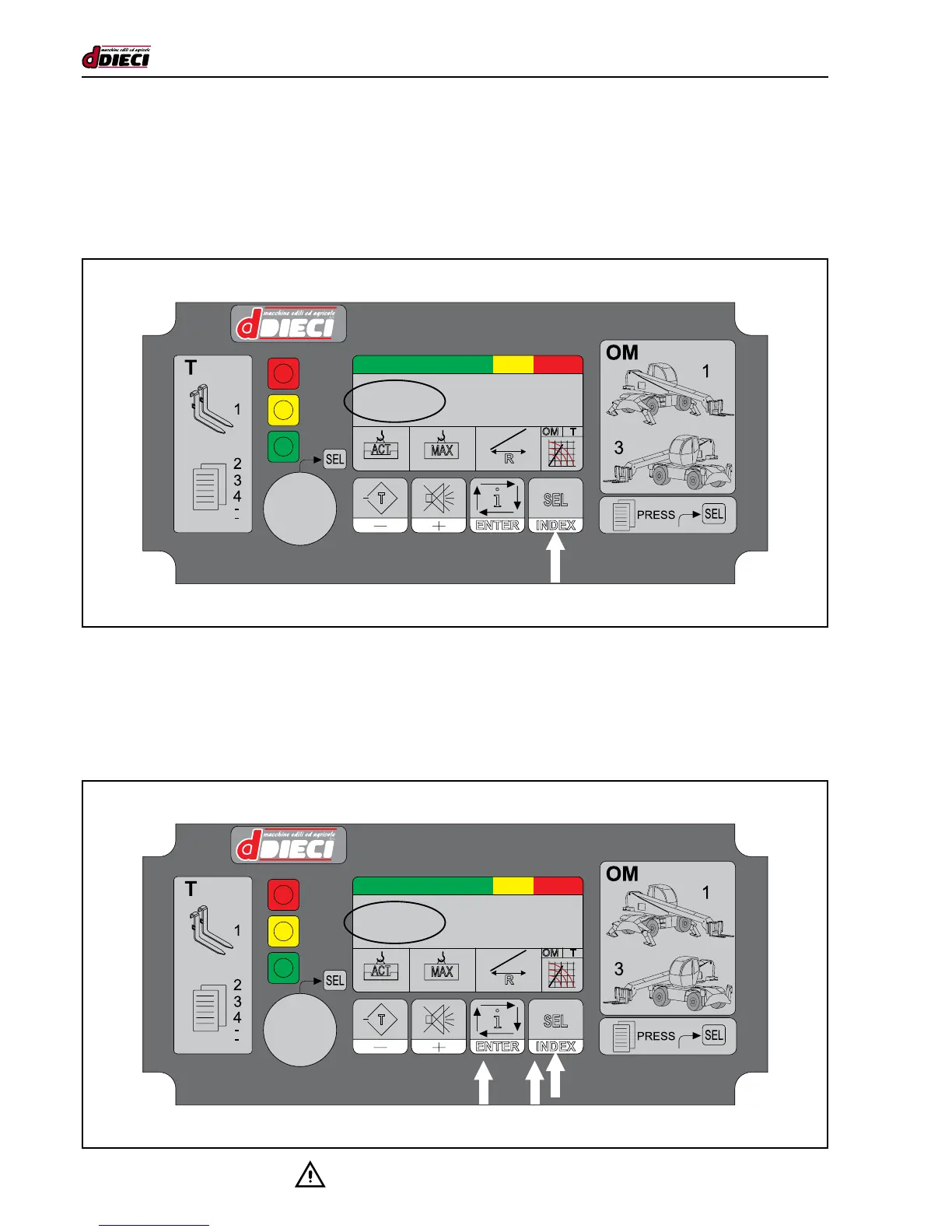
Starting from the basic display, keep the key turned and press INDEX to go to the page with the current Operating Mode (OM)
text and the Table (T) regarding the attachment in use.
While in this condition, press INDEX repeatedly to select the appropriate Table: every time the button is pressed one of the avai-
lable attachments is selected. During this phase the system is automatically blocked.
After selecting the correct Table, press ENTER to conrm your selection and make the control operative. Then release the key.
Forks
Stab. 360°
Forks
Stab. 360°
UNENCODED DISPLAY OF ATTACHMENTS AND OPERATING MODES
To better understand work conditions, or the operating mode (OM) and the attachment (Tool) (t), they can be displayed in text form:
press INDEX. The display shows the unencoded text of the Operating Mode and the selected Attachment Table.
This display is maintained for 3 seconds. After this the panel returns to the main working display.


 To Next Page