MightyMo/MiniMo User’s Guide 5-29
Part # 400030-C
Customizing Interface Features Chapter 5: System Setup
3. Select the Advanced Settings tab.
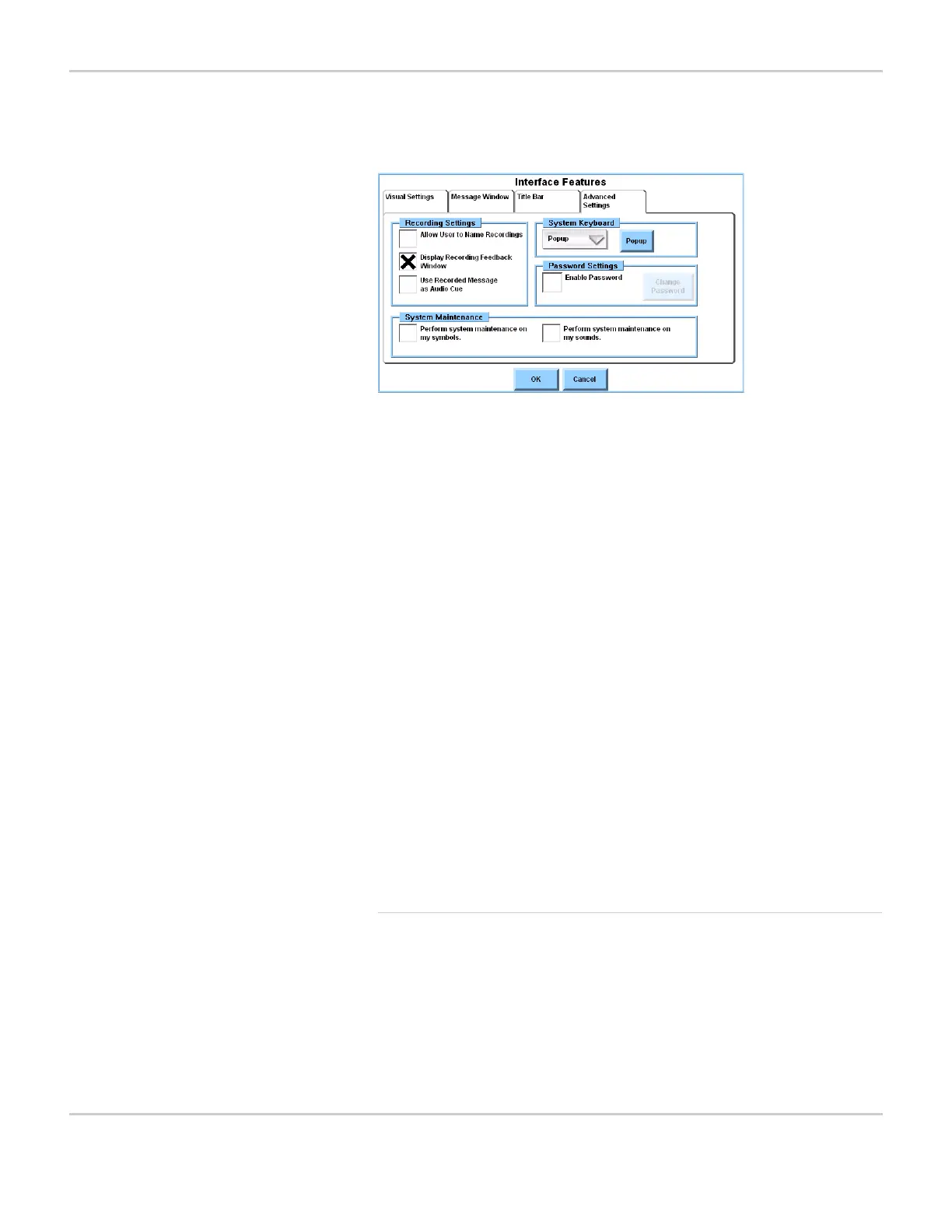
INTERFACE FEATURES MENU - ADVANCED SETTINGS TAB PANE
The Advanced Settings tab pane contains the following options:
Select a System Keyboard
When you are using or programming a MightyMo/MiniMo device, a
keyboard popup will appear when you are required to enter text
information or when you select a text box. The software provides a
number of system keyboards, each designed for different cognitive
levels and selection methods. They contain standard alphanumeric
keys, as well as keys for commands that are specific to the
Recordings
group box
These options assist you in the creation of
custom recordings. For more information,
refer to Recording Settings on page 8-6.
System
Keyboard
These controls enable you to select the
keyboard (onscreen or physical) that will be
used to enter text information.
Password
Settings group
box
These options allow you to create, modify or
deactivate password access to the controls
in the title bar. For more information, refer to
Protecting System Settings on page 5-31.
System
Maintenance
group box
These options allow you to choose whether
unused symbols or sounds (or both) should
be listed for deletion when you perform
system maintenance. For more information,
refer to System Maintenance on page 2-26.



 To Next Page