MightyMo/MiniMo User’s Guide 1-11
Part # 400030-C
Terms You Should Know Chapter 1: Introduction
TERMS YOU SHOULD KNOW
This document uses some basic computer terms as well as
vocabulary that is unique to DynaVox MightyMo/MiniMo software. It is
important that you take a few minutes to become familiar with these
terms and their meanings. Reviewing this section now will make it
easier for you to learn about your MightyMo/MiniMo device.
Pages The primary MightyMo/MiniMo communication tool is a page. Pages
can be designed and customized to meet your unique physical, visual
and communicative needs. A page contains a collection of buttons
that represent words, phrases, sentences, behaviors or links to other
pages. A page covers the entire touch screen below the title bar.
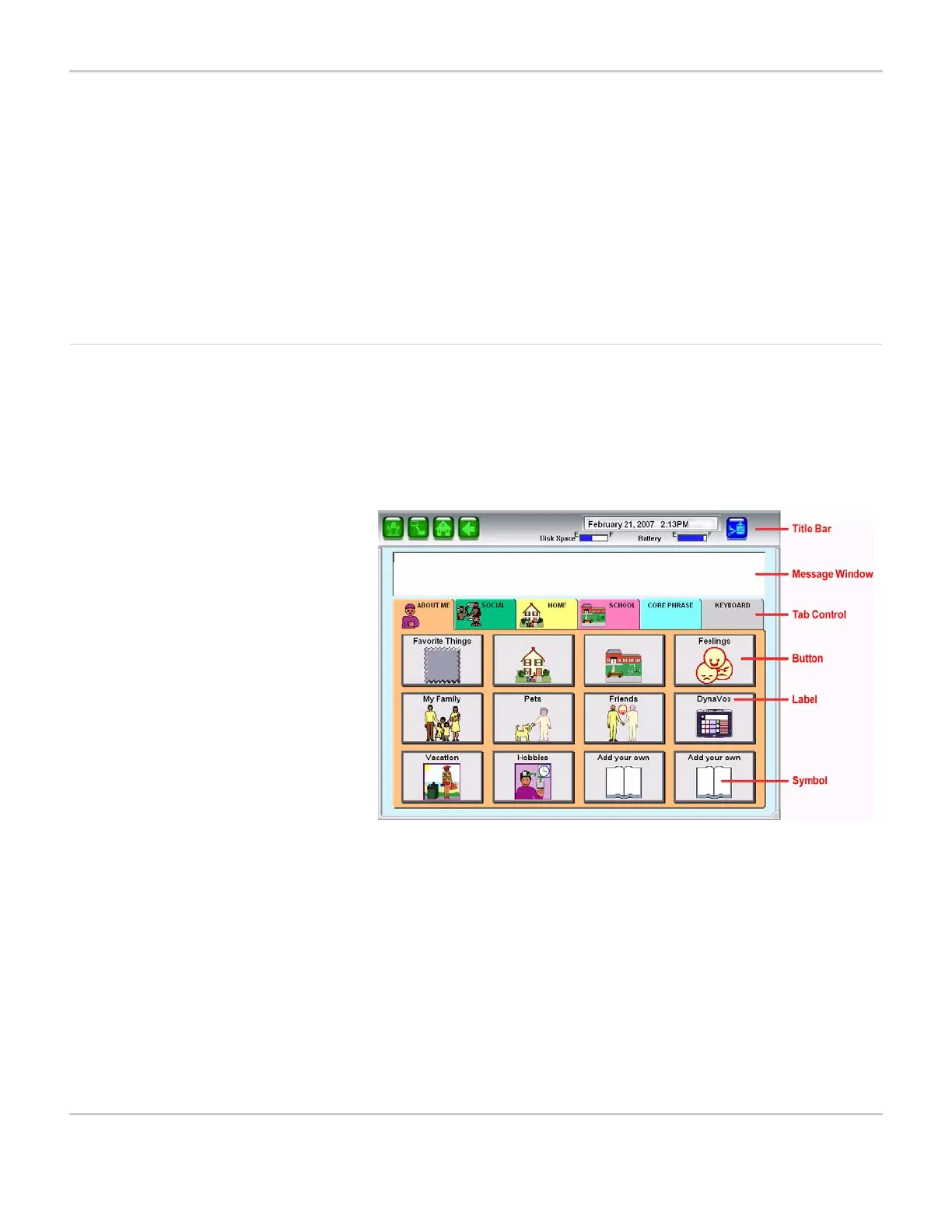
MIGHTYMO/MINIMO PAGE
Pages can feature various components:
• Message Window - The Message Window is an area on a page
where a text or symbol message can be composed. When the
Message Window is selected, the device will speak its contents.
The size and location of the Message Window may vary, but
moving from page to page will not delete or alter its contents.
• Tab Control - Tab controls are used to navigate between multiple
layers of buttons on a page. These layers are called panes. The
top of each pane features a tab. A pane is displayed whenever its


 To Next Page