A-4 DynaVox Technologies
Appendix A: External Hardware External Keyboard
EXTERNAL KEYBOARD
A standard computer keyboard can be used with your
MightyMo/MiniMo device. This is known as using a physical keyboard
instead of a system keyboard popup that is displayed on the touch
screen. Most commercially-available computer keyboards have a
USB connection at the end of their cords. Your MightyMo/MiniMo
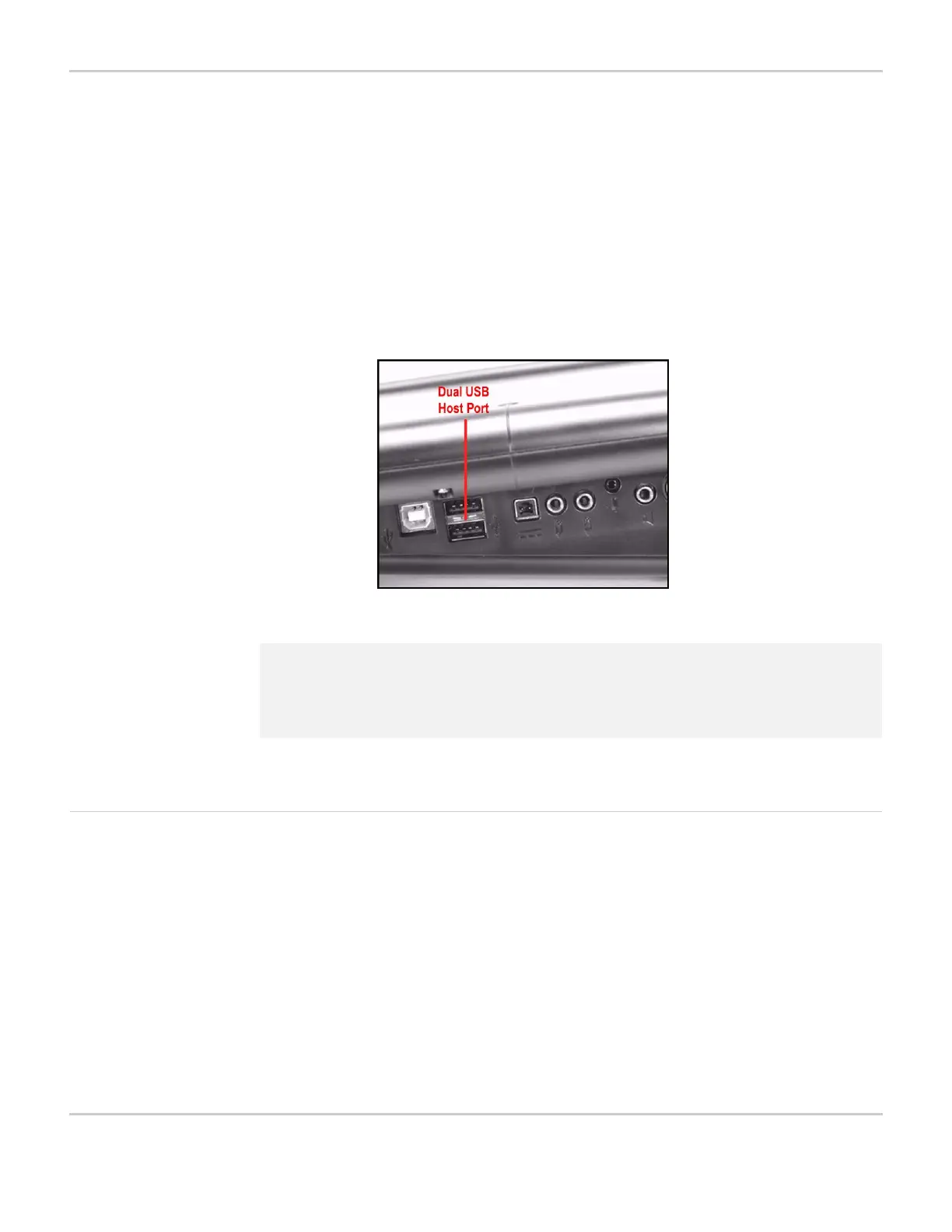
device has ports for this type of connection. Connect the keyboard to
the appropriate port.
MIGHTYMO/MINIMO DEVICE - USB PORT
Using an External
Keyboard With the Device
To select the physical keyboard as the default keyboard for your
MightyMo/MiniMo software, follow these steps:
1. Make sure that the external keyboard is connected to the
MightyMo/MiniMo device.
2. Select the blue Setup button in the title bar. The Mo Setup menu
will open.
3. Select the Interface Features button. The Interface Features
menu will open.
4. Select the Advanced Settings tab.
2 Note: The MightyMo/MiniMo device has a round 8-pin Mini DIN connector
for certain serial connections. This is not a PS2 mouse/keyboard
connector. Do not attempt to connect devices to it that do not
exactly match this connector.


 To Next Page