1-16 DynaVox Technologies
Chapter 1: Introduction Terms You Should Know
You also have the option to connect an external keyboard to your
MightyMo/MiniMo device. Refer to External Keyboard on page A-4
for more information.
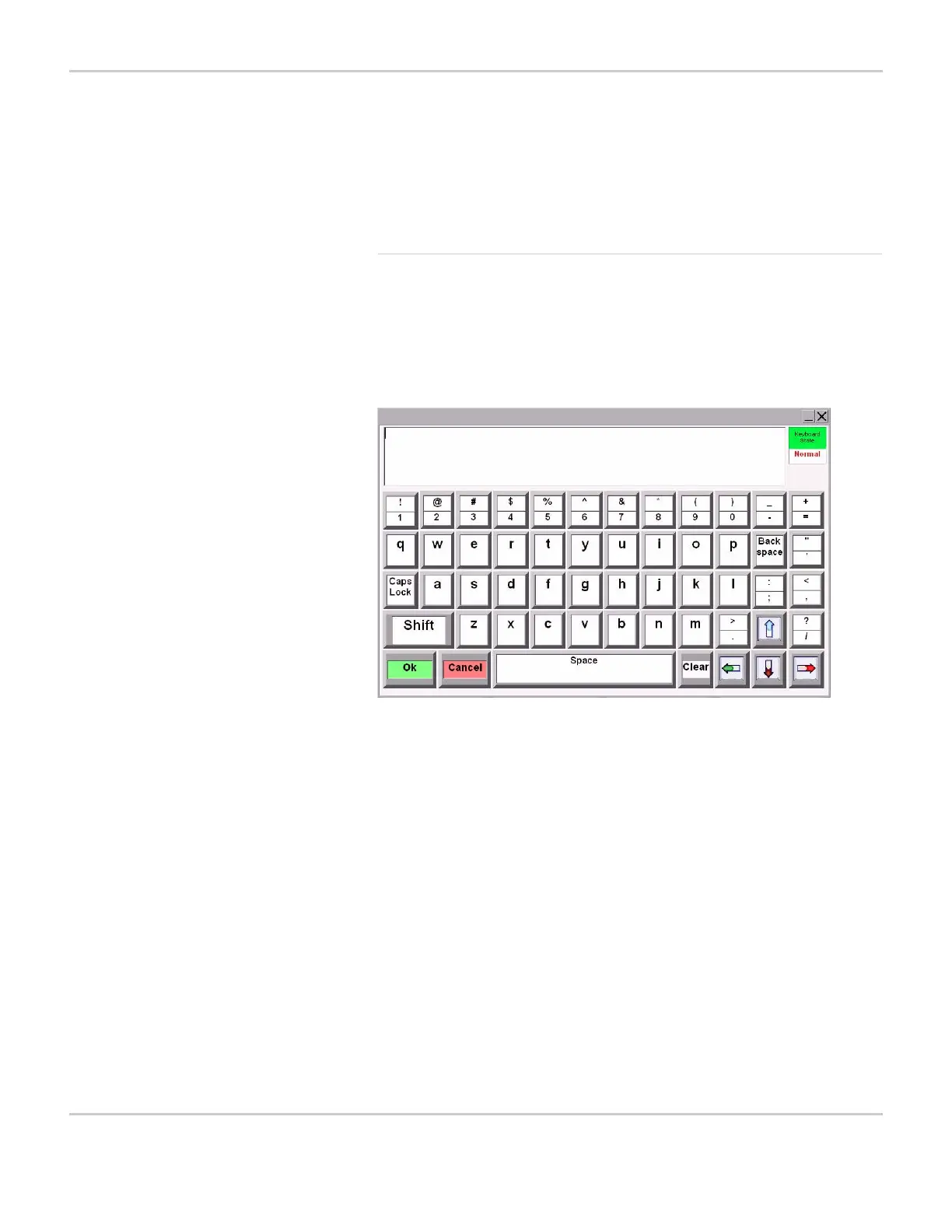
Default System Keyboard
The default system keyboard for the DynaVox MightyMo/MiniMo
software is called System Keyboard. When you first begin to use your
device, this system keyboard will be presented whenever you are
required to enter text information or when you select a text box.
DEFAULT SYSTEM KEYBOARD
The default system keyboard contains the alphanumeric and
punctuation buttons found on standard keyboards and typewriters. In
addition, it contains several buttons that provide functionality specific
to the Series 5 software:
Text Window The text window appears at the top of the
popup and displays the text you are
entering. Unlike the Message Window,
selecting the text window directly will not
speak its contents; rather, it will move the
cursor to the location of the selection.
OK Accept the content that you have entered
into the text window and close the system
keyboard.


 To Next Page