1-14 DynaVox Technologies
Chapter 1: Introduction Terms You Should Know
Like pages, menus feature several smaller components.
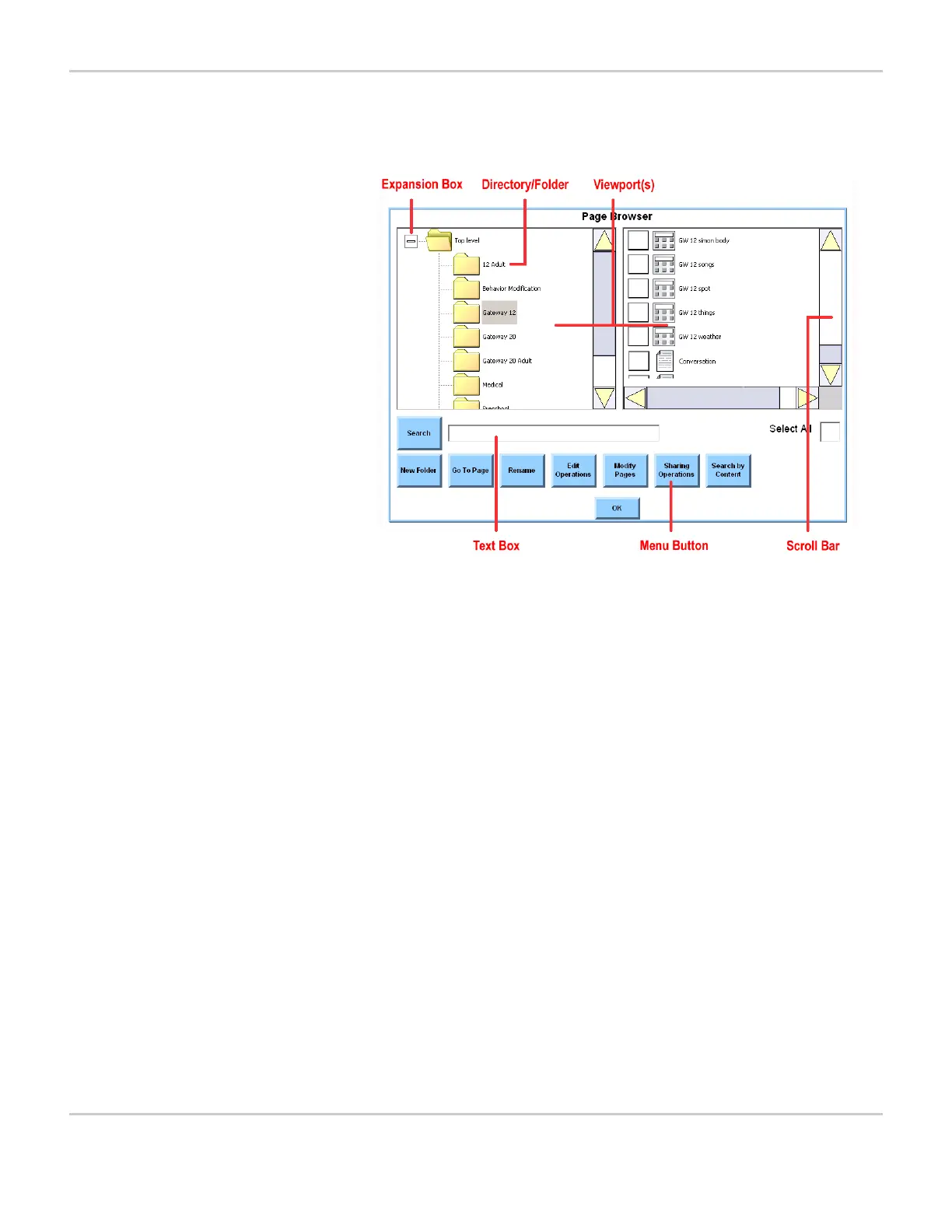
MIGHTYMO/MINIMO PAGE BROWSER MENU
• Viewport - A viewport is an area on some menus that displays a
list of files or other items. The viewport may sometimes be too
small to display the entire list at one time. A scroll bar beside the
viewport allows you to move through the whole list.
• Scroll Bar - Scroll bars enable you to navigate through the options
in a viewport. These vertical or horizontal bars have an arrow-
shaped button (scroll button) at each end. Each time a scroll button
is selected, the list in the viewport will move one interval in the
direction of the button’s arrow (up, down, right or left). Scroll bars
can also work like a slider. A slider thumb on the bar indicates the
position of the cursor and can be selected and dragged along the
bar to reposition the list in the viewport.
• Menu Button - Menus often include buttons that link to other
windows or menus. Selecting a menu button will usually take you
to a window with several options or to a menu with the same name
as the button.
• Text Box - Text boxes provide an area where you can enter text.
Text can be entered through a system keyboard page or with a
physical keyboard that is connected to the device.
• Directory/Folder - A directory is a stored group of files, pages or
other items. Directories are displayed in the viewports of browser
menus. Because a graphic that is shaped like a small file folder is



 To Next Page