4-6 DynaVox Technologies
Chapter 4: Working with Pages About Pages
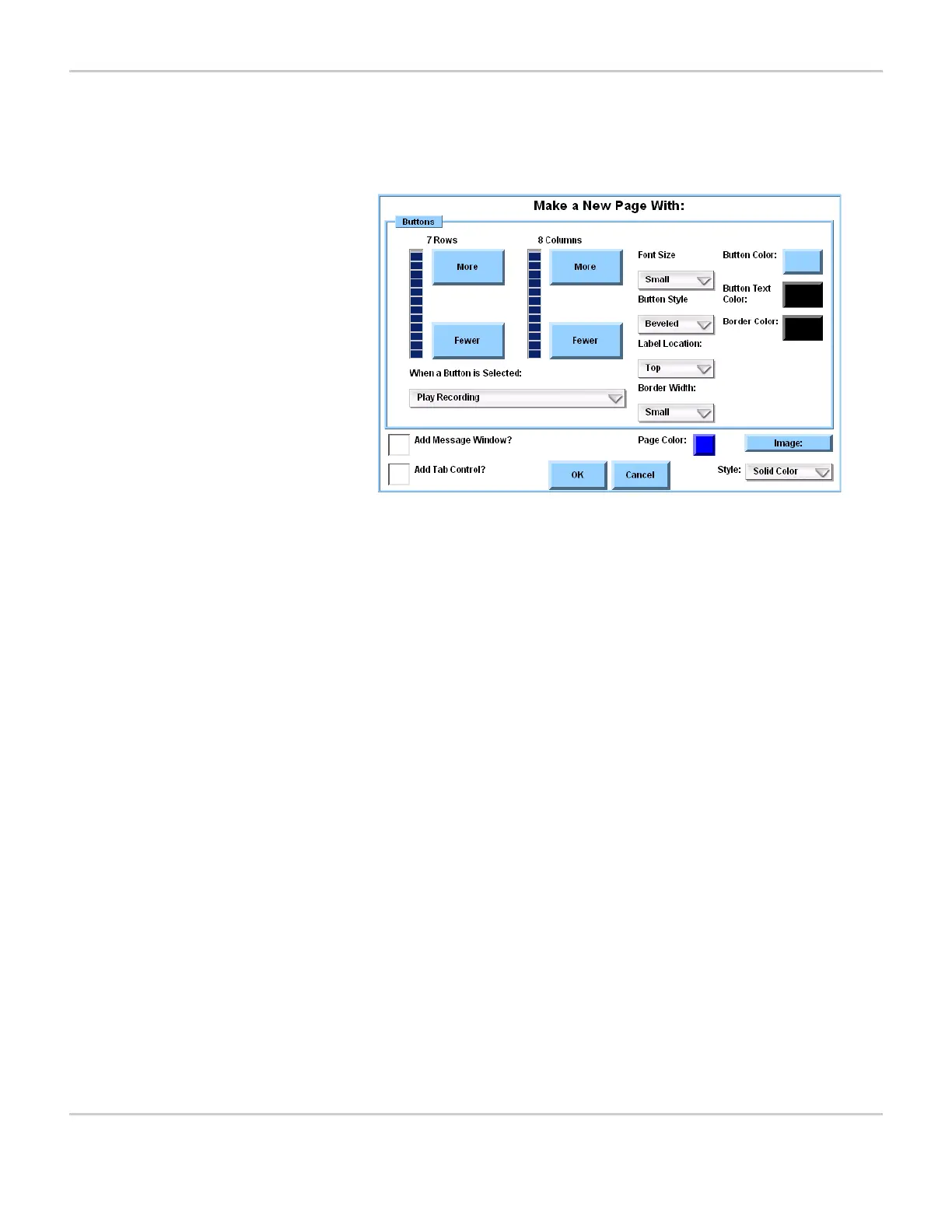
2. Select the Make New Page button. The Make a New Page With:
menu will open.
MAKE A NEW PAGE WITH: MENU
The Make a New Page With: menu contains these items:
More and Fewer
Rows buttons
Used to specify the number of rows
of buttons on the page.
More and Fewer
Columns buttons
Used to specify the number of
columns of buttons on the page.
When a Button is
Selected
Used to select the default behavior of
the buttons.
Font Size Used to select the default size of the
text for button labels.
Button Style Used to select the default style of the
buttons.
Label Location Used to select the default position of
the button label.
Border Width Used to select the default width of the
button border.
Button Color Used to select the default color for
the buttons.
Text Color Used to select the default color for
the button labels.
Border Color Used to select the default color of the
button border.
Add Message
Window?
Used to specify whether the page will
include a Message Window.


 To Next Page