▶
"Removing the air duct 1 (top system board)" on page 68.
▶
"Removing the fan cage" on page
64
▶
Release all HDD/SSD modules and pull them out a few centimeters, see
"Removing a 2.5-inch HDD/SSD module" on page 146.
CAUTION
The HDD/SSD modules need not to be removed.
▶
If you want to remove them nevertheless, check if all HDD/SSD
modules are uniquely identified so that you can reinsert them
into their original bays.
Removing the defective 8x 2.5-inch HDD backplane
▶
Disconnect all cables from the HDD backplane.
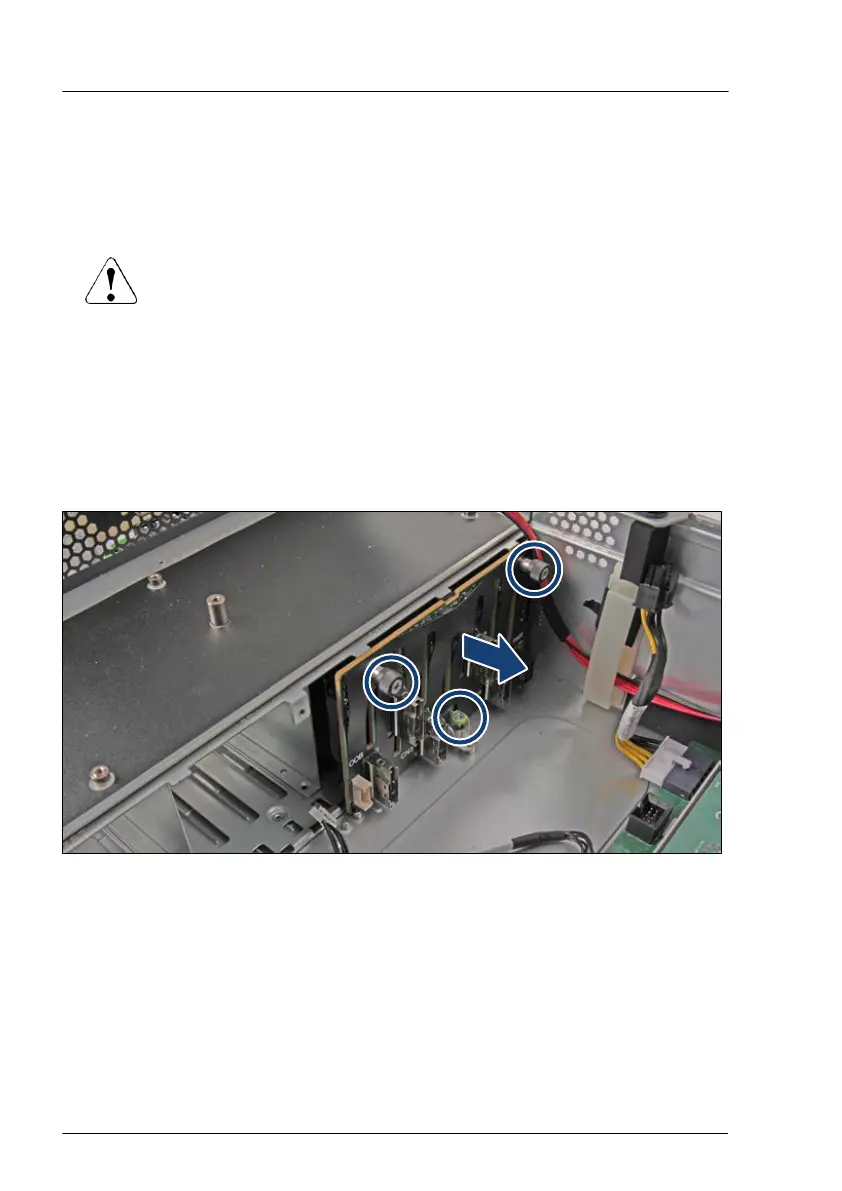
Figure 62: Removing the 8x 2.5-inch HDD backplane
▶
Loosen the three knurled screws of the HDD backplane (see circles).
▶
Remove the HDD backplane in a slight angle.
Hard disk drive (HDD) / solid state disk (SSD)
150 Upgrade and Maintenance Manual RX4770 M6


 To Next Page
 Loading...