3-4 3. Automationdirect
3.1.2 Direct LOGIC (Ethernet UDP/IP)
Communication Setting
Editor
Make the following settings on the editor. For more information, see 1.3.2 Ethernet Communication.
IP address for the V9 unit
- When specified on the screen program:
[System Setting] [Hardware Setting] [Local Port IP Address]
- When specified on the V9 unit:
Local mode [LAN Setting]
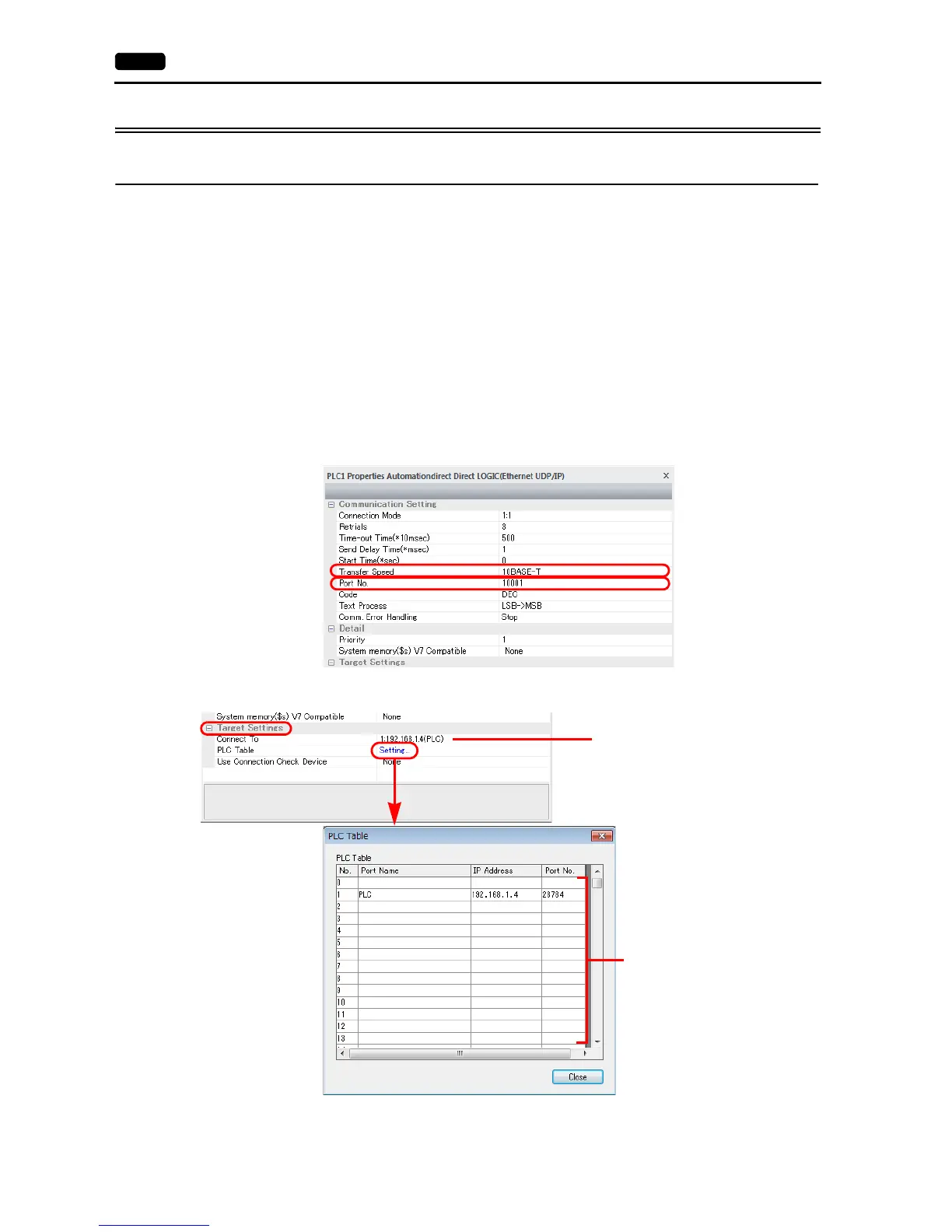
Port number for the V9 unit (for communication with PLC)
[System Setting] [Hardware Setting] [PLC Properties] [Communication Setting]
Others
[System Setting] [Hardware Setting] [PLC Properties] [Communication Setting]
- For [Transfer Speed], select the same setting as the specification of the connected communication module.*
For Hx-ECOM: 10BASE-T
For Hx-ECOM100: 100BASE-TX
* If the transfer speed is not selected correctly, a check code error occurs.
IP address and port number (No. 28784) of the PLC
Register on the [PLC Table] window in [System Setting] [Hardware Setting] [PLC Properties] [Target Settings].
Valid only for 1 : 1 connection
Select the PLC for connection from
those registered on the PLC table.
Set the IP address, port number and
whether or not to use the KeepAlive
function of the PLC.



 To Next Page