4
Operating instructions HERMA 400 A
PPLICATOR DESCRIPTION
3.28 US (130519) 47/154
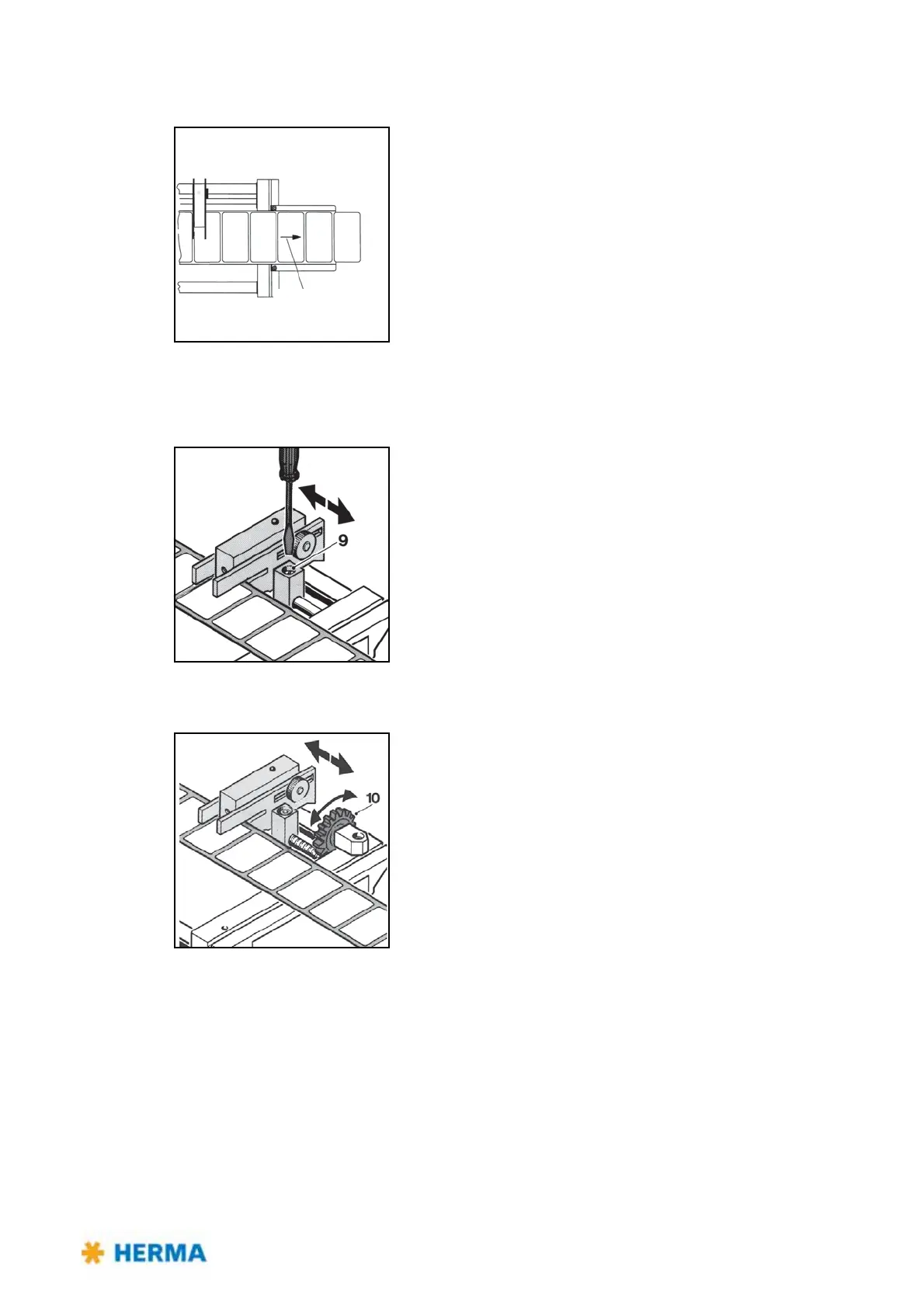
Positioning the label
Direction of web
movement
Depending on the application labels have to be peeled off completely
(for suction), or a small part of the
label remains attached to the
backing paper (for tearing off, i.e. the product „takes“ the label), or a
small part of the label is peeled off and most of it remains attached to
the backing paper (for labeling with synchronous parallel motion).
By changing the position of the label scanning unit the amount of
label lef
t on the backing paper can be adjusted.
This positioning is also called „label overfeed delay“ or „stop delay“.
With some configurations this delay is set via potentiometer at the
applicator housing (see also section / page 100) or in the control box
or even via parameter in the control program (where applicable).
For normal/coarse adjustment
> Loosen locking screw 9.
> Move the entire scanning unit to the desired position.
> Carry out a test run.
> Tighten locking screw 9 t
hereafter.
For vernier adjustment
> Move the entire scanning unit to the
desired position by means of
adjusting wheel 10.



 To Next Page