4
Operating instructions HERMA 400 A
PPLICATOR DESCRIPTION
3.28 US (130519) 51/154
Moving beak
Pneumatic working pressure must not exceed 5 bar. Do not reach into the
area of the unit during operation. The movement of the unit could cause
injuries!
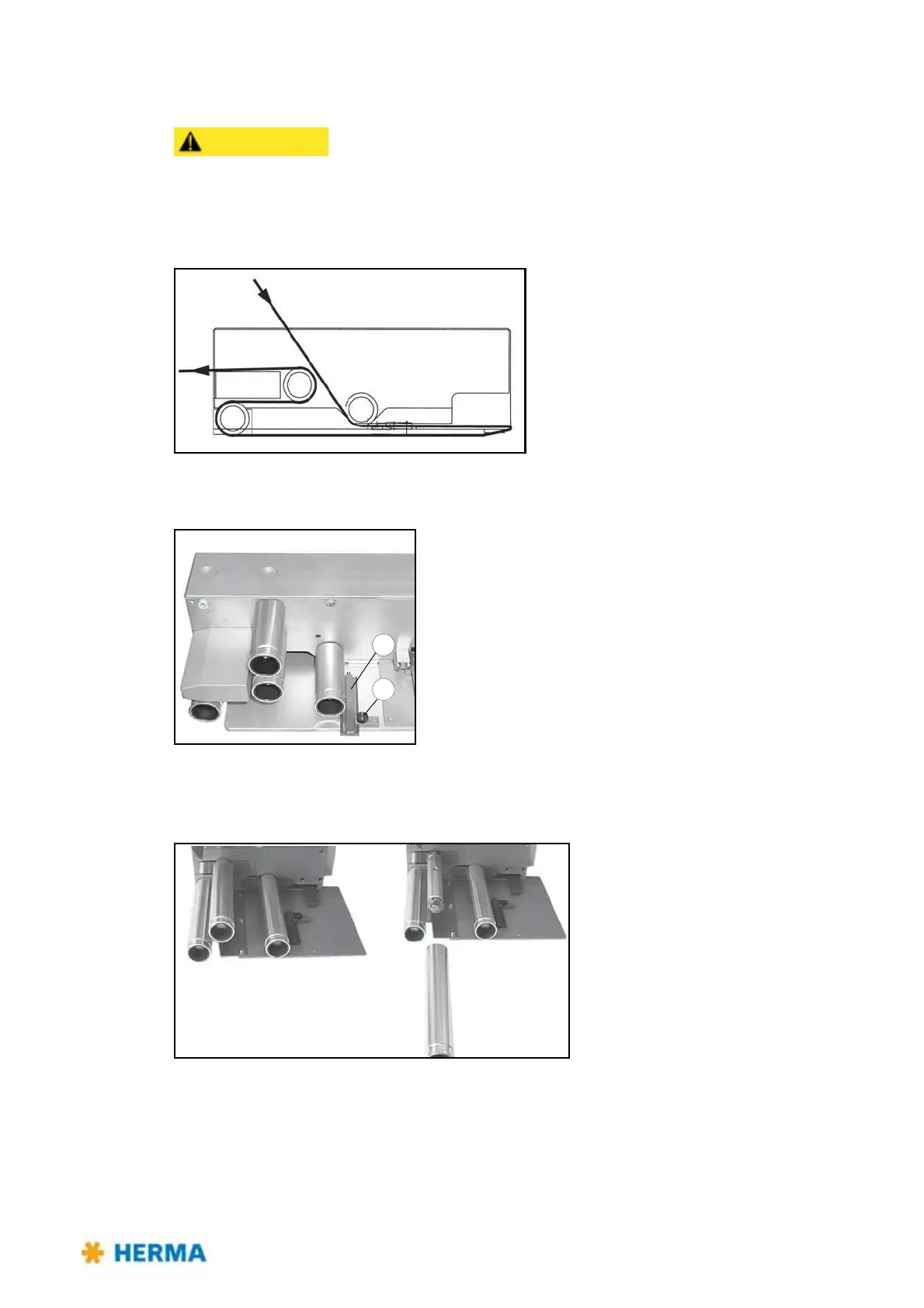
Inserting the label web
> Pass the label web around guide roller 1,
towards the dispensing plate 2 and around the
front edge. Run it back to the idling guide roller
3 (before going on, remove all unused labels
from the backing paper from point 2 onwards).
Pass the backing paper around roller 3, pull it
forward again to and around the fixed guide
roller 4, and run it back out again.
Adjusting for straight label web movement
> When inserting the label web, make sure it always nearly
touches the housing with one side on its way through the
moving beak. Loosen screw 5 and adjust the paper guide 6
such that it keeps the web in place from the other side. Tighten
screw 5.
Cleaning
> For cleaning simply pull the guide
rollers off the axles. When placing them
back onto the axles, make sure to shove
them past the point of resistance to
make them sit on the axles tightly.
Adjust the correct position (i.e. to what extent the label is to be peeled off the backing paper when
dispensed) according to the description „Positioning the label“ in section 4.1.5 or 4.1.6 (pages 41 / 46).



 To Next Page