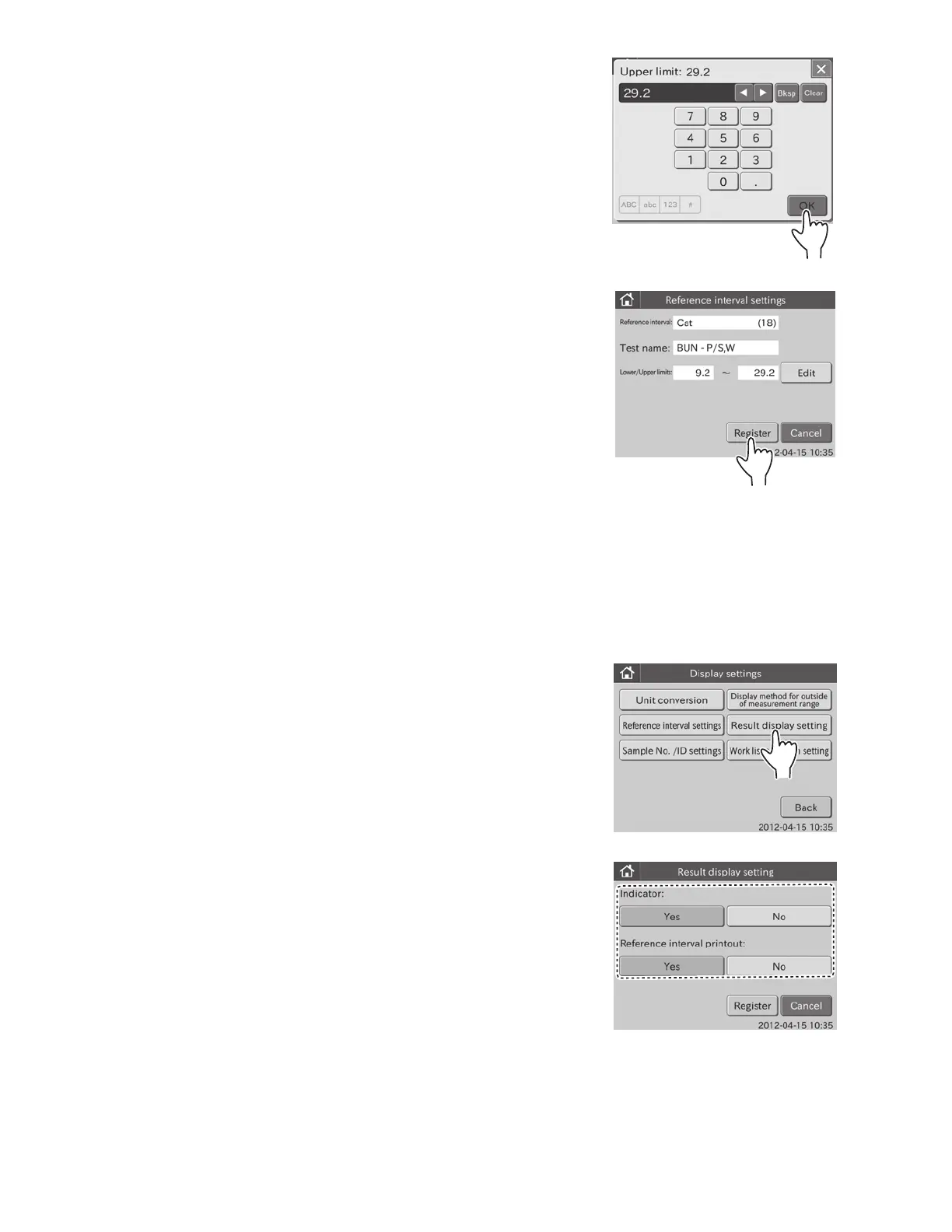
f. Enter values in the [Lower limit:] field, and then touch OK.
The screen keyboard to input the upper limit appears.
g. Enter values in the [Upper limit:] field, and then touch OK.
The edit dialogue for an individual test name is displayed.
h. Touch REGISTER.
The reference intervals are registered, and then the test
details dialogue is displayed.
NOTE: To cancel setting, touch CANCEL.
i. Touch REGISTER in the dialogue currently displayed.
The display returns to the reference interval item setting
dialogue.
NOTE: To cancel setting, touch CANCEL.
6.9.4 Result Display Setting
This mode is used to set the display/not display of indicator in test
result.
Also, the print out /not printout of reference intervals is set.
1. Touch DISPLAY SETTINGS in the ADMINISTRATOR MODE
FUNCTION menu dialogue.
The display settings menu dialogue is displayed.
NOTE: For information about how to display the MODE
FUNCTION menu dialogue, refer to Section 6.1.2.
2. Touch RESULT DISPLAY SETTING in the menu dialogue.
The result display setting dialogue is displayed.
101



 To Next Page