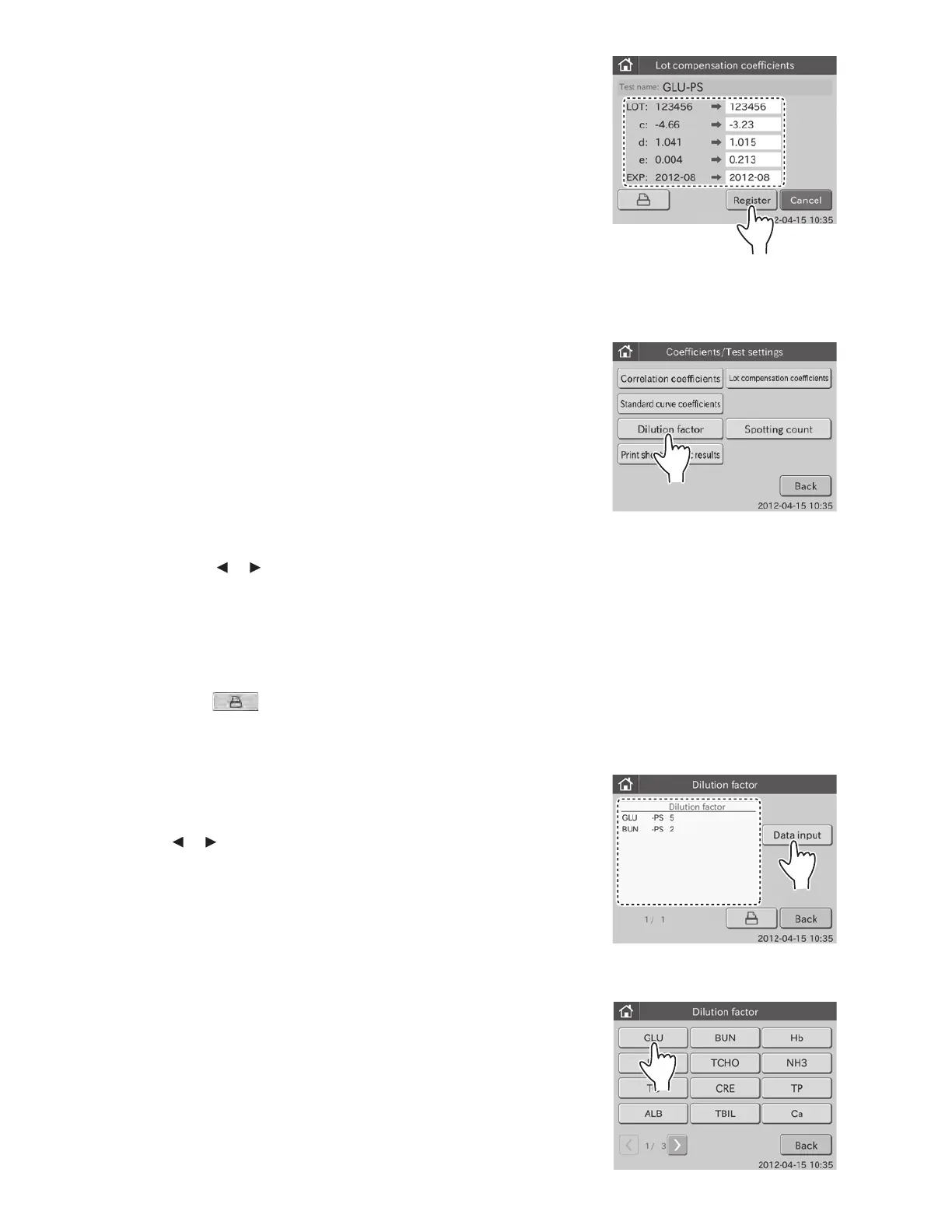
ExampleGLU
11. Touch REGISTER.
The input values are registered, and then the display returns
to the lot No. list dialogue.
NOTE: To cancel setting, touch CANCEL.
6.10.3 Dilution Factor
This mode is used to set dilution factors for each test and for each
sample type (P/S or W).
When performing tests without setting a dilution factor in the
Dilution field of the test preparation dialogue, the analyzer
performs tests according to the preset dilution factors in this
mode.
1. Touch COEFFICIENTS/TEST SETTINGS in the
ADMINISTRATOR MODE FUNCTION menu dialogue.
The COEFFICIENTS/TEST SETTINGS menu dialogue is
displayed.
NOTE: For information about how to display the ADMINISTRATOR
MODE FUNCTION menu dialogue, refer to Section 6.1.2.
2. Touch DILUTION FACTOR in the menu dialogue.
The dialogue to set dilution factors is displayed.
By touching touch or , you can see all tests presently
recorded.
NOTE: Test name, sample type and dilution factor are displayed.
NOTE: Test names are displayed in ascending order of test code.
Sample types are displayed in order of: [P/S] and [W].
NOTE: When touching
, all dilution factors that are
presently input are printed out.
NOTE: To cancel setting, touch BACK.
3. Touch DATA INPUT.
The test name selection dialogue is displayed.
By touching or , you can see all test names.
NOTE: All tests presently recorded in the analyzer are displayed.
NOTE: To cancel setting, touch BACK.
4. Touch the test name button to be edited.
The data input dialogue is displayed.
111



 To Next Page