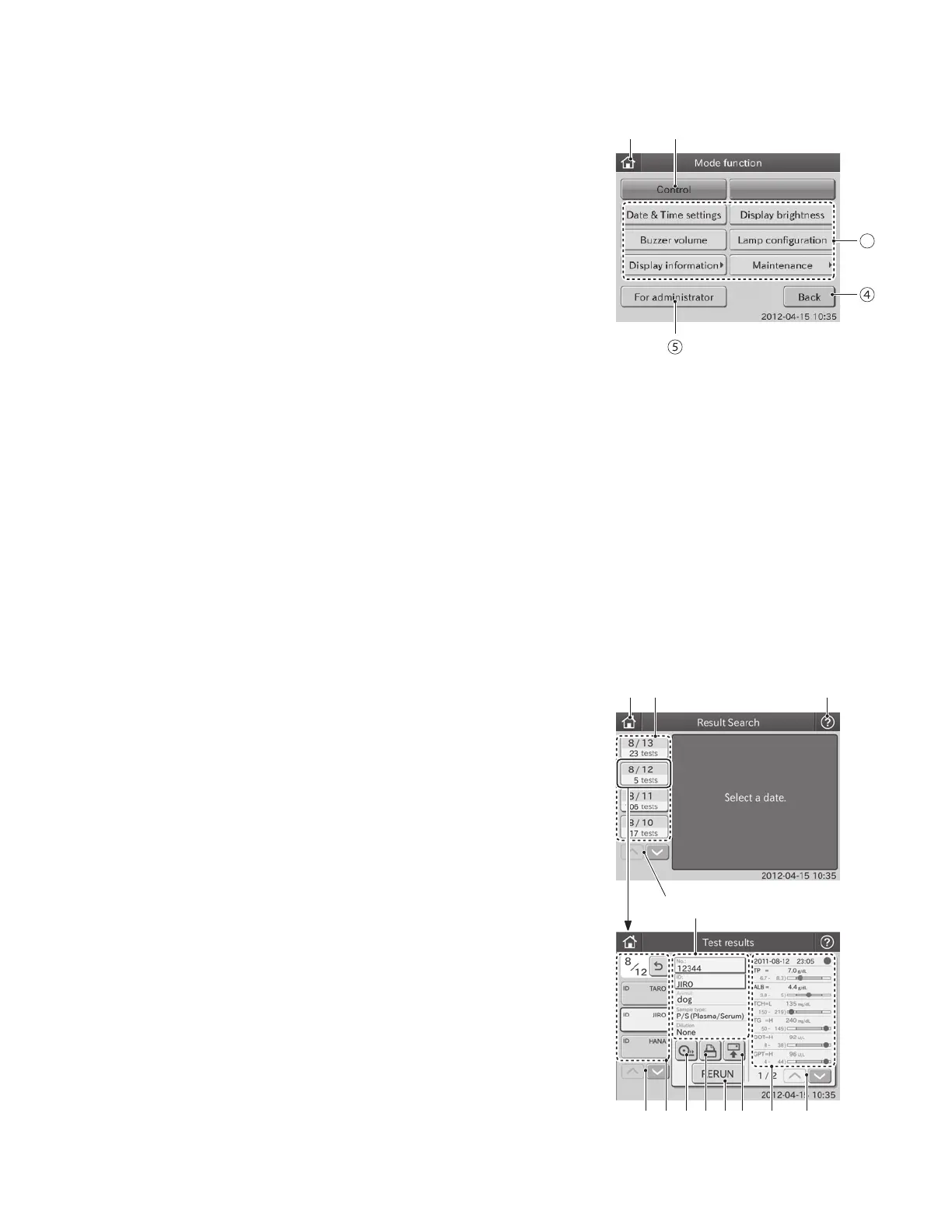
1. TOP DIALOGUE button
The TOP DIALOGUE button is used for returning to the TOP
dialogue.
2. CONTROL button
The CONTROL button is used for measuring with the control
mode. The correlation coefficients reset to a=1 and b=0, the
units reset to Unit (A) and the dilution factors reset to no
dilution. (Refer to Section 6.2)
NOTE: this is not used for Heska Chemistry Control.
3. MODE FUNCTION buttons <Normal>
The MODE FUNCTION buttons are used for displaying a
respective MODE FUNCTION dialogue to be used by normal
operators. (Refer to Section 6)
2.2.3 Mode Function Dialogue
Mode functions are used for changing functions, inputting or printing parameters, or cleaning the analyzer, etc.
4. BACK button
The BACK button is used for returning to the [TOP Dialogue].
5. FOR ADMINISTRATOR button <Admini.>
The FOR ADMINISTRATOR button is used for displaying the MODE FUNCTION menu dialogue. Inputting a password
is needed to enter into the administrator mode. (Refer to Section 6)
3
2.2.4 Result Search Dialogue
A maximum of latest test results for 100 samples can be displayed
in sequence beginning with newest data.
1. TOP Dialogue button
The TOP DIALOGUE button is used for returning to the
TOP DIALOGUE.
2. DATE button
The DATE button is used for displaying the search result
dialogue by date.
3. HELP button
The HELP button is used for displaying the help dialogue.
(Refer to Section 2.2.5)
4. DATE SCROLL button
The DATE SCROLL button is used for scrolling up or down
a list of the test date buttons.
5. Test Information Setting Area
The No., ID, Animal, Sample type and Dilution fields are
displayed in the Test Information Setting Area. By touching
NO. or ID, the preset information can be changed.
①
④
② ③
⑤
⑥⑫⑬ ⑨⑩⑪ ⑧ ⑦
17



 To Next Page