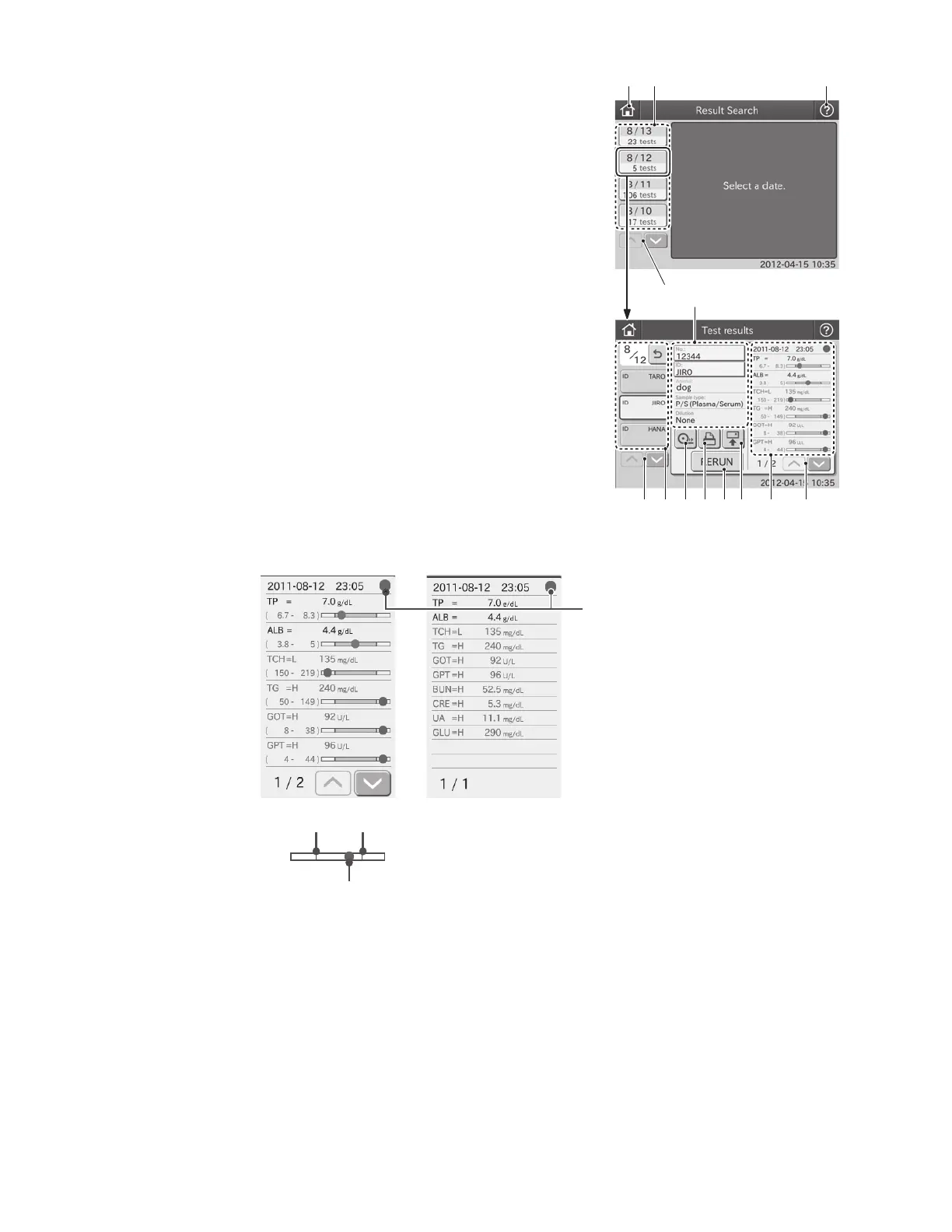
Hide indicator Display indicator
Test Results Lower Limit Test Results Upper Limit
Test Results
Green: Within reference interval
Red: Outside reference interval
Green: All test results within
reference interval
Red: One or more test
results outside
reference interval
6. Result data SCROLL button
The Result data SCROLL button is used for scrolling up or
down a list of the test results.
7. Result Data Display Area
Test results are displayed in the result data display area. You
can display or hide indicator. (Refer to Section 6.9.4)
8. RETRANSMISSION button
The RETRANSMISSION button is used for sending the test
results of the sample displayed in the dialogue to PC (PMS).
9. RERUN button
The RERUN button is used for perform the next test with
the same No., ID, Animal and Sample type information.
Information in the Dilution field can be changed.
10. REPRINT button
The REPRINT button is used for printing all test results of the
sample displayed.
①
④
② ③
⑤
⑥⑫⑬ ⑨⑩⑪ ⑧ ⑦
11. FEED button
The FEED button is used for advancing recording paper in the printer.
12. SAMPLE HISTORY button
The SAMPLE HISTORY button is used for displaying all sample test histories by day.
13. SAMPLE HISTORY SCROLl button
The SAMPLE HISTORY SCROLL button is used for scrolling up or down a list of sample histories.
18



 To Next Page