ᵏᵐᵑᵒᵓᵔ
Sample ID scanned by the barcode reader
To transmit to host computer
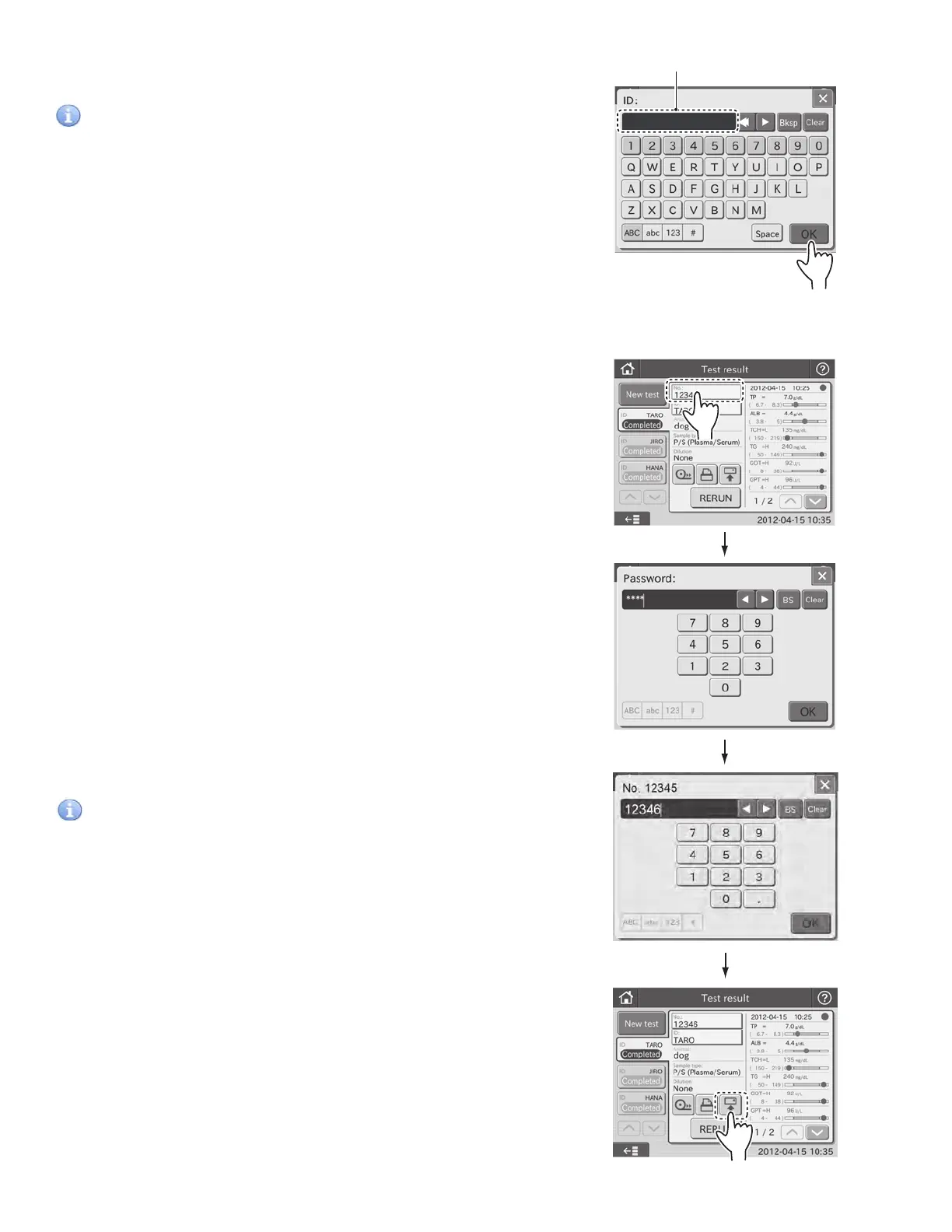
3.10 Editing Sample No. and Sample ID
This is used to edit sample No. and sample ID of test results. The
edited data can be sent to host computer.
1. To edit a sample No., touch NO. on the test result dialogue.
NOTE: It can be edited from the result search dialogue.
2. Enter the administrator password.
3. After completing the reading, a beep will be heard and the
Sample ID will be displayed.
IMPORTANT
Make sure that the barcode data (sample ID) displayed in the
test result dialogue is correct. Wrong reading will cause an
incorrect report to doctors.
NOTE: When re-inputting barcode by the barcode reader, touch
the ID FIELD in the test preparation dialogue, and then read the
barcode again.
4. Touch OK to confirm the Sample ID. The display returns to
the test preparation dialogue.
To transmit to host computer
3. Edit a Sample No.
IMPORTANT
Be careful not to input wrong No.
4. Touching OK returns to the previous dialogue.
5. Editing a Sample ID can be edited in the same manner.
6. Using RETRANSMISSION, the edited data can be sent to host
computer.
46



 To Next Page