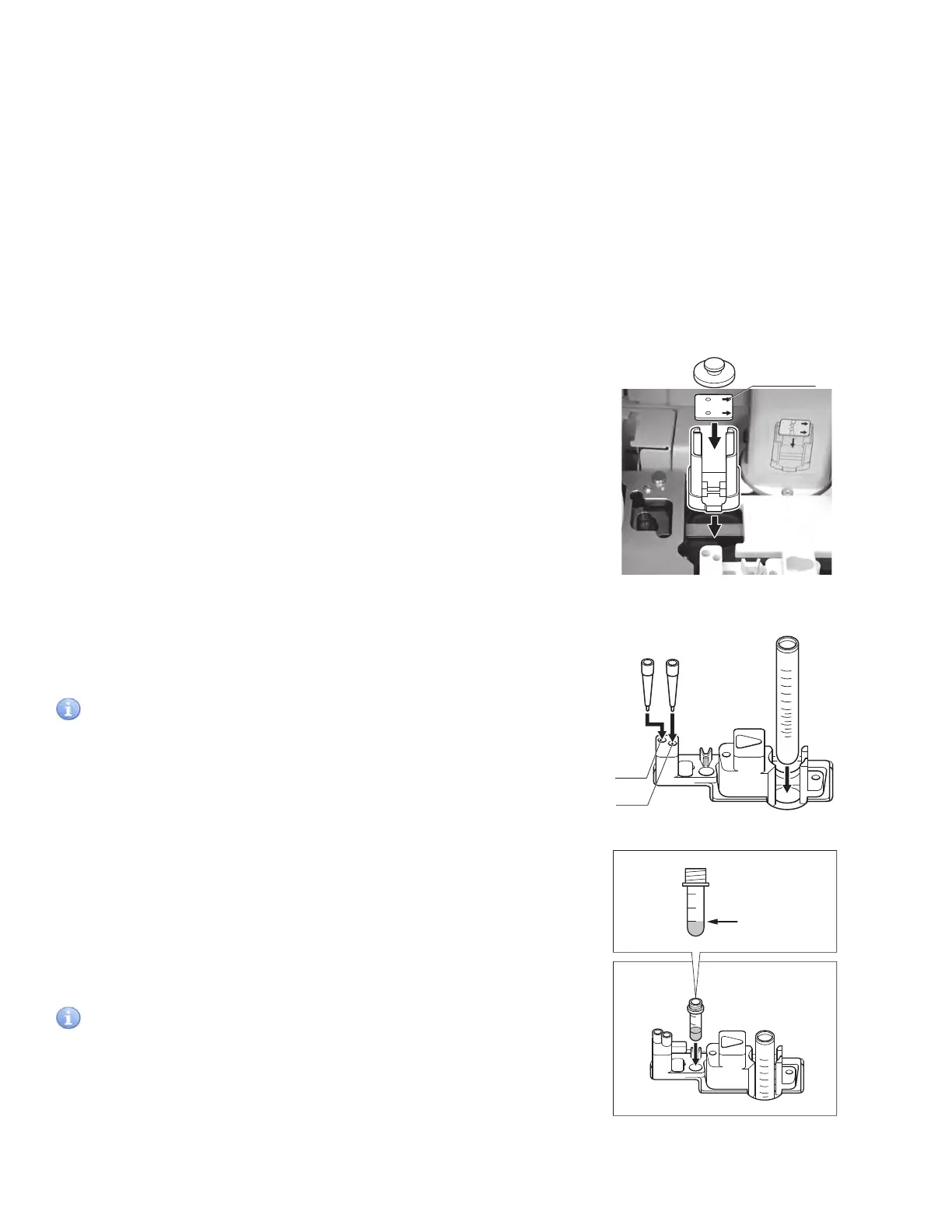
5. Load an ISE slide in a slide cartridge.
Place an ISE slide, the arrow indications facing up and
pointing to the right, in a slide cartridge. Be sure to put a
slide weight on top of the slide cartridge.
NOTE: The arrows on the ISE slide point in the opposite direction
to the movement of the slide transfer.
NOTE: Two or more ISE slides cannot be tested for one sample.
6. Place the slide cartridge in the analyzer.
Place the slide cartridge properly with the label side facing
the 2 SET POSITION (indicated by the label) in the analyzer.
NOTE: Be sure to set the slide cartridge firmly in place so that it is
not lifted. Otherwise, a reading error may occur.
7. Put tips into holes “c” and “d” on the sample rack.
8. Set a sample tube in the sample rack.
IMPORTANT
If the sample tube is set in the reference fluid setting position,
wrong test results will be obtained. Be sure to set in the sample
position on the sample rack.
Remove the cap from the sample tube which contains sample.
Put the tube in the sample rack.
To avoid an error, make sure there are no bubbles in the sample.
Use a centrifuge to remove bubbles.
9. Prepare the reference fluid.
Pour at least 100 µL of reference fluid into the 0.5 ml plain
tube (red cap) and insert it into the set position just before
the test. Do not put a cap on the tube.
IMPORTANT
If the reference fluid is set in the sample setting position,
wrong test results will be obtained. Be sure to set in the
reference fluid position.
NOTE: There is a 50 µL dead volume for reference fluid, which
cannot be aspirated.
MIX CUP
b
a
d
c
Hole d
Hole c
RE
MIX CUP
RE
b
a
d
c
RE
0.5
0.3
0.1
Required reference
fluid volume
At least 100ǴL
3.8.3 ISE Tests
1. Make sure [Ready to Test] is displayed.
2. Open the sample cover.
3. Set a sample rack.
Set a specified sample rack for the test tube to be used at the 1 SET POSITION (indicated by the label) on the analyzer.
NOTE: Be sure to set the sample rack down to the bottom.
4. Obtain test information from PMS (If the device is connected to PMS).
If the device is connected to PMS, you can obtain patient IDs and test requests from PMS by using the WORK LIST
button. (For details, refer to Section 3.8.2.)
38



 To Next Page