6.3 Date & Time Settings <Normal>
This mode is used to change date and time.
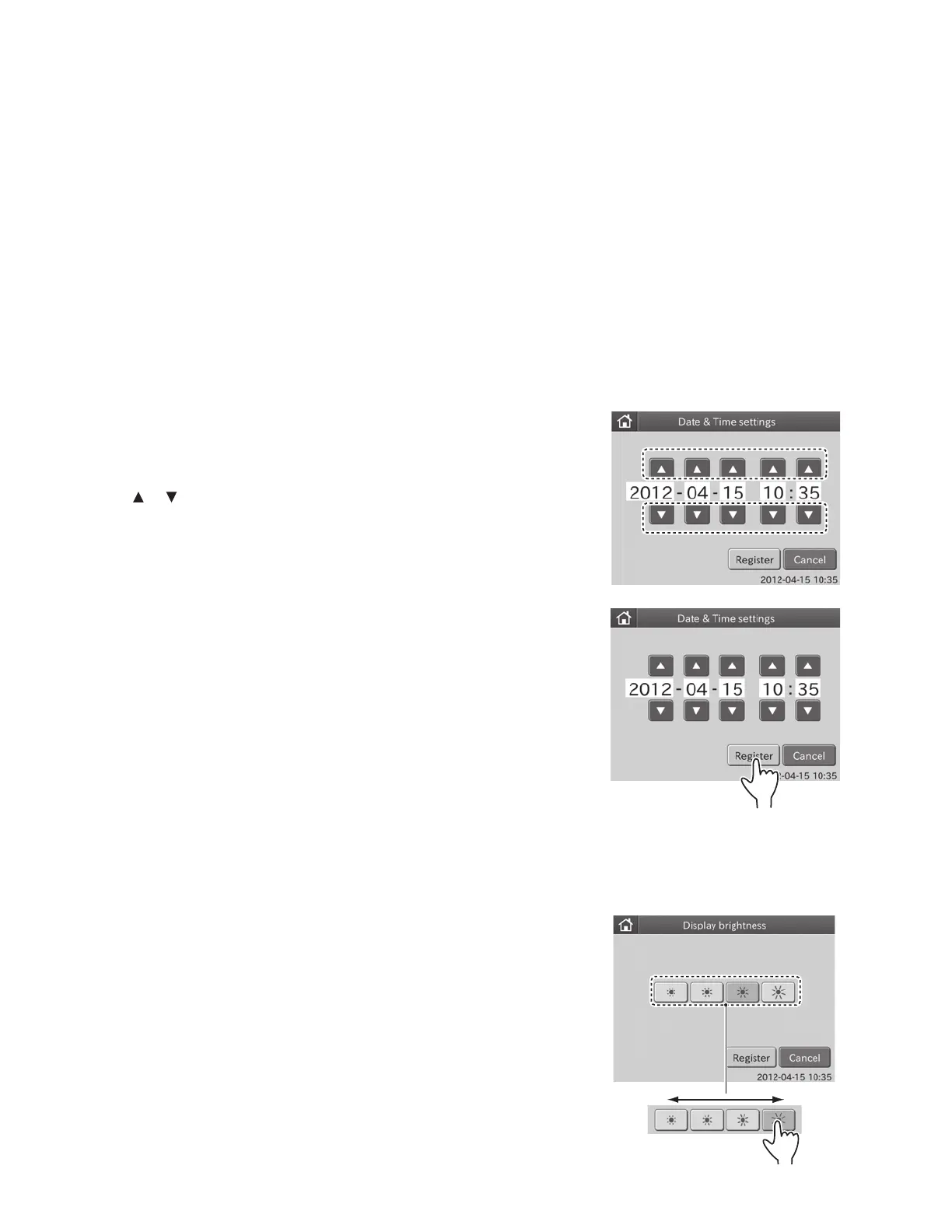
1. Touch DATE & TIME SETTINGS in the MODE FUNCTION
menu dialogue.
The date and time setting dialogue is displayed.
2. Touch or to change date and time.
3. Touch REGISTER.
The set date and time are registered, and then the display
returns to the MODE FUNCTION menu dialogue.
NOTE: To cancel setting, touch CANCEL.
6.2 Control Mode <Normal>
6.2.1 Execution of the Control Mode
This mode is only used for FUJI DRI-CHEM CONTROL QP-L or QP-H. This mode is not used for Heska Chemistry Control.
When the control mode is selected, the analyzer calculates the concentration with the correlation coefficients for all tests
reset to a=1 and b=0.
Correlation coefficients for all test names ==> Resets to (a=1, b=0)
Units ==> Resets to Unit (A)
Dilution factors ==> Resets to no dilution
In each test result dialogue, the indication [Control Mode] appears.
6.4 Display Brightness <Normal>
This mode function is used to adjust the touch screen brightness.
1. Touch DISPLAY BRIGHTNESS in the MODE FUNCTION menu
dialogue.
The brightness setting dialogue is displayed.
2. Touch DESIRED BRIGHTNESS.
When touching desired brightness, the touch screen brightness
is changed accordingly.
Dim
Brightness buttons
Light
77



 To Next Page