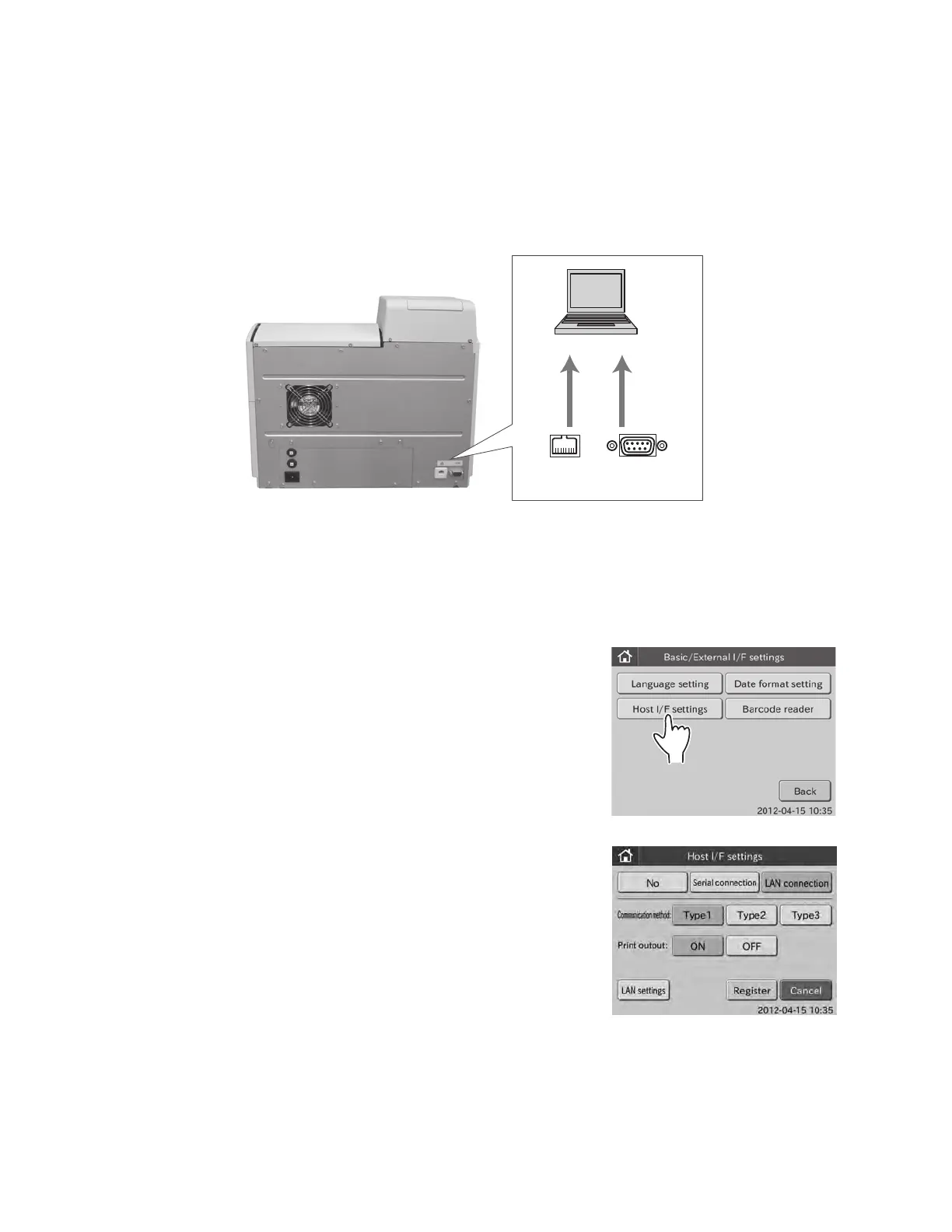
Host computer
Serial connector
(D-SUB 9 pins)
LAN connector
(100BASE-T)
6.8.3 Host I/F Settings
This mode is used to connect the Element DC to a host computer (PC) and to set communication parameters. Also, this
mode is used for turning the built-in printer ON/OFF.
NOTE: Do not connect the Element DC to the host computer, which has not been approved by IEC/UL60950−1.
NOTE: When connecting to the host computer, select either D−SUB 9-pin connector or 100BASE−T connector on the rear
panel. It is impossible to communicate through both connections at the same time.
NOTE: Perform the host I/F settings after connecting the communication cable to the D−SUB 9-pins or the 100BASE−T.
1. Touch BASIC/EXTERNAL I/F SETTINGS in the ADMINISTRATOR MODE FUNCTION menu dialogue.
The BASIC/EXTERNAL I/F SETTING menu dialogue is displayed.
NOTE: For information about how to display the ADMINISTRATOR MODE FUNCTION menu dialogue, refer to Section 6.1.2.
NOTE: The USB connector is only for the barcode reader.
2. Touch HOST I/F SETTINGS in the menu dialogue.
The HOST I/F SETTINGS menu dialogue is displayed.
To not connect to the host computer: 3
To use the serial connection: 4
To use the LAN connection: 5
88



 To Next Page