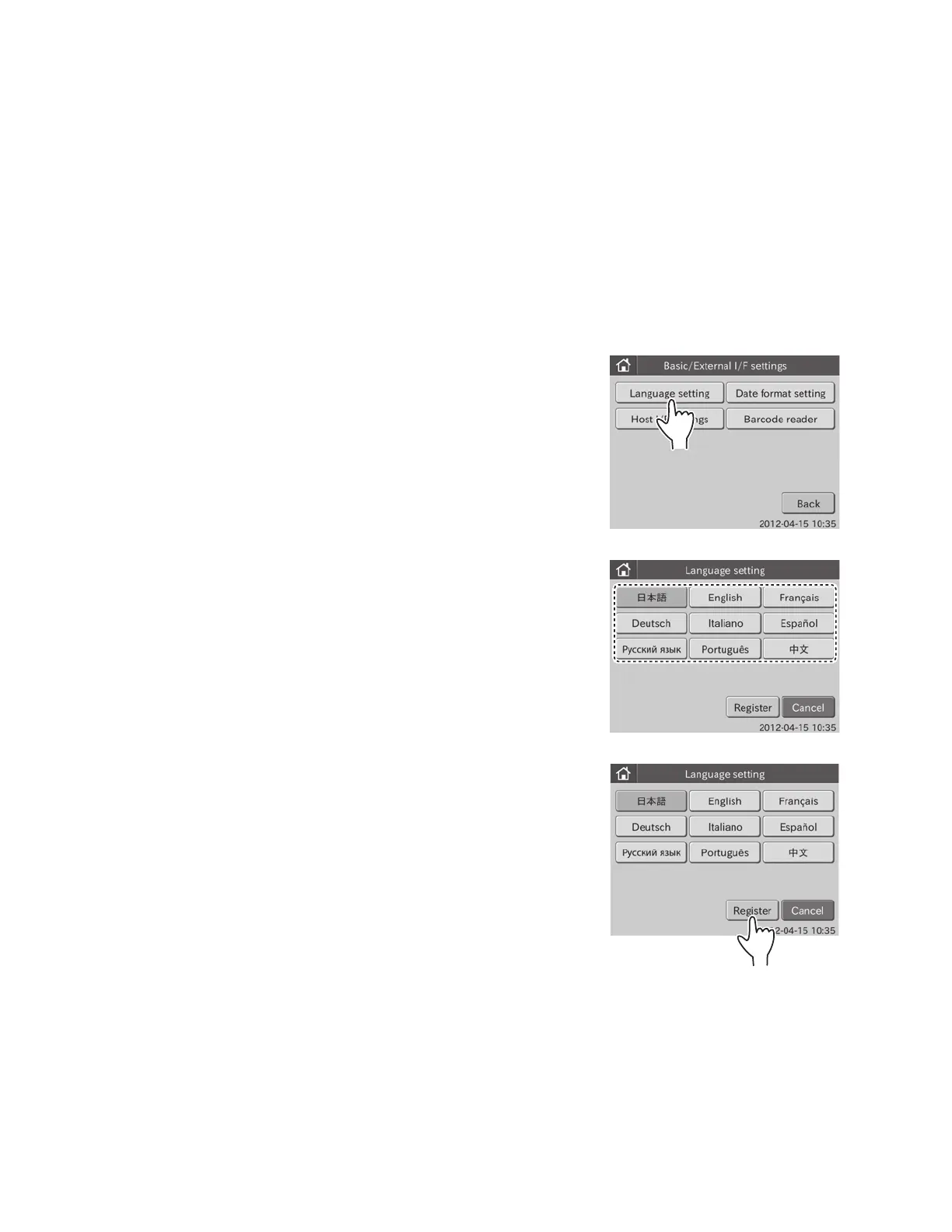
2. Touch LANGUAGE SETTING in the menu dialogue.
The language setting dialogue is displayed.
NOTE: The following 9 languages are selectable.
• Japanese
• English
• French
• German
• Italian
3. Touch desired language.
4. Touch REGISTER.
The selected language is registered, and then the display
returns to the BASIC/EXTERNAL I/F SETTING menu dialogue.
NOTE: The registered language is reflected after rebooting the
equipment.
• Spanish
• Russian
• Portuguese
• Chinese
6.8 Basic/External I/F Settings <Admini.>
This mode is used to display the following.
• Language setting
• Date format setting
• Host IF settings
• Barcode reader
6.8.1 Language Setting
This mode is used to set a language to be used in the equipment.
1. Touch BASIC/EXTERNAL I/F SETTINGS in the ADMINISTRATOR MODE FUNCTION menu dialogue.
The basic/external I/F setting menu dialogue is displayed.
NOTE: For information about how to display the ADMINISTRATOR MODE FUNCTION menu dialogue, refer to Section 6.1.2.
86



 To Next Page